What is MSS (maximum segment size)?

What is maximum segment size (MSS)?

MSS (maximum segment size) limits the size of packets, or small chunks of data, that travel across a network, such as the Internet. All data that travels over a network is broken up into packets. Packets have several headers attached to them that contain information about their contents and destination. MSS measures the non-header portion of a packet, which is called the payload.

If a data packet is compared to a transport truck, with the header being the truck itself and the payload being the trailer and cargo, then MSS is like a scale that measures only the trailer. If the trailer weighs too much, then the truck is not allowed to continue to its destination.

More specifically, MSS is the largest TCP (Transport Control Protocol) segment size that a network-connected device can receive. MSS defines “segment” as only the length of the payload, not any attached headers. MSS is measured in bytes.

MSS is determined by another metric that has to do with packet size: MTU, or the maximum transmission unit, which does include the TCP and IP (Internet Protocol) headers. To continue the analogy, MTU measures the total weight of the truck and its trailer and cargo, instead of just the trailer and cargo.

Essentially, the MSS is equal to MTU minus the size of a TCP header and an IP header:

MTU – (TCP header + IP header) = MSS

One of the key differences between MTU and MSS is that if a packet exceeds a device’s MTU, it is broken up into smaller pieces, or “fragmented.” In contrast, if a packet exceeds the MSS, it is dropped and not delivered.

What is TCP? What is a TCP header?

The Transport Control Protocol, or TCP, is a protocol that ensures data packets are delivered and received in order, with no dropped packets. Imagine if parcel delivery services called all package recipients ahead of time to make sure they would be home at a certain time before delivering packages, then sent word back to the sender to confirm they had been delivered. TCP works somewhat like that, with data packets as the “packages” being delivered.

TCP works by opening a connection between the two devices that are communicating via a process called a TCP handshake. The MSS is agreed on during the TCP handshake: both devices communicate the size of the packets they are able to receive (this can be called “MSS clamping”; see below). TCP adds a header to all packets to indicate which open connection each packet is a part of and what order the packets go in.

How long are TCP and IP headers?

TCP headers are almost always 20 bytes* long. IP headers include information such as the source and destination IP address, and they are also 20 bytes long. Both TCP and IP packets include optional header fields that can make the headers longer, but these are almost never used.

*In computer science, a byte is a unit of memory size that represents eight binary digits; in other words, a combination of eight ones and zeroes.

TCP MSS example

Suppose a network router has an MTU of 1,500, meaning it only accepts packets up to 1,500 bytes long. (Longer packets will be fragmented.) What should the MSS for the router be set to?

MTU – (TCP header + IP header) = MSS

1,500 – (20 + 20) = 1,460

The router’s MSS should be set to 1,460 bytes. Packets with a payload size larger than 1,460 bytes will be dropped. (A device could send an overly large packet like this by mistake if it is not aware of the MTU and MSS settings of the routers in between it and another device. A process called path MTU discovery helps avoid such incidents.)

How does the use of IPsec impact MSS?

IPsec (Internet Protocol security) is the encrypted version of IP. Data packets sent using IPsec are scrambled so that only the two connected devices are able to interpret them, keeping their payload contents secure from anyone who might intercept the packets. IPsec is often used to set up Virtual Private Networks, or VPNs.

IPsec adds a few bytes to the length of a packet. On connections that use this encryption, MSS must take IPsec into account as well:

MTU – (TCP header + IP header + IPsec) = MSS

Is MSS a network layer or transport layer metric?

MSS is a layer 4, or transport layer, metric. It is used with TCP, a transport layer protocol. However, it is closely related to MTU, which applies to layer 3 (the network layer).

What is MSS clamping?

Occasionally, a router along a network path has an MTU value set lower than the typical 1,500 bytes. This can result in packet loss and can be difficult to discover.

To ensure packets still reach their destination in this situation, one option is to reduce the size of incoming packet payloads. This can be achieved by configuring the server to apply an MSS clamp: during the TCP handshake, the server can signal the MSS for packets it is willing to receive, “clamping” the maximum payload size from the other server. For example, if servers A and B are establishing a TCP connection and server B communicates an MSS of 1,436 bytes, server A will send packets with a maximum payload size of 1,436 bytes for the duration of the connection.

Another application of MSS clamping is in the case of GRE tunneling, where a 24-byte header is added to the original packet in order to send it to a new destination. If the original packet was larger than 1,476 bytes, this could make the new packet exceed the typical 1,500-byte MTU; an MSS clamp can be applied to require incoming packets to be less than 1,500 bytes even after the GRE header is applied.

To learn more about MTU and MSS, see What is MTU?

What is the network layer? | Network vs. Internet layer

What is the network layer?

The Network Layer

Network-to-network connections are what make the Internet possible. The “network layer” is the part of the Internet communications process where these connections occur, by sending packets of data back and forth between different networks. In the 7-layer OSI model (see below), the network layer is layer 3. The Internet Protocol (IP) is one of the main protocols used at this layer, along with several other protocols for routing, testing, and encryption.

Suppose Bob and Alice are connected to the same local area network (LAN), and Bob wants to send Alice a message. Because Bob is on the same network as Alice, he could send it directly to her computer across the network. However, if Alice is instead on a different LAN several miles away, Bob’s message will have to be addressed and sent to Alice’s network before it can reach her computer, which is a network layer process.

What is a network?

A network is a group of two or more connected computing devices. Usually all devices in the network are connected to a central hub — for instance, a router. A network can also include subnetworks, or smaller subdivisions of the network. Subnetworking is how very large networks, such as those provided by ISPs, are able to manage thousands of IP addresses and connected devices.

Think of the Internet as a network of networks: computers are connected to each other within networks, and these networks connect to other networks. This enables these computers to connect with other computers both near and far.

What happens at the network layer?

Anything that has to do with inter-network connections takes place at the network layer. This includes setting up the routes for data packets to take, checking to see if a server in another network is up and running, and addressing and receiving IP packets from other networks. This last process is perhaps the most important, as the vast majority of Internet traffic is sent over IP.

What is a packet?

All data sent over the Internet is broken down into smaller chunks called “packets.” When Bob sends Alice a message, for instance, his message is broken down into smaller pieces and then reassembled on Alice’s computer. A packet has two parts: the header, which contains information about the packet itself, and the body, which is the actual data being sent.

At the network layer, networking software attaches a header to each packet when the packet is sent out over the Internet, and on the other end, networking software can use the header to understand how to handle the packet.

A header contains information about the content, source, and destination of each packet (somewhat like stamping an envelope with a destination and return address). For example, an IP header contains the destination IP address of each packet, the total size of the packet, an indication of whether or not the packet has been fragmented (broken up into still smaller pieces) in transit, and a count of how many networks the packet has traveled through.

What is the OSI model?

The Open Systems Interconnection (OSI) Model is a description of how the Internet works. It breaks down the functions involved in sending data over the Internet into seven layers. Each layer has some function that prepares the data to be sent over wires, cables, and radio waves as a series of bits.

The seven layers of the OSI model are:

  1. Application layer: Data generated by and usable by software applications. The main protocol used at this layer is HTTP.
  2. Presentation layer: Data is translated into a form the application can accept. Some authorities consider HTTPS encryption and decryption to take place at this layer.
  3. Session layer: Controls connections between computers (this can also be handled at layer 4 by the TCP protocol).
  4. Transport layer: Provides the means for transmitting data between the two connected parties, as well as controlling the quality of service. The main protocols used here are TCP and UDP.
  5. Network layer: Handles the routing and sending of data between different networks. The most important protocols at this layer are IP and ICMP.
  6. Data link layer: Handles communications between devices on the same network. If layer 3 is like the address on a piece of mail, then layer 2 is like indicating the office number or apartment number at that address. Ethernet is the protocol most used here.
  7. Physical layer: Packets are converted into electrical, radio, or optical pulses and transmitted as bits (the smallest possible units of information) over wires, radio waves, or cables.

It is important to keep in mind that the OSI model is an abstract conceptualization of the processes that make the Internet work, and interpreting and applying the model to the real-world Internet is sometimes a subjective exercise.

The OSI model is useful for helping people talk about networking equipment and protocols, determining which protocols are used by which software and hardware, and showing roughly how the Internet works. But it is not a rigid step-by-step definition of how Internet connections always function.

OSI model vs. TCP/IP model

The TCP/IP model is an alternative model of how the Internet works. It divides the processes involved into four layers instead of seven. Some would argue that the TCP/IP model better reflects the way the Internet functions today, but the OSI model is still widely referenced for understanding the Internet, and both models have their strengths and weaknesses.

In the TCP/IP model, the four layers are:

  1. Application layer: This corresponds, approximately, to layer 7 in the OSI model.
  2. Transport layer: Corresponds to layer 4 in the OSI model.
  3. Internet layer: Corresponds to layer 3 in the OSI model.
  4. Network access layer: Combines the processes of layers 1 and 2 in the OSI model.

But where are OSI layers 5 and 6 in the TCP/IP model? Some sources hold that the processes at OSI layers 5 and 6 either are no longer necessary in the modern Internet, or actually belong to layers 7 and 4 (represented by layers 4 and 3 in the TCP/IP model).

For instance, since the TCP protocol opens and maintains sessions at OSI layer 4, one could consider OSI layer 5 (the “session” layer) to be unnecessary — and it is not represented in the TCP/IP model. Additionally, HTTPS encryption and decryption can be considered an application layer (OSI layer 7 or TCP/IP layer 4) process instead of a presentation layer (OSI layer 6) process.

What is the difference between the ‘network’ layer and the ‘Internet’ layer?

In the TCP/IP model, there is no “network” layer. The OSI model network layer roughly corresponds to the TCP/IP model Internet layer. In the OSI model the network layer is layer 3; in the TCP/IP model the Internet layer is layer 2.

In other words, the network layer and the Internet layer are basically the same thing, but they come from different models of how the Internet works.

What protocols are used at the network layer?

A protocol is an agreed-upon way of formatting data so that two or more devices are able to communicate with and understand each other. A number of different protocols make connections, testing, routing, and encryption possible at the network layer, including:

  • IP
  • IPsec
  • ICMP
  • IGMP
  • GRE

How does Cloudflare protect the network layer?

Because they are exposed to the rest of the Internet, network layer infrastructure is vulnerable to external attacks, especially distributed denial-of-service (DDoS) attacks. Routers, switches, and other network interfaces can all be overwhelmed or compromised by malicious network traffic, and almost any of the above network protocols can be used in an attack.

What is the Internet Protocol?

What is the Internet Protocol (IP)?

The Internet Protocol (IP) is a protocol, or set of rules, for routing and addressing packets of data so that they can travel across networks and arrive at the correct destination. Data traversing the Internet is divided into smaller pieces, called packets. IP information is attached to each packet, and this information helps routers to send packets to the right place. Every device or domain that connects to the Internet is assigned an IP address, and as packets are directed to the IP address attached to them, data arrives where it is needed.

Once the packets arrive at their destination, they are handled differently depending on which transport protocol is used in combination with IP. The most common transport protocols are TCP and UDP.

What is a network protocol?

In networking, a protocol is a standardized way of doing certain actions and formatting data so that two or more devices are able to communicate with and understand each other.

To understand why protocols are necessary, consider the process of mailing a letter. On the envelope, addresses are written in the following order: name, street address, city, state, and zip code. If an envelope is dropped into a mailbox with the zip code written first, followed by the street address, followed by the state, and so on, the post office won’t deliver it. There is an agreed-upon protocol for writing addresses in order for the postal system to work. In the same way, all IP data packets must present certain information in a certain order, and all IP addresses follow a standardized format.

What is an IP address? How does IP addressing work?

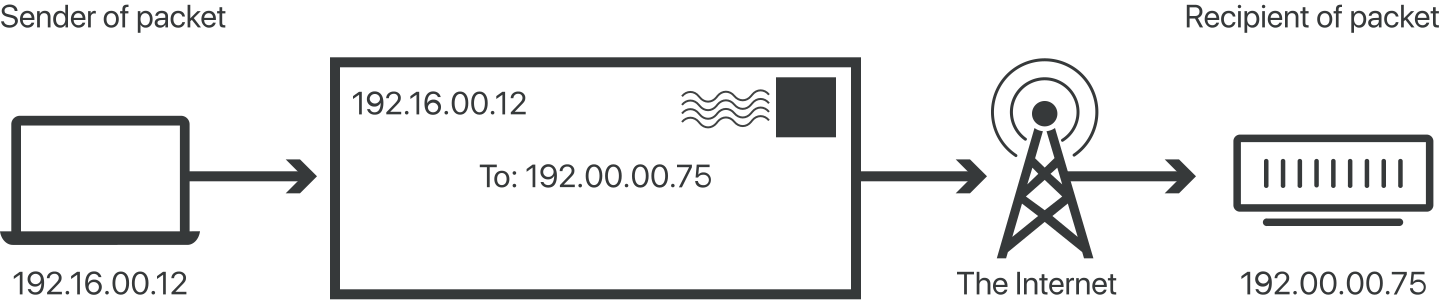
An IP address is a unique identifier assigned to a device or domain that connects to the Internet. Each IP address is a series of characters, such as ‘192.168.1.1’. Via DNS resolvers, which translate human-readable domain names into IP addresses, users are able to access websites without memorizing this complex series of characters. Each IP packet will contain both the IP address of the device or domain sending the packet and the IP address of the intended recipient, much like how both the destination address and the return address are included on a piece of mail.

IP address gets packets to their destination

IPv4 vs. IPv6

The fourth version of IP (IPv4 for short) was introduced in 1983. However, just as there are only so many possible permutations for automobile license plate numbers and they have to be reformatted periodically, the supply of available IPv4 addresses has become depleted. IPv6 addresses have many more characters and thus more permutations; however, IPv6 is not yet completely adopted, and most domains and devices still have IPv4 addresses. For more on IPv4 and IPv6, see What is my IP address?

What is an IP packet?

IP packets are created by adding an IP header to each packet of data before it is sent on its way. An IP header is just a series of bits (ones and zeros), and it records several pieces of information about the packet, including the sending and receiving IP address. IP headers also report:

  • Header length
  • Packet length
  • Time To Live (TTL), or the number of network hops a packet can make before it is discarded
  • Which transport protocol is being used (TCP, UDP, etc.)

In total there are 14 fields for information in IPv4 headers, although one of them is optional.

How does IP routing work?

The Internet is made up of interconnected large networks that are each responsible for certain blocks of IP addresses; these large networks are known as autonomous systems (AS). A variety of routing protocols, including BGP, help route packets across ASes based on their destination IP addresses. Routers have routing tables that indicate which ASes the packets should travel through in order to reach the desired destination as quickly as possible. Packets travel from AS to AS until they reach one that claims responsibility for the targeted IP address. That AS then internally routes the packets to the destination.

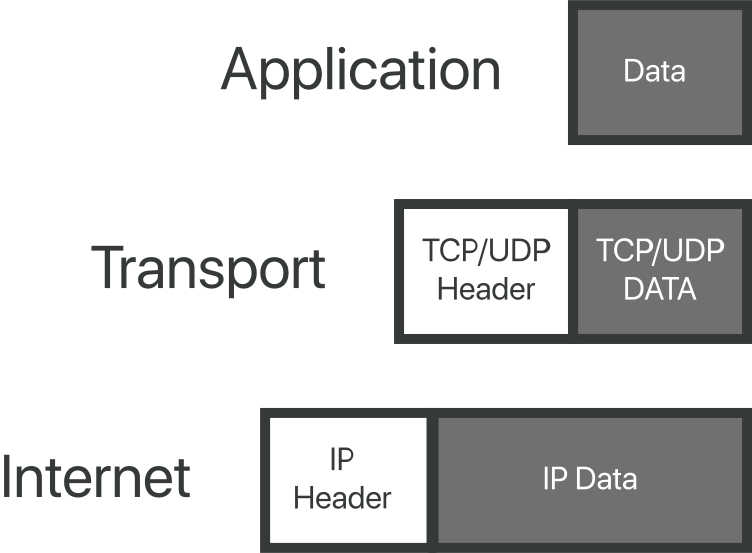
Protocols attach packet headers at different layers of the OSI model:

Protocols attach packet headers at different layers of OSI model

Packets can take different routes to the same place if necessary, just as a group of people driving to an agreed-upon destination can take different roads to get there.

What is TCP/IP?

The Transmission Control Protocol (TCP) is a transport protocol, meaning it dictates the way data is sent and received. A TCP header is included in the data portion of each packet that uses TCP/IP. Before transmitting data, TCP opens a connection with the recipient. TCP ensures that all packets arrive in order once transmission begins. Via TCP, the recipient will acknowledge receiving each packet that arrives. Missing packets will be sent again if receipt is not acknowledged.

TCP is designed for reliability, not speed. Because TCP has to make sure all packets arrive in order, loading data via TCP/IP can take longer if some packets are missing.

TCP and IP were originally designed to be used together, and these are often referred to as the TCP/IP suite. However, other transport protocols can be used with IP.

What is UDP/IP?

The User Datagram Protocol, or UDP, is another widely used transport protocol. It’s faster than TCP, but it is also less reliable. UDP does not make sure all packets are delivered and in order, and it doesn’t establish a connection before beginning or receiving transmissions.

UDP/IP is usually utilized for streaming audio or video, as these are use cases where the risk of dropped packets (meaning, missing data) is outweighed by the need to keep the transmission real-time. For instance, when users are watching a video online, not every pixel has to be present for every frame of the video. Users would rather have the video play at normal speed than sit and wait for every bit of data to be delivered.

Introduce Yourself (Example Post)

This is an example post, originally published as part of Blogging University. Enroll in one of our ten programs, and start your blog right.

You’re going to publish a post today. Don’t worry about how your blog looks. Don’t worry if you haven’t given it a name yet, or you’re feeling overwhelmed. Just click the “New Post” button, and tell us why you’re here.

Why do this?

  • Because it gives new readers context. What are you about? Why should they read your blog?
  • Because it will help you focus your own ideas about your blog and what you’d like to do with it.

The post can be short or long, a personal intro to your life or a bloggy mission statement, a manifesto for the future or a simple outline of your the types of things you hope to publish.

To help you get started, here are a few questions:

  • Why are you blogging publicly, rather than keeping a personal journal?
  • What topics do you think you’ll write about?
  • Who would you love to connect with via your blog?
  • If you blog successfully throughout the next year, what would you hope to have accomplished?

You’re not locked into any of this; one of the wonderful things about blogs is how they constantly evolve as we learn, grow, and interact with one another — but it’s good to know where and why you started, and articulating your goals may just give you a few other post ideas.

Can’t think how to get started? Just write the first thing that pops into your head. Anne Lamott, author of a book on writing we love, says that you need to give yourself permission to write a “crappy first draft”. Anne makes a great point — just start writing, and worry about editing it later.

When you’re ready to publish, give your post three to five tags that describe your blog’s focus — writing, photography, fiction, parenting, food, cars, movies, sports, whatever. These tags will help others who care about your topics find you in the Reader. Make sure one of the tags is “zerotohero,” so other new bloggers can find you, too.

Introduce Yourself (Example Post)

This is an example post, originally published as part of Blogging University. Enroll in one of our ten programs, and start your blog right.

You’re going to publish a post today. Don’t worry about how your blog looks. Don’t worry if you haven’t given it a name yet, or you’re feeling overwhelmed. Just click the “New Post” button, and tell us why you’re here.

Why do this?

  • Because it gives new readers context. What are you about? Why should they read your blog?
  • Because it will help you focus your own ideas about your blog and what you’d like to do with it.

The post can be short or long, a personal intro to your life or a bloggy mission statement, a manifesto for the future or a simple outline of your the types of things you hope to publish.

To help you get started, here are a few questions:

  • Why are you blogging publicly, rather than keeping a personal journal?
  • What topics do you think you’ll write about?
  • Who would you love to connect with via your blog?
  • If you blog successfully throughout the next year, what would you hope to have accomplished?

You’re not locked into any of this; one of the wonderful things about blogs is how they constantly evolve as we learn, grow, and interact with one another — but it’s good to know where and why you started, and articulating your goals may just give you a few other post ideas.

Can’t think how to get started? Just write the first thing that pops into your head. Anne Lamott, author of a book on writing we love, says that you need to give yourself permission to write a “crappy first draft”. Anne makes a great point — just start writing, and worry about editing it later.

When you’re ready to publish, give your post three to five tags that describe your blog’s focus — writing, photography, fiction, parenting, food, cars, movies, sports, whatever. These tags will help others who care about your topics find you in the Reader. Make sure one of the tags is “zerotohero,” so other new bloggers can find you, too.

Introduce Yourself (Example Post)

This is an example post, originally published as part of Blogging University. Enroll in one of our ten programs, and start your blog right.

You’re going to publish a post today. Don’t worry about how your blog looks. Don’t worry if you haven’t given it a name yet, or you’re feeling overwhelmed. Just click the “New Post” button, and tell us why you’re here.

Why do this?

  • Because it gives new readers context. What are you about? Why should they read your blog?
  • Because it will help you focus your own ideas about your blog and what you’d like to do with it.

The post can be short or long, a personal intro to your life or a bloggy mission statement, a manifesto for the future or a simple outline of your the types of things you hope to publish.

To help you get started, here are a few questions:

  • Why are you blogging publicly, rather than keeping a personal journal?
  • What topics do you think you’ll write about?
  • Who would you love to connect with via your blog?
  • If you blog successfully throughout the next year, what would you hope to have accomplished?

You’re not locked into any of this; one of the wonderful things about blogs is how they constantly evolve as we learn, grow, and interact with one another — but it’s good to know where and why you started, and articulating your goals may just give you a few other post ideas.

Can’t think how to get started? Just write the first thing that pops into your head. Anne Lamott, author of a book on writing we love, says that you need to give yourself permission to write a “crappy first draft”. Anne makes a great point — just start writing, and worry about editing it later.

When you’re ready to publish, give your post three to five tags that describe your blog’s focus — writing, photography, fiction, parenting, food, cars, movies, sports, whatever. These tags will help others who care about your topics find you in the Reader. Make sure one of the tags is “zerotohero,” so other new bloggers can find you, too.