What is an autonomous system? | What are ASNs?

An autonomous system (AS) is a very large network or group of networks with a single routing policy. Each AS is assigned a unique ASN, which is a number that identifies the AS

What is an autonomous system?

The Internet is a network of networks*, and autonomous systems are the big networks that make up the Internet. More specifically, an autonomous system (AS) is a large network or group of networks that has a unified routing policy. Every computer or device that connects to the Internet is connected to an AS.
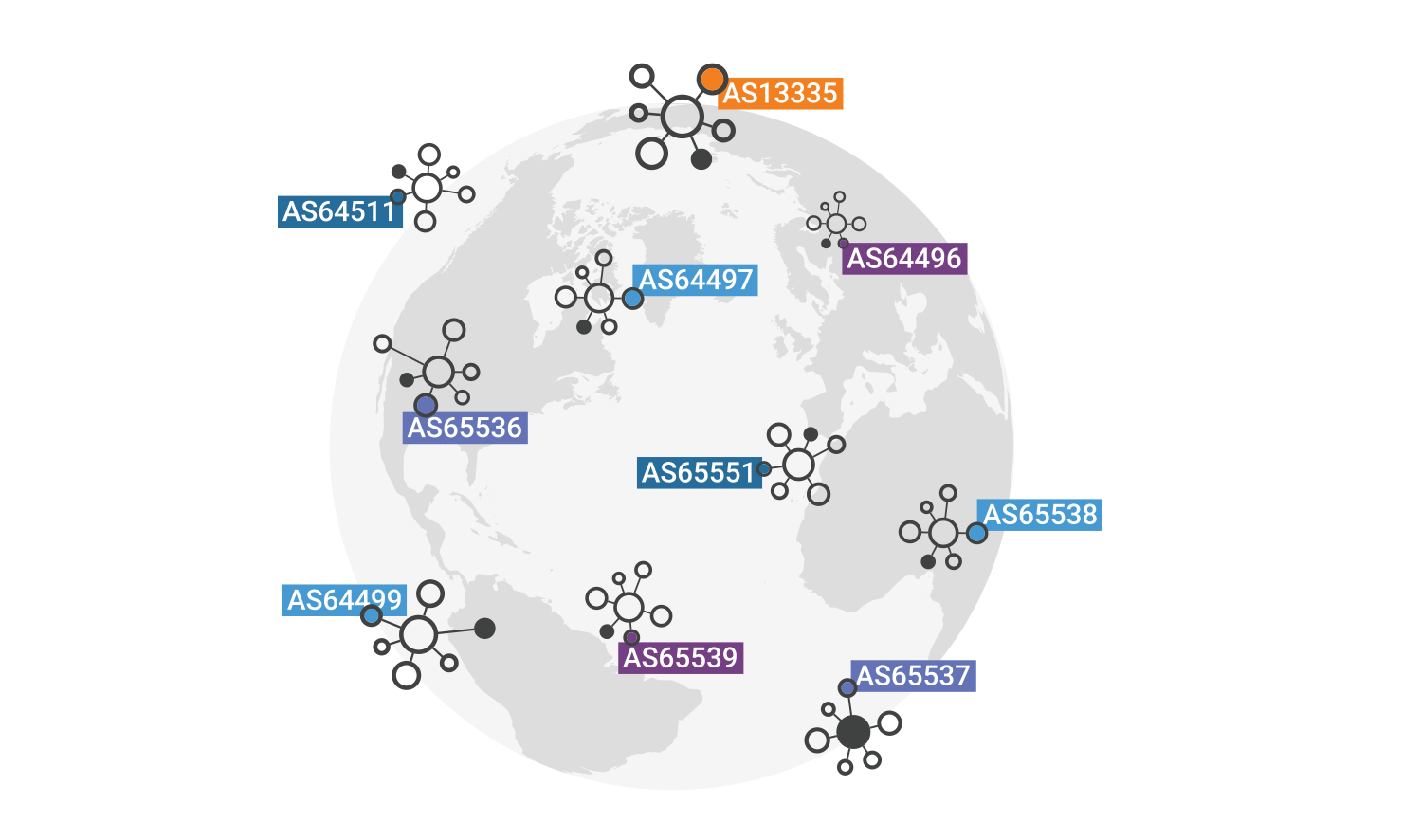
Autonomous systems around the world with ASNs

Imagine an AS as being like a town’s post office. Mail goes from post office to post office until it reaches the right town, and that town’s post office will then deliver the mail within that town. Similarly, data packets cross the Internet by hopping from AS to AS until they reach the AS that contains their destination Internet Protocol (IP) address. Routers within that AS send the packet to the IP address.

Every AS controls a specific set of IP addresses, just as every town’s post office is responsible for delivering mail to all the addresses within that town. The range of IP addresses that a given AS has control over is called their “IP address space.”

Most ASes connect to several other ASes. If an AS connects to only one other AS and shares the same routing policy, it may instead be considered a subnetwork of the first AS.

Typically, each AS is operated by a single large organization, such as an Internet service provider (ISP), a large enterprise technology company, a university, or a government agency.

*A network is a group of two or more connected computers.

What is an AS routing policy?

An AS routing policy is a list of the IP address space that the AS controls, plus a list of the other ASes to which it connects. This information is necessary for routing packets to the correct networks. ASes announce this information to the Internet using the Border Gateway Protocol (BGP).

What is IP address space?

A specified group or range of IP addresses is called “IP address space.” Each AS controls a certain amount of IP address space. (A group of IP addresses can also be called an IP address “block”.)

Imagine if all the phone numbers in the world were listed in order, and each telephone company was assigned a range: Phone Co. A controlled numbers 000-0000 through 599-9999, and Phone Co. B controlled numbers 600-0000 through 999-9999. If Alice calls Michelle at 555-2424, her call will be routed to Michelle via Phone Co. A. If she calls Jenny at 867-5309, her call will be routed to Jenny by Phone Co. B.

This is sort of how IP address space works. Suppose Acme Co. operates an AS and controls an IP address range that includes the address 192.0.2.253. If a computer sends a packet to 192.0.2.253, the packet will eventually reach the AS controlled by Acme Co. If that first computer is also sending packets to 198.51.100.255, the packets go to a different AS (although they may pass through Acme Co.’s AS on the way).

What are IP address prefixes?

When networking engineers communicate which IP addresses are controlled by which ASes, they do so by talking about the IP address “prefixes” owned by each AS. An IP address prefix is a range of IP addresses. Because of the way IP addresses are written, IP address prefixes are expressed in this fashion: 192.0.2.0/24. This represents IP addresses 192.0.2.0 through 192.0.2.255, not 192.0.2.0 through 192.0.2.24.

What is an autonomous system number (ASN)?

Each AS is assigned an official number, or autonomous system number (ASN), similar to how every business has a business license with an unique, official number. But unlike businesses, external parties often refer to ASes by their number alone.

AS numbers, or ASNs, are unique 16 bit numbers between 1 and 65534 or 32 bit numbers between 131072 and 4294967294. They are presented in this format: AS(number). For instance, Cloudflare’s ASN is AS13335. According to some estimates, there are over 90,000 ASNs in use worldwide.

ASNs are only required for external communications with inter-network routers (see “What is BGP?” below). Internal routers and computers within an AS may not need to know that AS’s number, since they are only communicating with devices within that AS.

An AS has to meet certain qualifications before the governing bodies that assign ASNs will give it a number. It must have a distinct routing policy, be of a certain size, and have more than one connection to other ASes. There is a limited amount of ASNs available, and if they were given out too freely, the supply would run out and routing would become much more complex.

What is BGP?

ASes announce their routing policy to other ASes and routers via the Border Gateway Protocol (BGP). BGP is the protocol for routing data packets between ASes. Without this routing information, operating the Internet on a large scale would quickly become impractical: data packets would get lost or take too long to reach their destinations.

Each AS uses BGP to announce which IP addresses they are responsible for and which other ASes they connect to. BGP routers take all this information from ASes around the world and put it into databases called routing tables to determine the fastest paths from AS to AS. When packets arrive, BGP routers refer to their routing tables to determine which AS the packet should go to next.

With so many ASes in the world, BGP routers are constantly updating their routing tables. As networks go offline, new networks come online, and ASes expand or contract their IP address space, all of this information has to be announced via BGP so that BGP routers can adjust their routing tables.

Why is BGP routing necessary? Isn’t IP used for routing?

IP, or the Internet Protocol, is indeed used for routing in that it specifies which destination each packet is going to. BGP is responsible for directing packets on the fastest route to their destination. Without BGP, IP packets would bounce around the Internet randomly from AS to AS, like a driver trying to reach their destination by guessing which roads to take.

How do autonomous systems connect with each other?

ASes connect with each other and exchange network traffic (data packets) through a process called peering. One way ASes peer with each other is by connecting at physical locations called Internet Exchange Points (IXPs). An IXP is a large local area network (LAN) with lots of routers, switches, and cable connections.
What is a metropolitan area network (MAN)?

 A metropolitan area network (MAN) is smaller than a wide area network (WAN) but larger than a local area network (LAN).

What is a metropolitan area network (MAN)?

A metropolitan area network (MAN) is a computer network that connects computers within a metropolitan area, which could be a single large city, multiple cities and towns, or any given large area with multiple buildings. A MAN is larger than a local area network (LAN) but smaller than a wide area network (WAN). MANs do not have to be in urban areas; the term “metropolitan” implies the size of the network, not the demographics of the area that it serves.

How are MAN networks constructed?

Like WANs, a MAN is made up of interconnected LANs. Because MANs are smaller, they are usually more efficient than WANs, since data does not have to travel over large distances. MANs typically combine the networks of multiple organizations, instead of being managed by a single organization.

Most MANs use fiber optic cables to form connections between LANs. Often a MAN will run on “dark fiber” — formerly unused fiber optic cables that are able to carry traffic. These fiber optic cables may be leased from private-sector Internet service providers (ISP).

In some cases, this model is reversed: a city government builds and maintains a metropolitan fiber optic network, then leases dark fiber to private companies.

MAN vs. CAN

A campus area network (CAN) is a large network that connects multiple buildings on a school or business campus. CANs may also be considered MANs, since they connect multiple LANs but are not large enough to be considered a WAN.

How does Cloudflare protect metropolitan area networks?

Large networks are subject to a variety of attacks, including distributed denial-of-service (DDoS) attacks. Cloudflare Magic Transit protects networks of all sizes from attacks, while also accelerating network traffic and helping ensure network reliability. By offering cloud-based network functions, Magic Transit enables network operators to reduce their investment in hardware.

With Cloudflare Network Interconnect, networks can directly interconnect with Cloudflare for increased security and performance, either through a private virtual connection or through a physical cable connection.

What is a WAN? | WAN vs. LAN

A wide area network (WAN) is any network that extends over a large geographic area, usually connecting multiple local area networks (LANs).

What is a wide area network (WAN)?

A wide area network (WAN) is a large computer network that connects groups of computers over large distances. WANs are often used by large businesses to connect their office networks; each office typically has its own local area network, or LAN, and these LANs connect via a WAN. These long connections may be formed in several different ways, including leased lines, VPNs, or IP tunnels (see below).

The definition of what constitutes a WAN is fairly broad. Technically, any large network that spreads out over a wide geographic area is a WAN. The Internet itself is considered a WAN.

What is a LAN?

A local area network (LAN) is a network confined to a small, localized area. Home WiFi networks and small business networks are common examples of LANs. Typically, whoever manages the LAN also manages the networking equipment it uses. A small business, for instance, will manage the routers and switches involved in setting up the LAN.

WAN vs. LAN

LANs typically exist in a contained area and usually share a single central point of Internet connection. WANs are designed to provide network connectivity over long distances. They are usually made up of several connected LANs. An organization that sets up its own WAN will almost always rely on network infrastructure that is outside their control: for example, a company with an office in Paris and an office in New York will have to send data between these offices over undersea cables that cross the Atlantic Ocean.

Usually a WAN will include multiple routers and switches. A LAN only needs one router for connecting to the Internet or other LANs, although it may use switches as well.

What is a leased line?

One of the ways that organizations connect their LANs to form a WAN is by using something called a leased line. A leased line is a direct network connection rented from a large network provider such as an ISP. Building their own physical network infrastructure — including cables, routers, and Internet exchange points across hundreds or thousands of miles — would be an almost impossible task for most organizations. So instead, they lease a direct, dedicated connection from a company that already has this infrastructure.

What is tunneling? What is a VPN?

If a company does not want to pay for a leased line, they can connect their LANs using tunneling. In networking, tunneling is a method for encapsulating data packets* within other data packets so that they go somewhere that they would not go otherwise. Imagine mailing an envelope inside another envelope, with both envelopes having a different address, so that the internal envelope gets mailed from the external envelope’s destination address. That is the general idea of tunneling, except data is contained within packets instead of envelopes.

Some network tunnels are encrypted in order to protect the packets’ contents from anyone who might intercept them en route. Encrypted tunnels are called VPNs, or virtual private networks. VPN connections between WANs are more secure than unencrypted tunneling connections. IPsec is one common VPN encryption protocol.

The main drawback of using tunneling to connect LANs is that tunneling increases overhead; it takes more computing power, and thus more time, to send packets in this way. Encapsulating and encrypting each packet slows down communications, just as stuffing an envelope twice instead of once slows down how quickly it can be placed in the mail. Additionally, encapsulated packets may end up larger than some routers on the network can handle, resulting in fragmentation and adding more delays.

*All data sent over a network is broken up into packets, which are smaller chunks of data. Each packet includes information about the packet’s origin, destination, and position in the series of packets.

What is a software-defined WAN (SD-WAN)?

A software-defined WAN, or SD-WAN, is a WAN that uses software to route traffic, in addition to or instead of traditional routers. With an SD-WAN, networking functions are virtualized — they run in software instead of hardware — making network management much easier for IT teams. In fact some SD-WAN vendors offer software-defined routers that can at least partially replace existing hardware routers.

SD-WANs are one form of software-defined networking (SDN), which is a category of technologies that make it possible to manage networks with software. They are also a key component of secure access service edge (SASE) solutions, which combine networking and network security functions into a single, cloud-based service.

How does Cloudflare protect WANs and SD-WANs?

LANs, WANs, and SD-WANs can all be targeted for DDoS attacks. Cloudflare Magic Transit protects networks from such attacks. Magic Transit also applies Cloudflare’s firewall capabilities to on-premise networks and accelerates network traffic. Learn more about Magic Transit.

What is a LAN (local area network)?

A LAN, or local area network, is a group of connected computing devices within a localized area that usually share a centralized Internet connection

What does ‘LAN’ stand for?

LAN stands for local area network. A network is a group of two or more connected computers, and a LAN is a network contained within a small geographic area, usually within the same building. Home WiFi networks and small business networks are common examples of LANs. LANs can also be fairly large, although if they take up multiple buildings, it is usually more accurate to classify them as wide area networks (WAN) or metropolitan area networks (MAN).

How do LANs work?

Most LANs connect to the Internet at a central point: a router. Home LANs often use a single router, while LANs in larger spaces may additionally use network switches for more efficient packet delivery.

LANs almost always use Ethernet, WiFi, or both in order to connect devices within the network. Ethernet is a protocol for physical network connections that requires the use of Ethernet cables. WiFi is a protocol for connecting to a network via radio waves.

A variety of devices can connect to LANs, including servers, desktop computers, laptops, printers, IoT devices, and even game consoles. In offices, LANs are often used to provide shared access to internal employees to connected printers or servers.

What equipment is needed to set up a LAN?

The simplest Internet-connected LANs require only a router and a way for computing devices to connect to the router, such as via Ethernet cables or a WiFi hotspot. LANs without an Internet connection need a switch for exchanging data. Large LANs, such as those in a large office building, may need additional routers or switches to more efficiently forward data to the right devices.

Not all LANs connect to the Internet. In fact, LANs predate the Internet: the first LANs were used in businesses in the late 1970s. (These old LANs used network protocols that are no longer in use today.) The only requirement for setting up a LAN is that the connected devices are able to exchange data. This usually requires a piece of networking equipment for packet switching, such as a network switch. Today, even non-Internet-connected LANs use the same networking protocols that are used on the Internet (such as IP).

What is a virtual LAN?

Virtual LANs, or VLANs, are a way of splitting up traffic on the same physical network into two networks. Imagine setting up two separate LANs, each with their own router and Internet connection, in the same room. VLANs are like that, but they are divided virtually using software instead of physically using hardware — only one router with one Internet connection is necessary.

VLANs help with network management, especially with very large LANs. By subdividing the network, administrators can manage the network much more easily. (VLANs are very different from subnets, which are another way of subdividing networks for greater efficiency.)

What is the difference between a LAN and a WAN?

A WAN, or wide area network, is a collection of connected LANs. It is a widespread network of local networks. A WAN can be any size, even thousands of miles wide; it is not restricted to a given area.

How do LANs relate to the rest of the Internet?

The Internet is a network of networks. LANs usually connect to a much larger network, an autonomous system (AS). ASes are very large networks with their own routing policies and with control over certain IP addresses. An Internet service provider (ISP) is one example of an AS.

Picture a LAN as a small network, that connects to a much larger network, that connects to other very large networks, all of which contain LANs. This is the Internet, and two computers connected to two different LANs thousands of miles apart can talk to each other by sending data over these connections between networks.

How does Cloudflare protect LANs?

On-premise business infrastructure, such as LANs and their accompanying routers, switches, and servers, often face malicious attacks, including DDoS attacks. Cloudflare Magic Transit protects on-premise networks and infrastructure from malicious attacks, in addition to accelerating legitimate network traffic. Cloudflare Magic Transit also protects cloud-hosted and hybrid networks.

What is a protocol? | Network protocol definition

In networking, a protocol is a standardized set of rules for formatting and processing data. Protocols enable computers to communicate with one another.

What is a network protocol?

In networking, a protocol is a set of rules for formatting and processing data. Network protocols are like a common language for computers. The computers within a network may use vastly different software and hardware; however, the use of protocols enables them to communicate with each other regardless.

Standardized protocols are like a common language that computers can use, similar to how two people from different parts of the world may not understand each other’s native languages, but they can communicate using a shared third language. If one computer uses the Internet Protocol (IP) and a second computer does as well, they will be able to communicate — just as the United Nations relies on its 6 official languages to communicate amongst representatives from all over the globe. But if one computer uses IP and the other does not know this protocol, they will be unable to communicate.

On the Internet, there are different protocols for different types of processes. Protocols are often discussed in terms of which OSI model layer they belong to.

What are the layers of the OSI model?

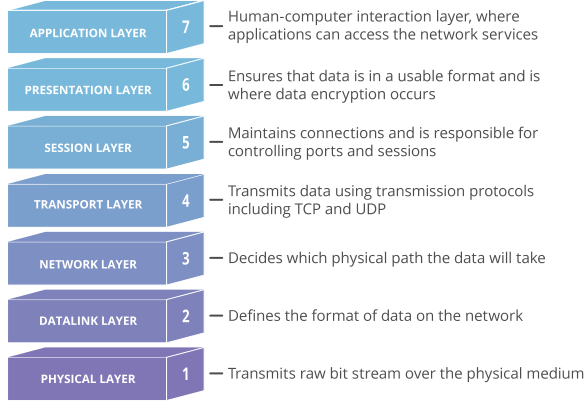
The Open Systems Interconnection (OSI) model is an abstract representation of how the Internet works. It contains 7 layers, with each layer representing a different category of networking functions.

The OSI Model

Protocols make these networking functions possible. For instance, the Internet Protocol (IP) is responsible for routing data by indicating where data packets* come from and what their destination is. IP makes network-to-network communications possible. Hence, IP is considered a network layer (layer 3) protocol.

As another example, the Transmission Control Protocol (TCP) ensures that the transportation of packets of data across networks goes smoothly. Therefore, TCP is considered a transport layer (layer 4) protocol.

*A packet is a small segment of data; all data sent over a network is divided into packets.

Which protocols run on the network layer?

As described above, IP is a network layer protocol responsible for routing. But it is not the only network layer protocol.

IPsec: Internet Protocol Security (IPsec) sets up encrypted, authenticated IP connections over a virtual private network (VPN). Technically IPsec is not a protocol, but rather a collection of protocols that includes the Encapsulating Security Protocol (ESP), Authentication Header (AH), and Security Associations (SA).

ICMP: The Internet Control Message Protocol (ICMP) reports errors and provides status updates. For example, if a router is unable to deliver a packet, it will send an ICMP message back to the packet’s source.

IGMP: The Internet Group Management Protocol (IGMP) sets up one-to-many network connections. IGMP helps set up multicasting, meaning multiple computers can receive data packets directed at one IP address.

What other protocols are used on the Internet?

Some of the most important protocols to know are:

TCP: As described above, TCP is a transport layer protocol that ensures reliable data delivery. TCP is meant to be used with IP, and the two protocols are often referenced together as TCP/IP.

HTTP: The Hypertext Transfer Protocol (HTTP) is the foundation of the World Wide Web, the Internet that most users interact with. It is used for transferring data between devices. HTTP belongs to the application layer (layer 7), because it puts data into a format that applications (e.g. a browser) can use directly, without further interpretation. The lower layers of the OSI model are handled by a computer’s operating system, not applications.

HTTPS: The problem with HTTP is that it is not encrypted — any attacker who intercepts an HTTP message can read it. HTTPS (HTTP Secure) corrects this by encrypting HTTP messages.

TLS/SSL: Transport Layer Security (TLS) is the protocol HTTPS uses for encryption. TLS used to be called Secure Sockets Layer (SSL).

UDP: The User Datagram Protocol (UDP) is a faster but less reliable alternative to TCP at the transport layer. It is often used in services like video streaming and gaming, where fast data delivery is paramount.

What protocols do routers use?

Network routers use certain protocols to discover the most efficient network paths to other routers. These protocols are not used for transferring user data. Important network routing protocols include:

BGP: The Border Gateway Protocol (BGP) is an application layer protocol networks use to broadcast which IP addresses they control. This information allows routers to decide which networks data packets should pass through on the way to their destinations.

EIGRP: The Enhanced Interior Gateway Routing Protocol (EIGRP) identifies distances between routers. EIGRP automatically updates each router’s record of the best routes (called a routing table) and broadcasts those updates to other routers within the network.

OSPF: The Open Shortest Path First (OSPF) protocol calculates the most efficient network routes based on a variety of factors, including distance and bandwidth.

RIP: The Routing Information Protocol (RIP) is an older routing protocol that identifies distances between routers. RIP is an application layer protocol.

How are protocols used in cyber attacks?

Just as with any aspect of computing, attackers can exploit the way networking protocols function to compromise or overwhelm systems. Many of these protocols are used in distributed denial-of-service (DDoS) attacks. For example, in a SYN flood attack, an attacker takes advantage of the way the TCP protocol works. They send SYN packets to repeatedly initiate a TCP handshake with a server, until the server is unable to provide service to legitimate users because its resources are tied up by all the phony TCP connections.

Cloudflare offers a number of solutions for stopping these and other cyber attacks. Cloudflare Magic Transit is able to mitigate attacks at layers 3, 4, and 7 of the OSI model. In the example case of a SYN flood attack, Cloudflare handles the TCP handshake process on the server’s behalf so that the server’s resources never become overwhelmed by open TCP connections.

What is a packet? | Network packet definition

Any data sent over the Internet is divided into smaller segments called packets.

What is a packet?

In networking, a packet is a small segment of a larger message. Data sent over computer networks*, such as the Internet, is divided into packets. These packets are then recombined by the computer or device that receives them.

Suppose Alice is writing a letter to Bob, but Bob’s mail slot is only wide enough to accept envelopes the size of a small index card. Instead of writing her letter on normal paper and then trying to stuff it through the mail slot, Alice divides her letter into much shorter sections, each a few words long, and writes these sections out on index cards. She delivers the group of cards to Bob, who puts them in order to read the whole message.

This is similar to how packets work on the Internet. Suppose a user needs to load an image. The image file does not go from a web server to the user’s computer in one piece. Instead, it is broken down into packets of data, sent over the wires, cables, and radio waves of the Internet, and then reassembled by the user’s computer into the original photo.

*A network is a group of two or more connected computers. The Internet is a network of networks — multiple networks around the world that are all interconnected with each other.

Why use packets?

Theoretically, it could be possible to send files and data over the Internet without chopping them down into small packets of information. One computer could send data to another computer in the form of a long unbroken line of bits (small units of information, communicated as pulses of electricity that computers can interpret).

However, such an approach quickly becomes impractical when more than two computers are involved. While the long line of bits passed over the wires between the two computers, no third computer could use those same wires to send information — it would have to wait its turn.

In contrast to this approach, the Internet is a “packet switching” network. Packet switching refers to the ability of networking equipment to process packets independently from each other. It also means that packets can take different network paths to the same destination, so long as they all arrive at the destination. (In certain protocols, packets do need to arrive at their final destinations in the correct order, even if each packet took a different route to get there.)

Because of packet switching, packets from multiple computers can travel over the same wires in basically any order. This enables multiple connections to take place over the same networking equipment at the same time. As a result, billions of devices can exchange data on the Internet at the same time, instead of just a handful.

What is a packet header?

A packet header is a “label” of sorts, which provides information about the packet’s contents, origin, and destination.

When Alice sends her series of index cards to Bob, the words on those cards alone will not give Bob enough context to read the letter correctly. Alice needs to indicate the order that the index cards go in so that Bob does not read them out of order. She also should indicate that each one is from her, in case Bob receives messages from other people while she is delivering hers. So Alice adds this information to the top of each index card, above the actual words of her message. On the first card she writes “Letter from Alice, 1 of 20,” on the second she writes “Letter from Alice, 2 of 20,” and so on.

Alice has created a miniature header for her cards so that Bob does not lose them or mix them up. Similarly, all network packets include a header so that the device that receives them knows where the packets come from, what they are for, and how to process them.

Packets consist of two portions: the header and the payload. The header contains information about the packet, such as its origin and destination IP addresses (an IP address is like a computer’s mailing address). The payload is the actual data. Referring back to the photo example, the thousands of packets that make up the image each have a payload, and the payload carries a little piece of the image.

Where do packet headers come from?

In practice, packets actually have more than one header, and each header is used by a different part of the networking process. Packet headers are attached by certain types of networking protocols.

A protocol is a standardized way of formatting data so that any computer can interpret the data. Many different protocols make the Internet work. Some of these protocols add headers to packets with information associated with that protocol. At minimum, most packets that traverse the Internet will include a Transmission Control Protocol (TCP) header and an Internet Protocol (IP) header.

What are packet trailers and footers?

Packet headers go at the front of each packet. Routers, switches, computers, and anything else that processes or receives a packet will see the header first. A packet can also have trailers and footers attached at the end. Like headers, these contain additional information about the packet.

Only certain network protocols attach trailers or footers to packets; most only attach headers. ESP (part of the IPsec suite) is one example of a network layer protocol that attaches trailers to packets.

What is an IP packet?

IP (Internet Protocol) is a network layer protocol that has to do with routing. It is used to make sure packets arrive at the correct destination.

Packets are sometimes defined by the protocol they are using. A packet with an IP header can be referred to as an “IP packet.” An IP header contains important information about where a packet is from (its source IP address), where it is going (destination IP address), how large the packet is, and how long network routers should continue to forward the packet before dropping it. It may also indicate whether or not the packet can be fragmented, and include information about reassembling fragmented packets.

Packets vs. datagrams

“Datagram” is a segment of data sent over a packet-switched network. A datagram contains enough information to be routed from its source to its destination. By this definition, an IP packet is one example of a datagram. Essentially, datagram is an alternative term for “packet.”

What is network traffic? What is malicious network traffic?

Network traffic is a term that refers to the packets that pass through a network, in the same way that automobile traffic refers to the cars and trucks that travel on roads.

However, not all packets are good or useful, and not all network traffic is safe. Attackers can generate malicious network traffic — data packets designed to compromise or overwhelm a network. This can take the form of a distributed denial-of-service (DDoS) attack, a vulnerability exploitation, or several other forms of cyber attack.

Cloudflare offers several products that protect against malicious network traffic. Cloudflare Magic Transit, for instance, protects company networks from DDoS attacks at the network layer by extending the power of the Cloudflare global cloud network to on-premise, hybrid, and cloud infrastructure.

What is a router?

A router is a device that connects two or more IP networks or subnetworks.

What is a router?

A router is a device that connects two or more packet-switched networks or subnetworks. It serves two primary functions: managing traffic between these networks by forwarding data packets to their intended IP addresses, and allowing multiple devices to use the same Internet connection.

There are several types of routers, but most routers pass data between LANs (local area networks) and WANs (wide area networks). A LAN is a group of connected devices restricted to a specific geographic area. A LAN usually requires a single router.

A WAN, by contrast, is a large network spread out over a vast geographic area. Large organizations and companies that operate in multiple locations across the country, for instance, will need separate LANs for each location, which then connect to the other LANs to form a WAN. Because a WAN is distributed over a large area, it often necessitates multiple routers and switches*.

*network switch forwards data packets between groups of devices in the same network, whereas a router forwards data between different networks.

How does a router work?

Think of a router as an air traffic controller and data packets as aircraft headed to different airports (or networks). Just as each plane has a unique destination and follows a unique route, each packet needs to be guided to its destination as efficiently as possible. In the same way that an air traffic controller ensures that planes reach their destinations without getting lost or suffering a major disruption along the way, a router helps direct data packets to their destination IP address.

In order to direct packets effectively, a router uses an internal routing table — a list of paths to various network destinations. The router reads a packet’s header to determine where it is going, then consults the routing table to figure out the most efficient path to that destination. It then forwards the packet to the next network in the path.

To learn more about IP routing and the protocols that are used during this process, read What is routing?

What is the difference between a router and a modem?

Although some Internet service providers (ISPs) may combine a router and a modem within a single device, they are not the same. Each plays a different but equally important role in connecting networks to each other and to the Internet.

A router forms networks and manages the flow of data within and between those networks, while a modem connects those networks to the Internet. Modems forge a connection to the Internet by converting signals from an ISP into a digital signal that can be interpreted by any connected device. A single device may plug into a modem in order to connect to the Internet; alternately, a router can help distribute this signal to multiple devices within an established network, allowing all of them to connect to the Internet simultaneously.

Think of it like this: If Bob has a router, but no modem, he will be able to create a LAN and send data between the devices on that network. However, he will not be able to connect that network to the Internet. Alice, on the other hand, has a modem, but no router. She will be able to connect a single device to the Internet (for example, her work laptop), but cannot distribute that Internet connection to multiple devices (say, her laptop and her smartphone). Carol, meanwhile, has a router and a modem. Using both devices, she can form a LAN with her desktop computer, tablet, and smartphone and connect them all to the Internet at the same time.

What are the different types of routers?

In order to connect a LAN to the Internet, a router first needs to communicate with a modem. There are two primary ways to do this:

  • Wireless router: A wireless router uses an Ethernet cable to connect to a modem. It distributes data by converting packets from binary code into radio signals, then wirelessly broadcasts them using antennae. Wireless routers do not establish LANs; instead, they create WLANs (wireless local area networks), which connect multiple devices using wireless communication.
  • Wired router: Like a wireless router, a wired router also uses an Ethernet cable to connect to a modem. It then uses separate cables to connect to one or more devices within the network, create a LAN, and link the devices within that network to the Internet.

In addition to wireless and wired routers for small LANs, there are many specialized types of routers that serve specific functions:

  • Core router: Unlike the routers used within a home or small business LAN, a core router is used by large corporations and businesses that transmit a high volume of data packets within their network. Core routers operate at the “core” of a network and do not communicate with external networks.
  • Edge router: While a core router exclusively manages data traffic within a large-scale network, an edge router communicates with both core routers and external networks. Edge routers live at the “edge” of a network and use the BGP (Border Gateway Protocol) to send and receive data from other LANs and WANs.
  • Virtual router: A virtual router is a software application that performs the same function as a standard hardware router. It may use the Virtual Router Redundancy Protocol (VRRP) to establish primary and backup virtual routers, should one fail.

What are some of the security challenges associated with routers?

Vulnerability exploits: All hardware-based routers come with automatically installed software known as firmware that helps the router perform its functions. Like any other piece of software, router firmware often contains vulnerabilities that cyber attackers can exploit (one example), and router vendors periodically issue updates to patch these vulnerabilities. For this reason, router firmware needs to be updated regularly. Unpatched routers can be compromised by attackers, enabling them to monitor traffic or use the router as part of a botnet.

DDoS attacks: Small and large organizations often are the targets of distributed denial-of-service (DDoS) attacks directed at their network infrastructure. Unmitigated network layer DDoS attacks can overwhelm routers or cause them to crash, resulting in network downtime. Cloudflare Magic Transit is one solution for protecting routers and networks from these kinds of DDoS attacks.

Administrative credentials: All routers come with a set of admin credentials for performing administrative functions. These credentials are set to default values, such as “admin” as the username and “admin” as the password. The username and password should be reset to something more secure as soon as possible: attackers are aware of the common default values for these credentials and can use them to gain control of the router remotely if they are not reset.

What is routing? | IP routing

On the Internet, routing is the way IP packets of data travel from their origin to their destination.

What is routing?

Network routing is the process of selecting a path across one or more networks. The principles of routing can apply to any type of network, from telephone networks to public transportation. In packet-switching networks, such as the Internet, routing selects the paths for Internet Protocol (IP) packets to travel from their origin to their destination. These Internet routing decisions are made by specialized pieces of network hardware called routers.

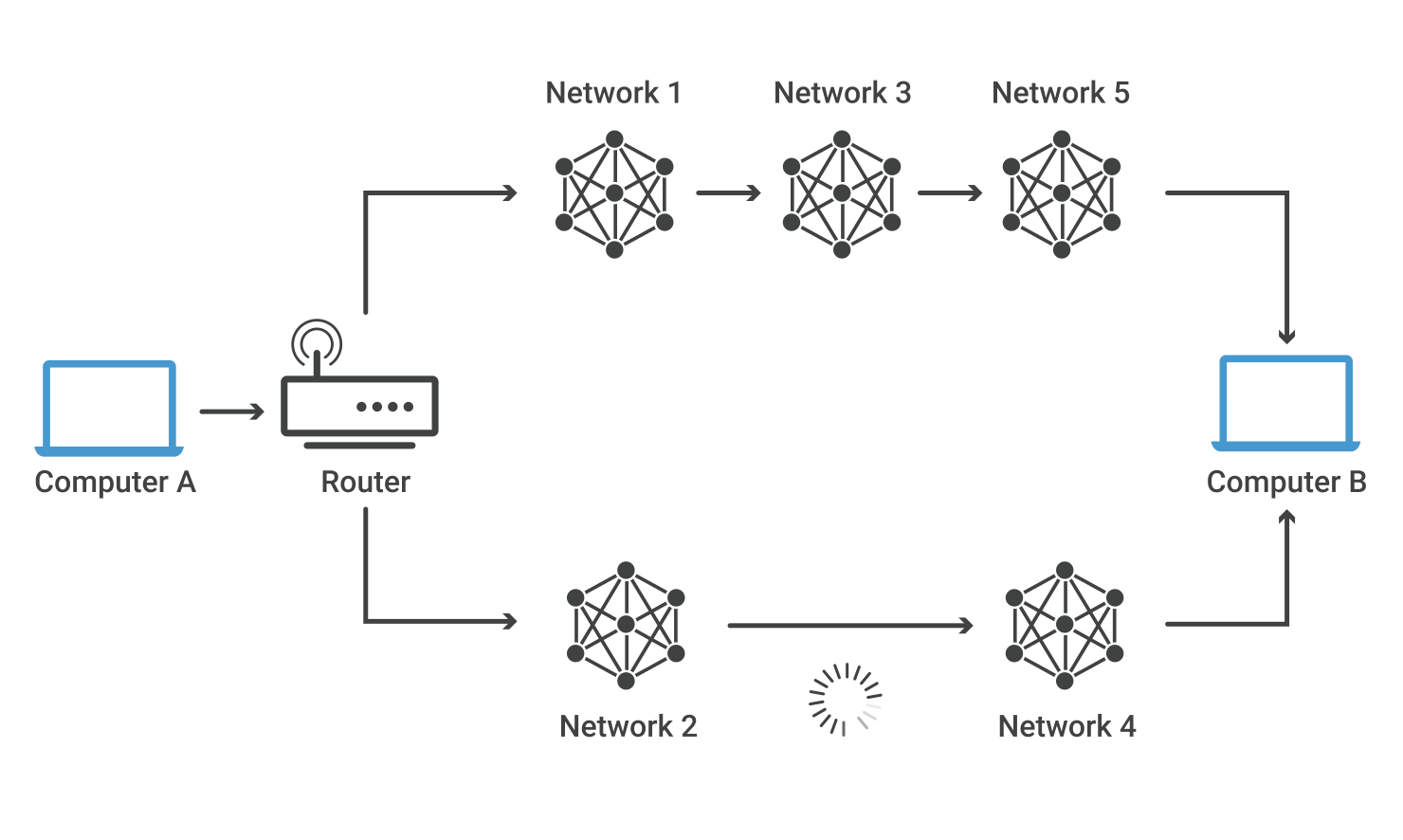
Consider the image below. For a data packet to get from Computer A to Computer B, should it pass through networks 1, 3, and 5 or networks 2 and 4? The packet will take a shorter path through networks 2 and 4, but networks 1, 3, and 5 might be faster at forwarding packets than 2 and 4. These are the kinds of choices network routers constantly make.

ip routing diagram

How does routing work?

Routers refer to internal routing tables to make decisions about how to route packets along network paths. A routing table records the paths that packets should take to reach every destination that the router is responsible for. Think of train timetables, which train passengers consult to decide which train to catch. Routing tables are like that, but for network paths rather than trains.

Routers work in the following way: when a router receives a packet, it reads the headers* of the packet to see its intended destination, like the way a train conductor may check a passenger’s tickets to determine which train they should go on. It then determines where to route the packet based on information in its routing tables.

Routers do this millions of times a second with millions of packets. As a packet travels to its destination, it may be routed several times by different routers.

Routing tables can either be static or dynamic. Static routing tables do not change. A network administrator manually sets up static routing tables. This essentially sets in stone the routes data packets take across the network, unless the administrator manually updates the tables.

Dynamic routing tables update automatically. Dynamic routers use various routing protocols (see below) to determine the shortest and fastest paths. They also make this determination based on how long it takes packets to reach their destination — similar to the way Google Maps, Waze, and other GPS services determine the best driving routes based on past driving performance and current driving conditions.

Dynamic routing requires more computing power, which is why smaller networks may rely on static routing. But for medium-sized and large networks, dynamic routing is much more efficient.

*Packet headers are small bundles of data attached to packets that provide useful information, including where the packet is coming from and where it is headed, like the packing slip stamped on the outside of a mail parcel.

What are the main routing protocols?

In networking, a protocol is a standardized way of formatting data so that any connected computer can understand the data. A routing protocol is a protocol used for identifying or announcing network paths.

The following protocols help data packets find their way across the Internet:

IP: The Internet Protocol (IP) specifies the origin and destination for each data packet. Routers inspect each packet’s IP header to identify where to send them.

BGP: The Border Gateway Protocol (BGP) routing protocol is used to announce which networks control which IP addresses, and which networks connect to each other. (The large networks that make these BGP announcements are called autonomous systems.) BGP is a dynamic routing protocol.

The below protocols route packets within an AS:

OSPF: The Open Shortest Path First (OSPF) protocol is commonly used by network routers to dynamically identify the fastest and shortest available routes for sending packets to their destination.

RIP: The Routing Information Protocol (RIP) uses “hop count” to find the shortest path from one network to another, where “hop count” means number of routers a packet must pass through on the way. (When a packet goes from one network to another, this is known as a “hop.”)

Other interior routing protocols include EIGRP (the Enhanced Interior Gateway Routing Protocol, mainly for use with Cisco routers) and IS-IS (Intermediate System to Intermediate System).

What is a router?

A router is a piece of network hardware responsible for forwarding packets to their destinations. Routers connect to two or more IP networks or subnetworks and pass data packets between them as needed. Routers are used in homes and offices for setting up local network connections. More powerful routers operate all over the Internet, helping data packets reach their destinations.

How does Cloudflare help make routing more efficient and secure?

Cloudflare Argo uses smart routing to identify the fastest routes across the Internet, sending packets around highly congested networks rather than through them. The result is similar to when car traffic is routed around traffic jams: data packets arrive faster, accelerating the online experience for users.

Cloudflare Magic Transit uses BGP to announce IP subnets on Cloudflare customers’ behalf. Network traffic to those IP addresses is routed through the Cloudflare global network rather than going directly to those customers’ networks. Cloudflare filters out any attack traffic before forwarding the legitimate traffic.

What is a subnet? | How subnetting works

A subnet or subnetwork is a smaller network inside a large network. Subnetting makes network routing much more efficient.

What is a subnet?

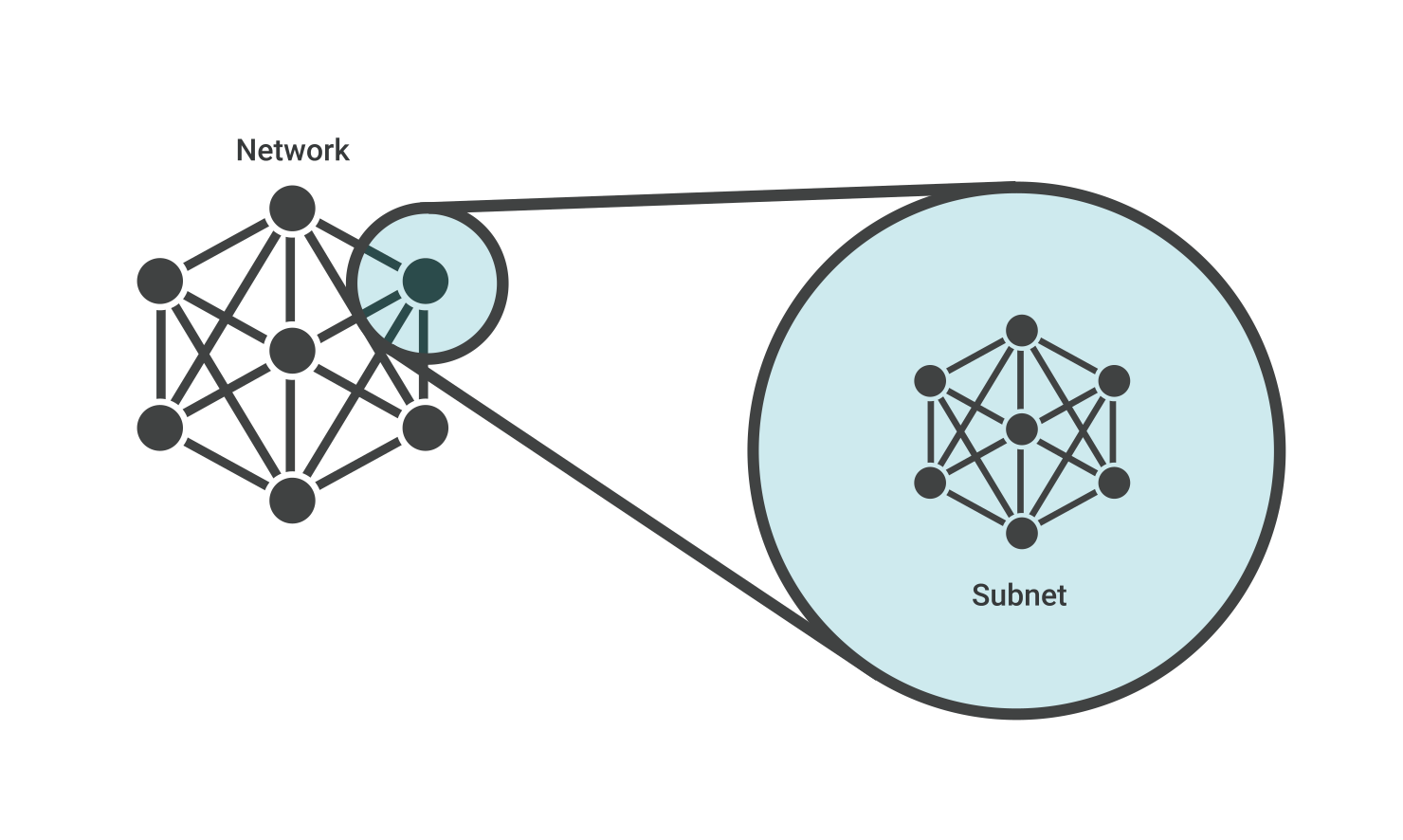
A subnet, or subnetwork, is a network inside a network. Subnets make networks more efficient. Through subnetting, network traffic can travel a shorter distance without passing through unnecessary routers to reach its destination.

subnet diagram

Imagine Alice puts a letter in the mail that is addressed to Bob, who lives in the town right next to hers. For the letter to reach Bob as quickly as possible, it should be delivered right from Alice’s post office to the post office in Bob’s town, and then to Bob. If the letter is first sent to a post office hundreds of miles away, Alice’s letter could take a lot longer to reach Bob.

Like the postal service, networks are more efficient when messages travel as directly as possible. When a network receives data packets from another network, it will sort and route those packets by subnet so that the packets do not take an inefficient route to their destination.

What is an IP address?

In order to understand subnets, we must quickly define IP addresses. Every device that connects to the Internet is assigned a unique IP (Internet Protocol) address, enabling data sent over the Internet to reach the right device out of the billions of devices connected to the Internet. While computers read IP addresses as binary code (a series of 1s and 0s), IP addresses are usually written as a series of alphanumeric characters.

What do the different parts of an IP address mean?

This section focuses on IPv4 addresses, which are presented in the form of four decimal numbers separated by periods, like 203.0.113.112. (IPv6 addresses are longer and use letters as well as numbers.)

Every IP address has two parts. The first part indicates which network the address belongs to. The second part specifies the device within that network. However, the length of the “first part” changes depending on the network’s class.

Networks are categorized into different classes, labeled A through E. Class A networks can connect millions of devices. Class B networks and Class C networks are progressively smaller in size. (Class D and Class E networks are not commonly used.)

Let’s break down how these classes affect IP address construction:

Class A network: Everything before the first period indicates the network, and everything after it specifies the device within that network. Using 203.0.113.112 as an example, the network is indicated by “203” and the device by “0.113.112.”

Class B network: Everything before the second period indicates the network. Again using 203.0.113.112 as an example, “203.0” indicates the network and “113.112” indicates the device within that network.

Class C network: For Class C networks, everything before the third period indicates the network. Using the same example, “203.0.113” indicates the Class C network, and “112” indicates the device.

Why is subnetting necessary?

As the previous example illustrates, the way IP addresses are constructed makes it relatively simple for Internet routers to find the right network to route data into. However, in a Class A network (for instance), there could be millions of connected devices, and it could take some time for the data to find the right device. This is why subnetting comes in handy: subnetting narrows down the IP address to usage within a range of devices.

Because an IP address is limited to indicating the network and the device address, IP addresses cannot be used to indicate which subnet an IP packet should go to. Routers within a network use something called a subnet mask to sort data into subnetworks.

What is a subnet mask?

A subnet mask is like an IP address, but for only internal usage within a network. Routers use subnet masks to route data packets to the right place. Subnet masks are not indicated within data packets traversing the Internet — those packets only indicate the destination IP address, which a router will match with a subnet.

Suppose Bob answers Alice’s letter, but he sends his reply to Alice’s place of employment rather than her home. Alice’s office is quite large with many different departments. To ensure employees receive their correspondence quickly, the administrative team at Alice’s workplace sorts mail by department rather than by individual employee. After receiving Bob’s letter, they look up Alice’s department and see she works in Customer Support. They send the letter to the Customer Support department instead of to Alice, and the customer support department gives it to Alice.

In this analogy, “Alice” is like an IP address and “Customer Support” is like a subnet mask. By matching Alice to her department, Bob’s letter was quickly sorted into the right group of potential recipients. Without this step, office administrators would have to spend time laboriously looking for the exact location of Alice’s desk, which could be anywhere in the building.

For a real-world example, suppose an IP packet is addressed to the IP address 192.0.2.15. This IP address is a Class C network, so the network is identified by “192.0.2” (or to be technically precise, 192.0.2.0/24). Network routers forward the packet to a host on the network indicated by “192.0.2.”

Once the packet arrives at that network, a router within the network consults its routing table. It does some binary mathematics using its subnet mask of 255.255.255.0, sees the device address “15” (the rest of the IP address indicates the network), and calculates which subnet the packet should go to. It forwards the packet to the router or switch responsible for delivering packets within that subnet, and the packet arrives at IP address 192.0.2.15 (learn more about routers and switches).

How does the Internet work?

The Internet is a network of networks. It works by using a technique called packet switching, and by relying on standardized networking protocols that all computers can interpret.

What is the Internet?

how the Internet works

Before we cover what the Internet is, we must define what a “network” is. A network is a group of connected computers that are able to send data to each other. A computer network is much like a social circle, which is a group of people who all know each other, regularly exchange information, and coordinate activities together.

The Internet is a vast, sprawling collection of networks that connect to each other. In fact, the word “Internet” comes from this concept: interconnected networks.

Since computers connect to each other within networks and these networks also all connect with each other, one computer can talk to another computer in a faraway network thanks to the Internet. This makes it possible to rapidly exchange information between computers across the world.

Computers connect to each other and to the Internet via wires, cables, radio waves, and other types of networking infrastructure. All data sent over the Internet is translated into pulses of light or electricity, also called “bits,” and then interpreted by the receiving computer. The wires, cables, and radio waves conduct these bits at the speed of light. The more bits that can pass over these wires and cables at once, the faster the Internet works.

What is distributed networking, and why is this concept important for the Internet?

There is no control center for the Internet. Instead, it is a distributed networking system, meaning it is not dependent on any individual machine. Any computer or hardware that can send and receive data in the correct fashion (e.g. using the correct networking protocols) can be part of the Internet.

The Internet’s distributed nature makes it resilient. Computers, servers, and other pieces of networking hardware connect and disconnect from the Internet all the time without impacting how the Internet functions — unlike a computer, which may not function at all if it is missing a component. This applies even at a large scale: if a server, an entire data center, or an entire region of data centers goes down, the rest of the Internet can still function (if more slowly).

How does the Internet work?

There are two main concepts that are fundamental to the way the Internet functions: packets and protocols.

Packets

In networking, a packet is a small segment of a larger message. Each packet contains both data and information about that data. The information about the packet’s contents is known as the “header,” and it goes at the front of the packet so that the receiving machine knows what to do with the packet. To understand the purpose of a packet header, think of how some consumer products come with assembly instructions.

When data gets sent over the Internet, it is first broken up into smaller packets, which are then translated into bits. The packets get routed to their destination by various networking devices such as routers and switches. When the packets arrive at their destination, the receiving device reassembles the packets in order and can then use or display the data.

Compare this process to the way the United States’ Statue of Liberty was constructed. The Statue of Liberty was first designed and built in France. However, it was too large to fit onto a ship, so it was shipped to the United States in pieces, along with instructions about where each piece belonged. Workers who received the pieces reassembled them into the statue that stands today in New York.

While this took a long time for the Statue of Liberty, sending digital information in smaller pieces is extremely fast over the Internet. For instance, a photo of the Statue of Liberty stored on a web server can travel across the world one packet at a time and load on someone’s computer within milliseconds.

Packets are sent across the Internet using a technique called packet switching. Intermediary routers and switches are able to process packets independently from each other, without accounting for their source or destination. This is by design so that no single connection dominates the network. If data was sent between computers all at once with no packet switching, a connection between two computers could occupy multiple cables, routers, and switches for minutes at a time. Essentially, only two people would be able to use the Internet at a time — instead of an almost unlimited number of people, as is the case in reality.

Protocols

Connecting two computers, both of which may use different hardware and run different software, is one of the main challenges that the creators of the Internet had to solve. It requires the use of communications techniques that are understandable by all connected computers, just as two people who grew up in different parts of the world may need to speak a common language to understand each other.

This problem is solved with standardized protocols. In networking, a protocol is a standardized way of doing certain actions and formatting data so that two or more devices are able to communicate with and understand each other.

There are protocols for sending packets between devices on the same network (Ethernet), for sending packets from network to network (IP), for ensuring those packets successfully arrive in order (TCP), and for formatting data for websites and applications (HTTP). In addition to these foundational protocols, there are also protocols for routing, testing, and encryption. And there are alternatives to the protocols listed above for different types of content — for instance, streaming video often uses UDP instead of TCP.

Because all Internet-connected computers and other devices can interpret and understand these protocols, the Internet works no matter who or what connects to it.

What physical infrastructure makes the Internet work?

A lot of different kinds of hardware and infrastructure go into making the Internet work for everyone. Some of the most important types include the following:

  • Routers forward packets to different computer networks based on their destination. Routers are like the traffic cops of the Internet, making sure that Internet traffic goes to the right networks.
  • Switches connect devices that share a single network. They use packet switching to forward packets to the correct devices. They also receive outbound packets from those devices and pass them along to the right destination.
  • Web servers are specialized high-powered computers that store and serve content (webpages, images, videos) to users, in addition to hosting applications and databases. Servers also respond to DNS queries and perform other important tasks to keep the Internet up and running. Most servers are kept in large data centers, which are located throughout the world.

How do these concepts relate to websites and applications users access over the Internet?

Consider this article. In order for you to see it, it was sent over the Internet piece by piece in the form of several thousand data packets. These packets traveled over cables and radio waves and through routers and switches from our web server to your computer or device. Your computer or smartphone received those packets and passed them to your device’s browser, and your browser interpreted the data within the packets in order to display the text you are reading now.

The specific steps involved in this process are:

  1. DNS query: When your browser started to load this webpage, it likely first made a DNS query to find out the Cloudflare website’s IP address.
  2. TCP handshake: Your browser opened a connection with that IP address.
  3. TLS handshake: Your browser also set up encryption between a Cloudflare web server and your device so that attackers cannot read the data packets that travel between those two endpoints.
  4. HTTP request: Your browser requested the content that appears on this webpage.
  5. HTTP response: Cloudflare’s server transmitted the content in the form of HTML, CSS, and JavaScript code, broken up into a series of data packets. Once your device received the packets and verified it had received all of them, your browser interpreted the HTML, CSS, and JavaScript code contained in the packets to render this article about how the Internet works. The whole process took only a second or two.

As you can see, several different processes and protocols are involved in loading a webpage. You can learn more about these technologies in other parts of the Cloudflare Learning Center:

What does ‘helping build a better Internet’ mean?

The creation of the Internet was an incredible achievement that involved the collective efforts of thousands of individuals and organizations. The fact that the Internet functions today at a far bigger scale than its founders anticipated is a testament to their work.

However, the Internet does not always work as well as it should. Networking issues and malicious activity can slow down Internet access or block it altogether. Third parties can spy on user activities, leading to abuse and, in some cases, government repression. Internet protocols and processes were not designed with security and privacy in mind, since the people who first designed and built the Internet were more concerned with getting it to work than making it perfect.

The Cloudflare mission is to help build a better Internet. Cloudflare aims to accomplish this in a number of ways, including:

  • Contributing to the development of newer, faster, and more secure protocols for the Internet
  • Putting privacy first by building it into all products and offering free services to increase user privacy (such as 1.1.1.1 and DNS over HTTPS)
  • Extending Cloudflare services to a global audience through an ever-expanding international network of data centers
  • Offering products that increase security, performance, and reliability for web properties and network infrastructure (many of these products are offered for free to anyone with a website or API)
  • Enabling developers to build faster, more efficient serverless applications to better serve users
  • Educating users about how Internet technology works through the Learning Center and the Cloudflare Blog

To learn more about Cloudflare’s ongoing efforts to contribute to a better Internet, visit our homepage or follow our blog.

To learn in more detail about how networking works, see What is the network layer?