DNS over TLS vs. DNS over HTTPS | Secure DNS

DNS queries are sent in plaintext, which means anyone can read them. DNS over HTTPS and DNS over TLS encrypt DNS queries and responses to keep user browsing secure and private. However, both approaches have their pros and cons.

Why does DNS need additional layers of security?

DNS is the phonebook of the Internet; DNS resolvers translate human-readable domain names into machine-readable IP addresses. By default, DNS queries and responses are sent in plaintext (via UDP), which means they can be read by networks, ISPs, or anybody able to monitor transmissions. Even if a website uses HTTPS, the DNS query required to navigate to that website is exposed.

This lack of privacy has a huge impact on security and, in some cases, human rights; if DNS queries are not private, then it becomes easier for governments to censor the Internet and for attackers to stalk users’ online behavior.
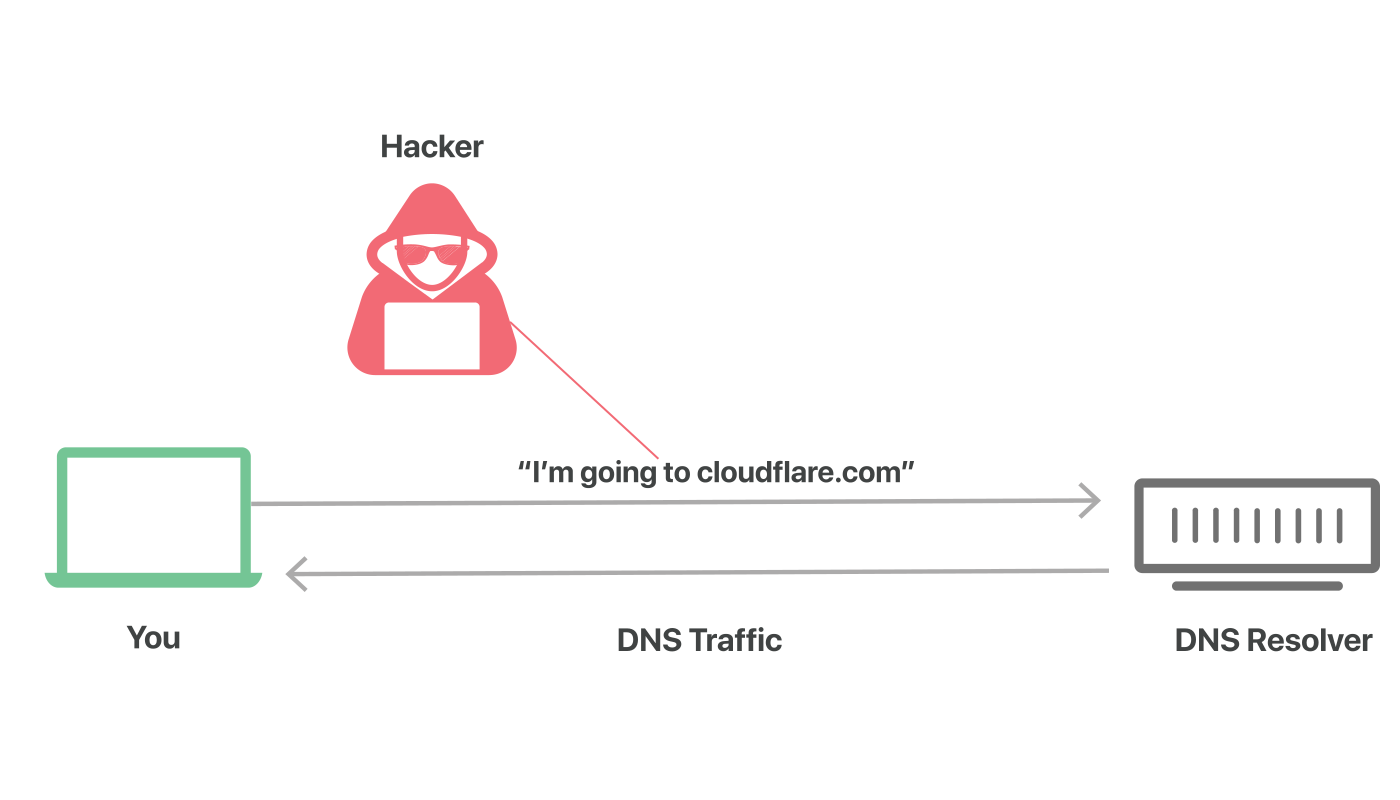
Attacker views unsecured DNS traffic

Think of a normal, unencrypted DNS query as being like a postcard sent through the mail: anyone handling the mail may happen to catch a glimpse of the text written on the back side, so it is not wise to mail a postcard that contains sensitive or private information.

DNS over TLS and DNS over HTTPS are two standards developed for encrypting plaintext DNS traffic in order to prevent malicious parties, advertisers, ISPs, and others from being able to interpret the data. Continuing the analogy, these standards aim to put an envelope around all postcards going through the mail, so that anyone can send a postcard without worrying that someone is snooping on what they are up to.
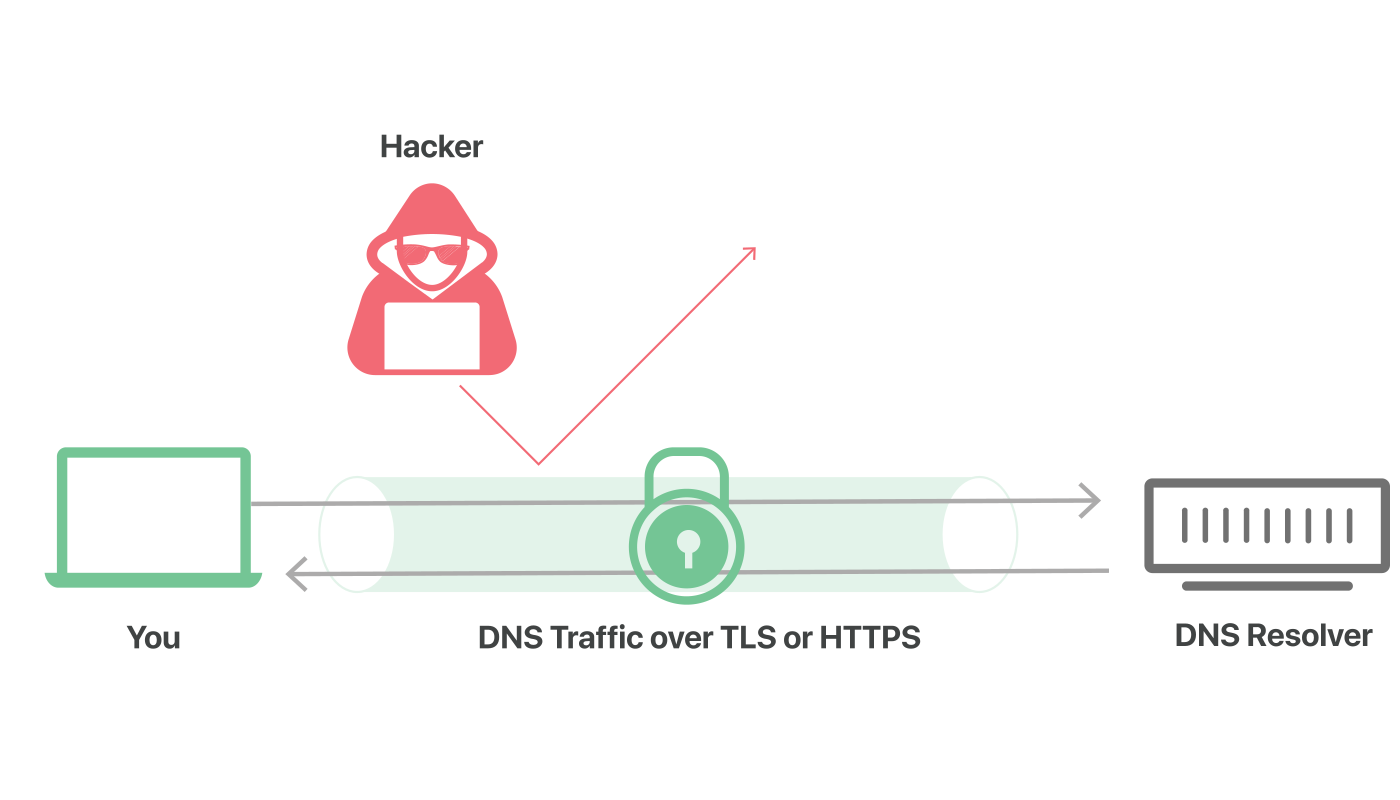
DNS queries secured over TLS or HTTPS, attacker blocked

What is DNS over TLS?

DNS over TLS, or DoT, is a standard for encrypting DNS queries to keep them secure and private. DoT uses the same security protocol, TLS, that HTTPS websites use to encrypt and authenticate communications. (TLS is also known as “SSL.”) DoT adds TLS encryption on top of the user datagram protocol (UDP), which is used for DNS queries. Additionally, it ensures that DNS requests and responses are not tampered with or forged via on-path attacks.

What is DNS over HTTPS?

DNS over HTTPS, or DoH, is an alternative to DoT. With DoH, DNS queries and responses are encrypted, but they are sent via the HTTP or HTTP/2 protocols instead of directly over UDP. Like DoT, DoH ensures that attackers can’t forge or alter DNS traffic. DoH traffic looks like other HTTPS traffic – e.g. normal user-driven interactions with websites and web apps – from a network administrator’s perspective.

In February 2020, the Mozilla Firefox browser began enabling DoH for U.S. users by default. DNS queries from the Firefox browser are encrypted by DoH and go to either Cloudflare or NextDNS. Several other browsers also support DoH, although it is not turned on by default.

Wait, doesn’t HTTPS use TLS for encryption too? How are DNS over TLS and DNS over HTTPS different?

Each standard was developed separately and has its own RFC* documentation, but the most important difference between DoT and DoH is what port they use. DoT only uses port 853, while DoH uses port 443, which is the port that all other HTTPS traffic uses as well.

Because DoT has a dedicated port, anyone with network visibility can see DoT traffic coming and going, even though the requests and responses themselves are encrypted. In contrast, with DoH, DNS queries and responses are camouflaged within other HTTPS traffic, since it all comes and goes from the same port.

*RFC stands for “Request for Comments”, and an RFC is a collective attempt by developers, networking experts, and thought leaders to standardize an Internet technology or protocol.

What is a port?

In networking, a port is a virtual place on a machine that is open to connections from other machines. Every networked computer has a standard number of ports, and each port is reserved for certain types of communication.

Think of ports for ships in a harbor: each shipping port is numbered, and different kinds of ships are supposed to go to specific shipping ports to unload cargo or passengers. Networking is the same way: certain types of communications are supposed to go to certain network ports. The difference is that the network ports are virtual; they are places for digital connections rather than physical connections.

Which is better, DoT or DoH?

This is up for debate. From a network security standpoint, DoT is arguably better. It gives network administrators the ability to monitor and block DNS queries, which is important for identifying and stopping malicious traffic. DoH queries, meanwhile, are hidden in regular HTTPS traffic, meaning they cannot easily be blocked without blocking all other HTTPS traffic as well.

However, from a privacy perspective, DoH is arguably preferable. With DoH, DNS queries are hidden within the larger flow of HTTPS traffic. This gives network administrators less visibility but provides users with more privacy.

1.1.1.1, the free DNS resolver from Cloudflare, supports both DoT and DoH.

What is the difference between DNS over TLS/HTTPS and DNSSEC?

DNSSEC is a set of security extensions for verifying the identity of DNS root servers and authoritative nameservers in communications with DNS resolvers. It is designed to prevent DNS cache poisoning, among other attacks. It does not encrypt communications. DNS over TLS or HTTPS, on the other hand, does encrypt DNS queries. 1.1.1.1 supports DNSSEC as well.

To learn more about 1.1.1.1, see What is 1.1.1.1?

What is a Domain Name? | Domain name vs URL

A domain name is a unique, easy-to-remember address used to access websites, such as ‘google.com’, and ‘facebook.com’. Users can connect to websites using domain names thanks to the DNS system.

What is a domain name?

A domain name is a string of text that maps to a numeric IP address, used to access a website from client software. In plain English, a domain name is the text that a user types into a browser window to reach a particular website. For instance, the domain name for Google is ‘google.com’.

The actual address of a website is a complex numerical IP address (e.g. 103.21.244.0), but thanks to DNS, users are able to enter human-friendly domain names and be routed to the websites they are looking for. This process is known as a DNS lookup.

Who manages domain names?

Domain names are all managed by domain registries, which delegate the reservation of domain names to registrars. Anyone who wants to create a website can register a domain name with a registrar, and there are currently over 300 million registered domain names.

What’s the difference between a domain name and a URL?

A uniform resource locator (URL), sometimes called a web address, contains the domain name of a site as well as other information, including the transfer protocol and the path. For example, in the URL ‘https://cloudflare.com/learning/’, ‘cloudflare.com’ is the domain name, while ‘https’ is the protocol and ‘/learning/’ is the path to a specific page on the website.

Anatomy of a domain name

Domain names are typically broken up into two or three parts, each separated by a dot. When read right-to-left, the identifiers in domain names go from most general to most specific. The section to the right of the last dot in a domain name is the top-level domain (TLD). These include the ‘generic’ TLDs such as ‘.com’, ‘.net’, and ‘.org’, as well as country-specific TLDs like ‘.uk’ and ‘.jp’.

To the left of the TLD is the second-level domain (2LD) and if there is anything to the left of the 2LD, it is called the third-level domain (3LD). Let’s look at a couple of examples:

For Google’s US domain name, ‘google.com’:

  • ’.com’ is the TLD (most general)
  • ’google’ is the 2LD (most specific)

But for Google UK’s domain name, ‘google.co.uk’:

  • ’.com’ is the TLD (most general)
  • ’.co’* is the 2LD
  • ’google’ is the 3LD (most specific)

*In this case the 2LD indicates the type of organization that registered the domain (.co in the UK is for sites registered by companies)

How to keep a domain name secure

Once a domain name has been registered with a registrar, that registrar is in charge of notifying the registrant when their domain is about to expire and giving them the chance to renew, ensuring they don’t lose their domain name. In some cases registrars will prey on their users’ expired domain names by buying those domains the second they expire and then selling them back to the original registrant at an exorbitant price. It’s important to choose an honest and trustworthy registrar to avoid these kinds of predatory practices.

DNS Root Server

A DNS root server is the first stop in a DNS lookup

What is a DNS root server?

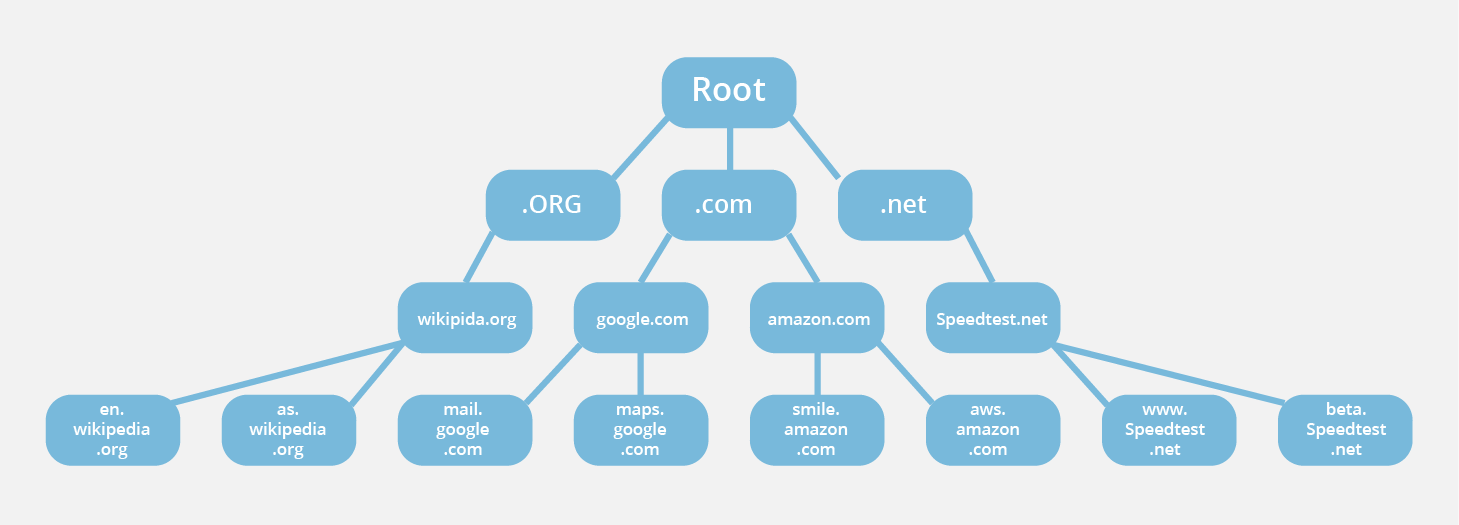
The administration of the Domain Name System (DNS) is structured in a hierarchy using different managed areas or “zones”, with the root zone at the very top of that hierarchy. Root servers are DNS nameservers that operate in the root zone. These servers can directly answer queries for records stored or cached within the root zone, and they can also refer other requests to the appropriate Top Level Domain (TLD) server. The TLD servers are the DNS server group one step below root servers in the DNS hierarchy, and they are an integral part of resolving DNS queries.

DNS Heirarchy

During an uncached DNS query, whenever a user enters a web address into their browser, this action triggers a DNS lookup, and all DNS lookups start at the root zone. Once the lookup hits the root zone, the lookup will then travel down the hierarchy of the DNS system, first hitting the TLDs servers, then the servers for specific domains (and possibly subdomains) until it finally hits the authoritative nameserver for the correct domain, which contains the numerical IP address of the website being sought. This IP address is then returned to the client. Interestingly, despite the number of steps required, this process can happen very quickly.

Root servers are an essential part of the infrastructure of the Internet; web browsers and many other internet tools would not work without them. There are 13 different IP addresses that serve the DNS root zone, and hundreds of redundant root servers exist around the globe to handle requests to the root zone.

Why are there only 13 DNS root server addresses?

A common misconception is that there are only 13 root servers in the world. In reality there are many more, but still only 13 IP addresses used to query the different root server networks. Limitations in the original architecture of DNS require there to be a maximum of 13 server addresses in the root zone. In the early days of the Internet, there was only one server for each of the 13 IP addresses, most of which were located in the United States.

Today each of the 13 IP addresses has several servers, which use Anycast routing to distribute requests based on load and proximity. Right now there are over 600 different DNS root servers distributed across every populated continent on earth.

Who Has Authority Over DNS Root Servers?

Ultimate authority over the root zone belongs to the National Telecommunications and Information Administration (NTIA), which is a part of the US Department of Commerce. The NTIA delegates management of the root zone to the Internet Corporation for Assigned Names and Numbers (ICANN).

ICANN operates servers for one of the 13 IP addresses in the root zone and delegates operation of the other 12 IP addresses to various organizations including NASA, the University of Maryland, and Verisign, which is the only organization that operates two of the root IP addresses. Cloudflare actually helps provide DNS Anycast services to one of the root servers known as the F-Root; Cloudflare supplies additional F-Root instances under contract with ISC (the F-Root operator). Learn more about how Cloudflare supports the F-Root.

How do resolvers find DNS root servers?

Since the DNS root zone is at the top of the DNS hierarchy, recursive resolvers cannot be directed to them in a DNS lookup. Because of this, every DNS resolver has a list of the 13 IP root server addresses built into its software. Whenever a DNS lookup is initiated, the recursor’s first communication is with one of those 13 IP addresses.

What happens if a DNS root server becomes unavailable?

Thanks to the use of Anycast routing and heavy redundancy, the root servers are very reliable. But on rare occasions a root server will have to update its IP address. In this case, recursive resolvers can continue using the other 12 IP addresses in the root zone to perform DNS lookups until their software is updated with the correct addresses of all 13 servers. Since all the root servers are able to forward DNS requests to TLD servers, there is no disruption to the normal operations of the Internet when one root server is down. Learn more about how Cloudflare DNS uses Anycast routing to improve reliability.

What is a DNS Zone?

DNS zones breakup the DNS into a clear hierarchy.

What is a DNS zone?

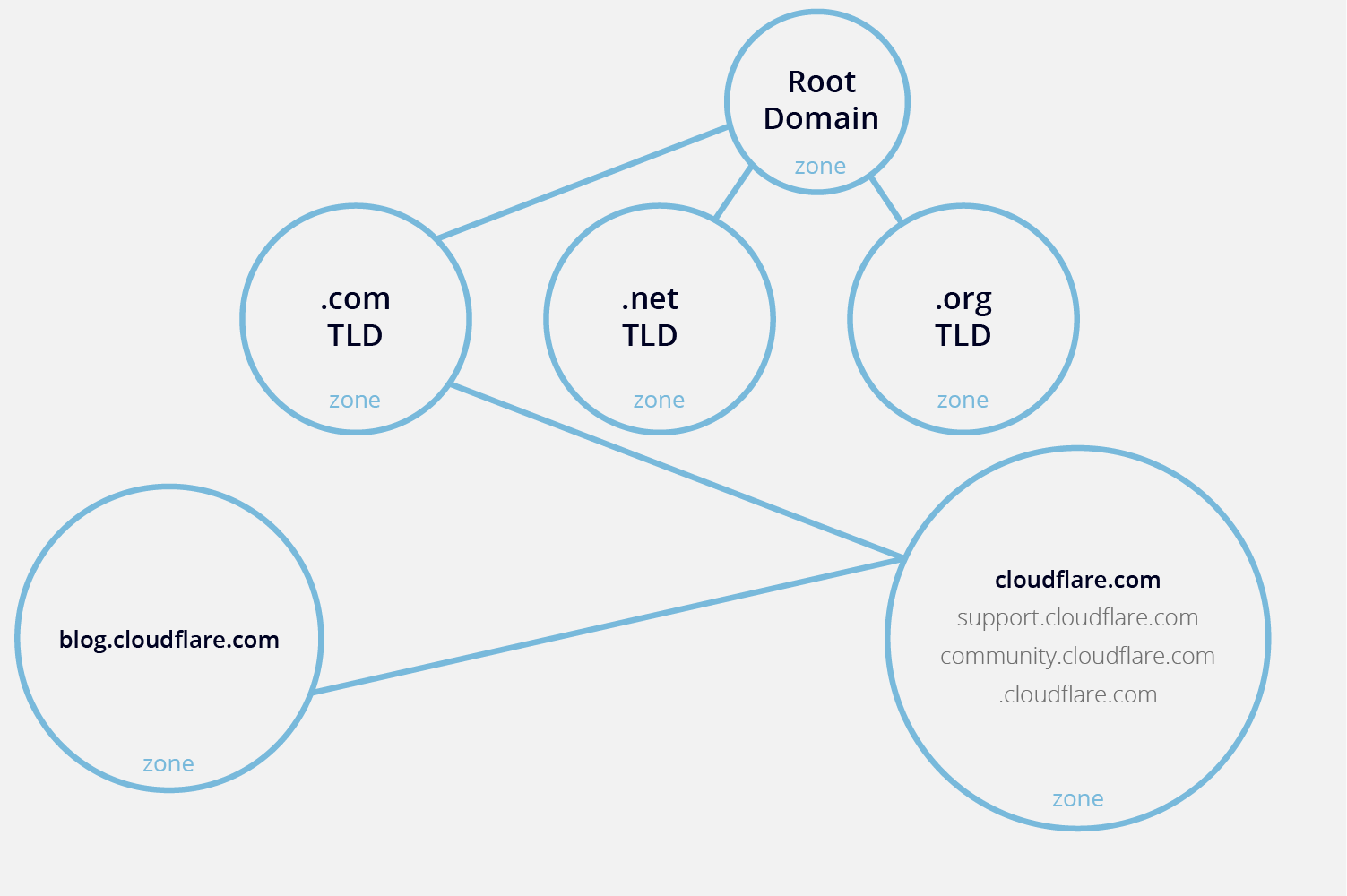
The DNS is broken up into many different zones. These zones differentiate between distinctly managed areas in the DNS namespace. A DNS zone is a portion of the DNS namespace that is managed by a specific organization or administrator. A DNS zone is an administrative space which allows for more granular control of DNS components, such as authoritative nameservers. The domain name space is a hierarchical tree, with the DNS root domain at the top. A DNS zone starts at a domain within the tree and can also extend down into subdomains so that multiple subdomains can be managed by one entity.

A common mistake is to associate a DNS zone with a domain name or a single DNS server. In fact, a DNS zone can contain multiple subdomains and multiple zones can exist on the same server. DNS zones are not necessarily physically separated from one another, zones are strictly used for delegating control.

For example, imagine a hypothetical zone for the cloudflare.com domain and three of its subdomains: support.cloudflare.com, community.cloudflare.com, and blog.cloudflare.com. Suppose the blog is a robust, independent site that needs separate administration, but the support and community pages are more closely associated with cloudflare.com and can be managed in the same zone as the primary domain. In this case, cloudflare.com as well as the support and community sites would all be in one zone, while blog.cloudflare.com would exist in its own zone.

DNS Zone

All of the information for a zone is stored in what’s called a DNS zone file, which is the key to understanding how a DNS zone operates.

What is a DNS zone file?

A zone file is a plain text file stored in a DNS server that contains an actual representation of the zone and contains all the records for every domain within the zone. Zone files must always start with a Start of Authority (SOA) record, which contains important information including contact information for the zone administrator.

What is a Reverse Lookup Zone?

reverse lookup zone contains mapping from an IP address to the host (the opposite function of most DNS zones). These zones are used for troubleshooting, spam filtering, and bot detection.

Learn more about Cloudflare’s DNS

What is a DNS SRV record

The SRV record is used for special services like VoIP.

What is a DNS SRV record?

The DNS ‘service’ (SRV) record specifies a host and port for specific services such as voice over IP (VoIP), instant messaging, and so on. Most other DNS records only specify a server or an IP address, but SRV records include a port at that IP address as well. Some Internet protocols require the use of SRV records in order to function.

What is a port?

In networking, ports are virtual places that designate what processes network traffic goes to within a computer. Ports allow computers to easily differentiate between different kinds of traffic: VoIP streams go to a different port than email messages, for instance, even though both reach a computer over the same Internet connection. Much like IP addresses, all ports are assigned a number.

Certain Internet protocols, such as IMAP, SIP, and XMPP, need to connect to a specific port in addition to connecting with a specific server. SRV records are how a port can be specified within the DNS.

What goes in an SRV record?

An SRV record contains the following information. Here, we list example values for each field.

serviceXMPP
proto*TCP
name**example.com
TTL86400
classIN
typeSRV
priority10
weight5
port5223
targetserver.example.com

*Short for ‘protocol,’ as in transport protocol.
**Domain name.

However, SRV records are actually formatted in this way:

_service._proto.name. TTL class type of record priority weight port target.

So our example SRV record would actually look like:

_xmpp._tcp.example.com. 86400 IN SRV 10 5 5223 server.example.com.

In the above example, ‘_xmpp’ indicates the type of service (the XMPP protocol), ‘_tcp’ indicates the TCP transport protocol, while ‘example.com’ is the host, or the domain name. ‘Server.example.com’ is the target server and ‘5223’ indicates the port within that server.

SRV records must point to an A record (in IPv4) or an AAAA record (in IPv6). The server name they list cannot be a CNAME. So ‘server.example.com’ must lead directly to an A or AAAA record under that name.

What is the difference between priority and weight in SRV records?

SRV records indicate the ‘priority’ and ‘weight’ of the various servers they list. The ‘priority’ value in an SRV record enables administrators to prioritize one server that supports the given service over another. A server with a lower priority value will receive more traffic than other servers. However, the ‘weight’ value is similar: a server with a higher weight will receive more traffic than other servers with the same priority.

The main difference between them is that priority is looked at first. If there are three servers, Server A, Server B, and Server C, and they have respective priorities of 10, 20, and 30, then their ‘weight’ does not matter. The service will always query Server A first.

But suppose Servers A, B, and C all have a priority of 10 — how will a service choose between them? This is where weight becomes a factor: if Server A has a ‘weight’ value of 5 and Servers B and C have a ‘weight’ value of 3 and 2, Server A will receive the most traffic, Server B will receive the second-most traffic, and Server C the third-most.

What is a DNS CNAME record?

The DNS CNAME record works as an alias for domain names that share a single IP address.

What is a DNS CNAME record?

The ‘canonical name’ (CNAME) record is used in lieu of an A record, when a domain or subdomain is an alias of another domain. All CNAME records must point to a domain, never to an IP address. Imagine a scavenger hunt where each clue points to another clue, and the final clue points to the treasure. A domain with a CNAME record is like a clue that can point you to another clue (another domain with a CNAME record) or to the treasure (a domain with an A record).

For example, suppose blog.example.com has a CNAME record with a value of ‘example.com’ (without the ‘blog’). This means when a DNS server hits the DNS records for blog.example.com, it actually triggers another DNS lookup to example.com, returning example.com’s IP address via its A record. In this case we would say that example.com is the canonical name (or true name) of blog.example.com.

Oftentimes, when sites have subdomains such as blog.example.com or shop.example.com, those subdomains will have CNAME records that point to a root domain (example.com). This way if the IP address of the host changes, only the DNS A record for the root domain needs to be updated and all the CNAME records will follow along with whatever changes are made to the root.

A frequent misconception is that a CNAME record must always resolve to the same website as the domain it points to, but this is not the case. The CNAME record only points the client to the same IP address as the root domain. Once the client hits that IP address, the web server will still handle the URL accordingly. So for instance, blog.example.com might have a CNAME that points to example.com, directing the client to example.com’s IP address. But when the client actually connects to that IP address, the web server will look at the URL, see that it is blog.example.com, and deliver the blog page rather than the home page.

Example of a CNAME record:

blog.example.comrecord type:value:TTL
@CNAMEis an alias of example.com32600

In this example you can see that blog.example.com points to example.com, and assuming it is based on our example A record we know that it will eventually resolve to the IP address 192.0.2.1.

Can a CNAME record point to another CNAME record?

Pointing a CNAME record to another CNAME record is inefficient because it requires multiple DNS lookups before the domain can be loaded — which slows down the user experience — but it is possible. For example, blog.example.com could have a CNAME record that pointed to http://www.example.com’s CNAME record, which then pointed to example.com’s A record.

CNAME for blog.example.com:

blog.example.comrecord type:value:TTL
@CNAMEis an alias of http://www.example.com32600

Which points to a CNAME for http://www.example.com:

http://www.example.comrecord type:value:TTL
@CNAMEis an alias of example.com32600

This configuration adds an extra step to the DNS lookup process and should be avoided if possible. Instead, the CNAME records for both blog.example.com and http://www.example.com should point directly to example.com.

What restrictions are there on using CNAME records?

MX and NS records cannot point to a CNAME record; they have to point to an A record (for IPv4) or an AAAA record (for IPv6). An MX record is a mail exchange record that directs email to a mail server. An NS record is a ‘name server’ record and indicates which DNS server is authoritative for that domain.

Learn more about MX records or NS records.

DNS A record

The DNS A record points to the IP address for a given domain name.

What is a DNS A record?

The ‘A’ stands for ‘address’ and this is the most fundamental type of DNS record: it indicates the IP address of a given domain. For example, if you pull the DNS records of cloudflare.com, the A record currently returns an IP address of: 104.17.210.9.

A records only hold IPv4 addresses. If a website has an IPv6 address, it will instead use an ‘AAAA’ record.

Here is an example of an A record:

example.comrecord type:value:TTL
@A192.0.2.114400

The ‘@’ symbol in this example indicates that this is a record for the root domain, and the ‘14400’ value is the TTL (time to live), listed in seconds. The default TTL for A records is 14400 seconds. This means that if an A record gets updated, it takes 240 minutes (14400 seconds) to take effect.

The vast majority of websites only have one A record, but it is possible to have several. Some higher profile websites will have several different A records as part of a technique called round robin load balancing, which can distribute request traffic to one of several IP addresses, each hosting identical content.

When are DNS A records used?

The most common usage of A records is IP address lookups: matching a domain name (like ‘cloudflare.com’) to an IPv4 address. This enables a user’s device to connect with and load a website, without the user memorizing and typing in the actual IP address. The user’s web browser automatically carries this out by sending a query to a DNS resolver.

DNS A records are also used for operating a Domain Name System-based Blackhole List (DNSBL). DNSBLs can help mail servers identify and block email messages from known spammer domains.

If you want to learn more about DNS A records, you can see the original 1987 RFC where A records and several other DNS record types are defined here. To learn more about how the Domain Name System works, see What is DNS?

DNS records

DNS records are sets of instructions that live on DNS servers. These instructions are vital to the success of a DNS lookup.

What is a DNS record?

DNS records (aka zone files) are instructions that live in authoritative DNS servers and provide information about a domain including what IP address is associated with that domain and how to handle requests for that domain. These records consist of a series of text files written in what is known as DNS syntax. DNS syntax is just a string of characters used as commands that tell the DNS server what to do. All DNS records also have a ‘TTL’, which stands for time-to-live, and indicates how often a DNS server will refresh that record.

You can think of a set of DNS records like a business listing on Yelp. That listing will give you a bunch of useful information about a business such as their location, hours, services offered, etc. All domains are required to have at least a few essential DNS records for a user to be able to access their website using a domain name, and there are several optional records that serve additional purposes.

What are the most common types of DNS record?

What are some of the less commonly used DNS records?

  • AFSDB record – This record is used for clients of the Andrew File System (AFS) developed by Carnegie Melon. The AFSDB record functions to find other AFS cells.
  • APL record – The ‘address prefix list’ is an experiment record that specifies lists of address ranges.
  • CAA record – This is the ‘certification authority authorization’ record, it allows domain owners state which certificate authorities can issue certificates for that domain. If no CAA record exists, then anyone can issue a certificate for the domain. These records are also inherited by subdomains.
  • DNSKEY record – The ‘DNS Key Record’ contains a public key used to verify Domain Name System Security Extension (DNSSEC) signatures.
  • CDNSKEY record – This is a child copy of the DNSKEY record, meant to be transferred to a parent.
  • CERT record – The ‘certificate record’ stores public key certificates.
  • DCHID record – The ‘DHCP Identifier’ stores info for the Dynamic Host Configuration Protocol (DHCP), a standardized network protocol used on IP networks.
  • DNAME record – The ‘delegation name’ record creates a domain alias, just like CNAME, but this alias will redirect all subdomains as well. For instance if the owner of ‘example.com’ bought the domain ‘website.net’ and gave it a DNAME record that points to ‘example.com’, then that pointer would also extend to ‘blog.website.net’ and any other subdomains.
  • HIP record – This record uses ‘Host identity protocol’, a way to separate the roles of an IP address; this record is used most often in mobile computing.
  • IPSECKEY record – The ‘IPSEC key’ record works with the Internet Protocol Security (IPSEC), an end-to-end security protocol framework and part of the Internet Protocol Suite (TCP/IP).
  • LOC record – The ‘location’ record contains geographical information for a domain in the form of longitude and latitude coordinates.
  • NAPTR record – The ‘name authority pointer’ record can be combined with an SRV record to dynamically create URI’s to point to based on a regular expression.
  • NSEC record – The ‘next secure record’ is part of DNSSEC, and it’s used to prove that a requested DNS resource record does not exist.
  • RRSIG record – The ‘resource record signature’ is a record to store digital signatures used to authenticate records in accordance with DNSSEC.
  • RP record – This is the ‘responsible person’ record and it stores the email address of the person responsible for the domain.
  • SSHFP record – This record stores the ‘SSH public key fingerprints’; SSH stands for Secure Shell and it’s a cryptographic networking protocol for secure communication over an unsecure network.

Cloudflare DNS supports a wide variety of DNS records. Learn about Cloudflare’s authoritative DNS service, or about managing DNS records in Cloudflare.

DNS Server Types

There are four different types of DNS server that have to work in harmony to deliver a single webpage.

What are the different types of DNS server?

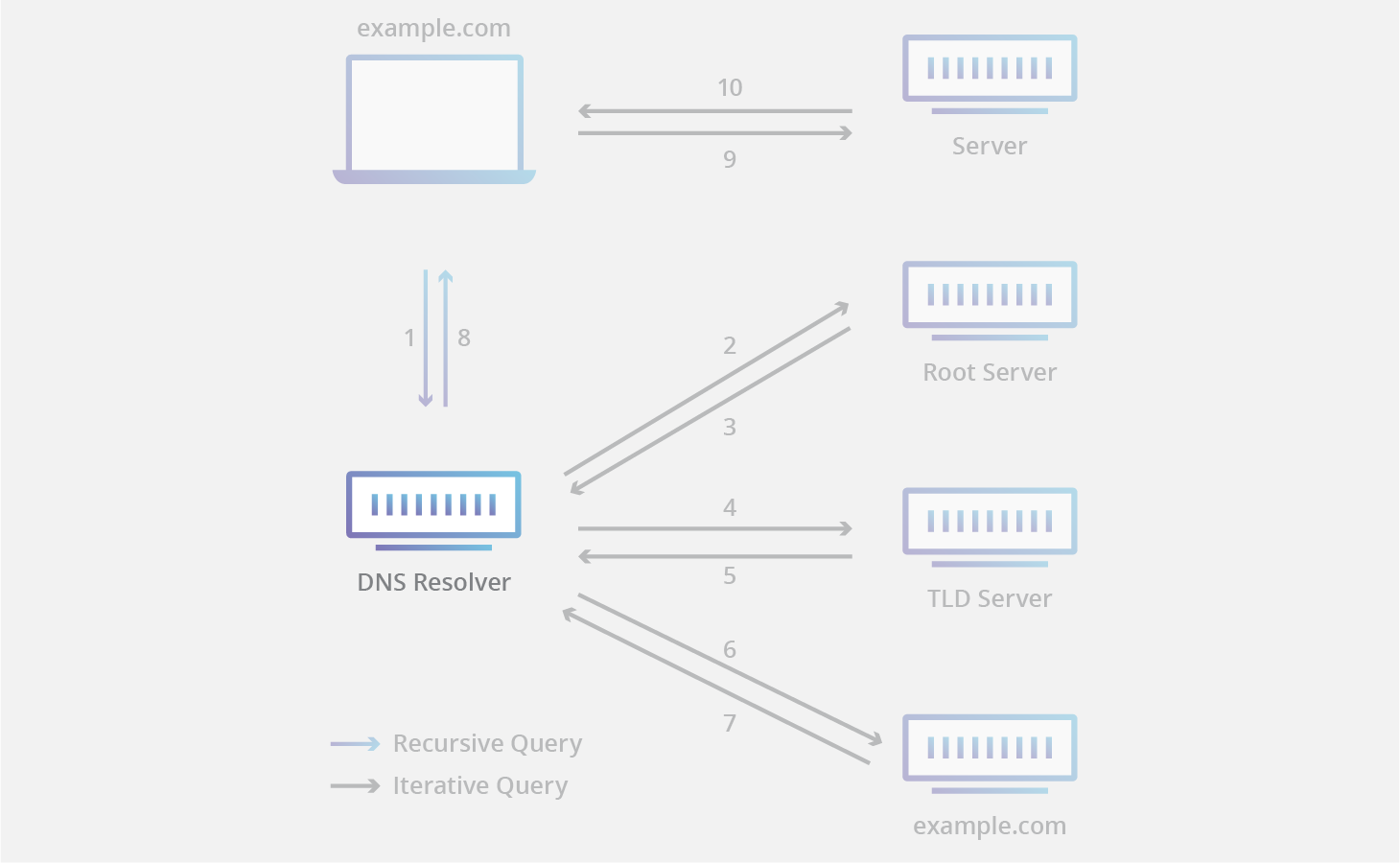
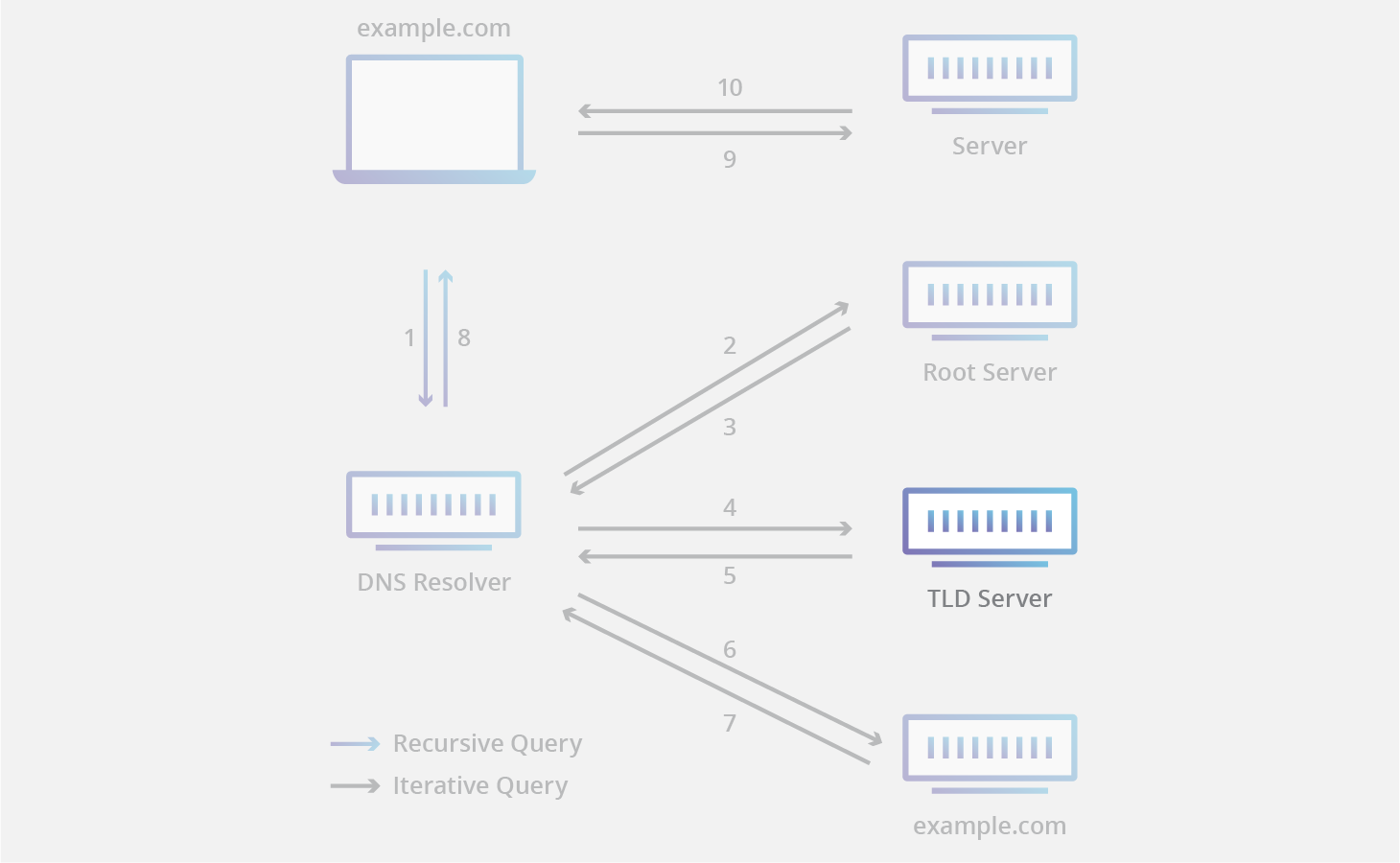
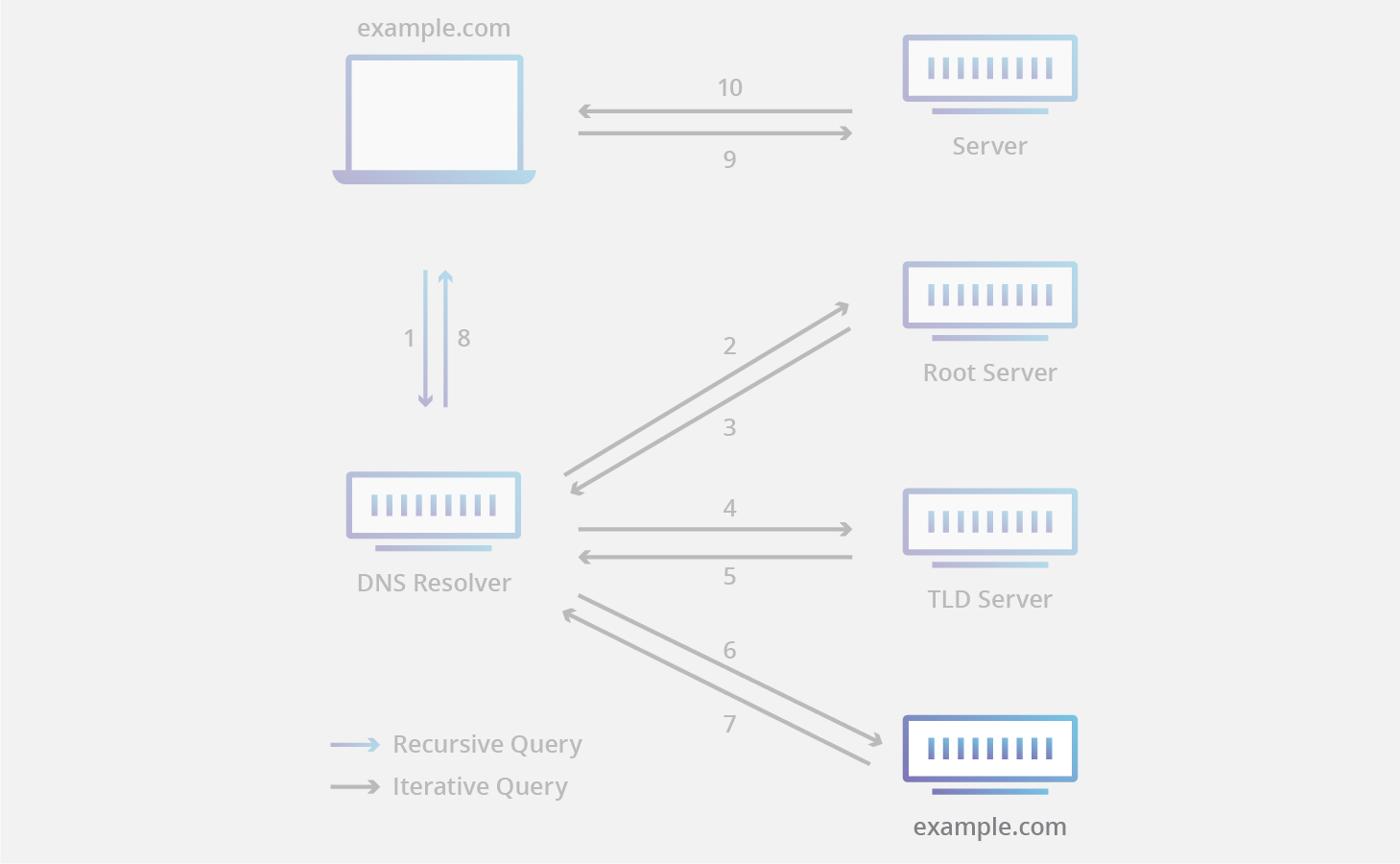
All DNS servers fall into one of four categories: Recursive resolvers, root nameservers, TLD nameservers, and authoritative nameservers. In a typical DNS lookup (when there is no caching in play), these four DNS servers work together in harmony to complete the task of delivering the IP address for a specified domain to the client (the client is usually a stub resolver – a simple resolver built into an operating system).

What is a DNS recursive resolver?

DNS recursive resolver

A recursive resolver (also known as a DNS recursor) is the first stop in a DNS query. The recursive resolver acts as a middleman between a client and a DNS nameserver. After receiving a DNS query from a web client, a recursive resolver will either respond with cached data, or send a request to a root nameserver, followed by another request to a TLD nameserver, and then one last request to an authoritative nameserver. After receiving a response from the authoritative nameserver containing the requested IP address, the recursive resolver then sends a response to the client.

During this process, the recursive resolver will cache information received from authoritative name servers. When a client requests the IP address of a domain name that was recently requested by another client, the resolver can circumvent the process of communicating with the nameservers, and just deliver the client the requested record from its cache.

Most internet users use a recursive resolver provided by their ISP, but there are other options available; for example Cloudflare’s 1.1.1.1.

What is a DNS root nameserver?

DNS root nameserver

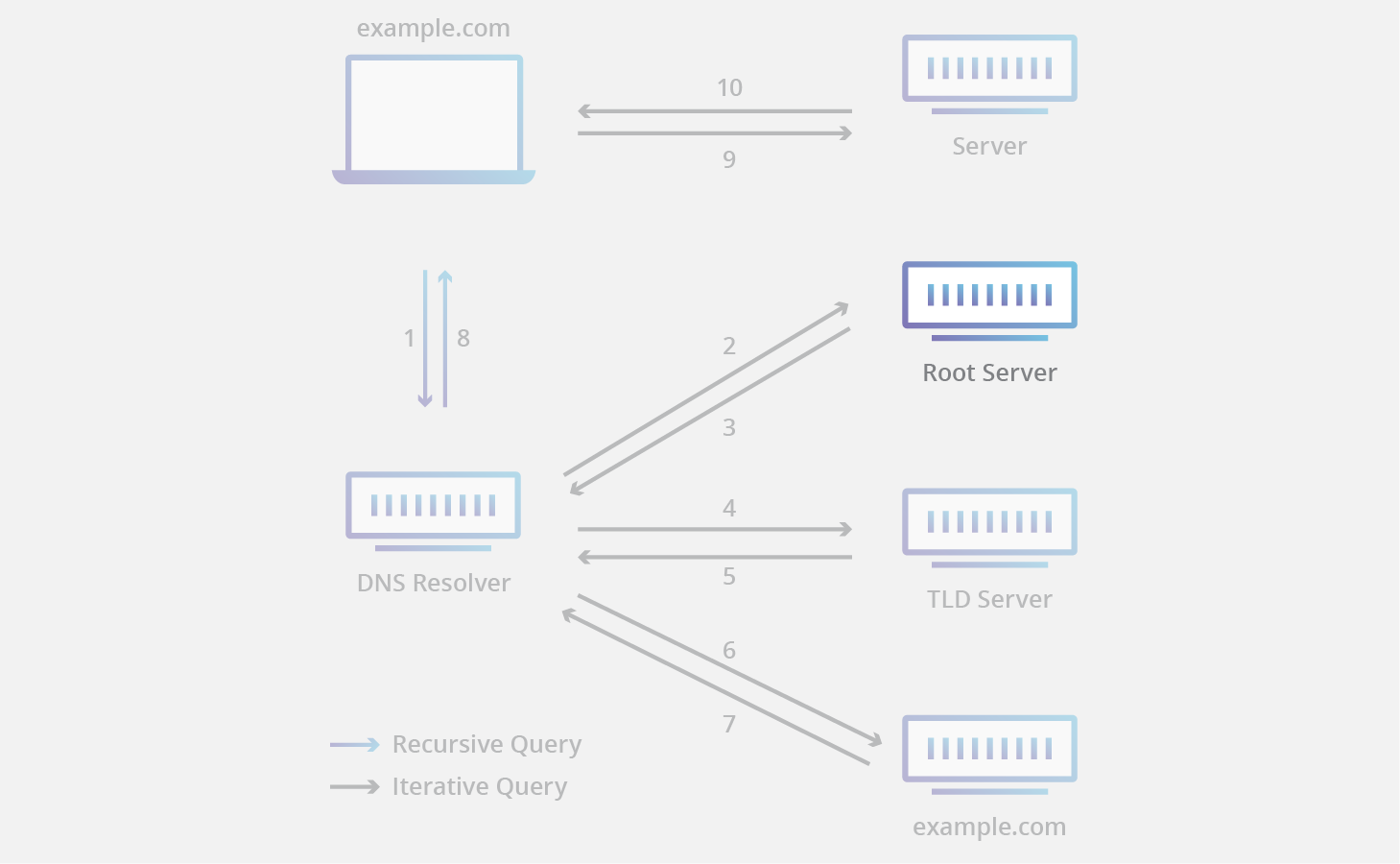
The 13 DNS root nameservers are known to every recursive resolver, and they are the first stop in a recursive resolver’s quest for DNS records. A root server accepts a recursive resolver’s query which includes a domain name, and the root nameserver responds by directing the recursive resolver to a TLD nameserver, based on the extension of that domain (.com, .net, .org, etc.). The root nameservers are overseen by a nonprofit called the Internet Corporation for Assigned Names and Numbers (ICANN).

Note that while there are 13 root nameservers, that doesn’t mean that there are only 13 machines in the root nameserver system. There are 13 types of root nameservers, but there are multiple copies of each one all over the world, which use Anycast routing to provide speedy responses. If you added up all the instances of root nameservers, you’d have 632 different servers (as of October 2016).

What is a TLD nameserver?

DNS TLD nameserver

A TLD nameserver maintains information for all the domain names that share a common domain extension, such as .com, .net, or whatever comes after the last dot in a url. For example, a .com TLD nameserver contains information for every website that ends in ‘.com’. If a user was searching for google.com, after receiving a response from a root nameserver, the recursive resolver would then send a query to a .com TLD nameserver, which would respond by pointing to the authoritative nameserver (see below) for that domain.

Management of TLD nameservers is handled by the Internet Assigned Numbers Authority (IANA), which is a branch of ICANN. The IANA breaks up the TLD servers into two main groups:

  • Generic top-level domains: These are domains that are not country specific, some of the best-known generic TLDs include .com, .org, .net, .edu, and .gov.
  • Country code top-level domains: These include any domains that are specific to a country or state. Examples include .uk, .us, .ru, and .jp.

There is actually a third category for infrastructure domains, but it is almost never used. This category was created for the .arpa domain, which was a transitional domain used in the creation of modern DNS; its significance today is mostly historical.

What is an authoritative nameserver?

DNS authoritative nameserver

When a recursive resolver receives a response from a TLD nameserver, that response will direct the resolver to an authoritative nameserver. The authoritative nameserver is usually the resolver’s last step in the journey for an IP address. The authoritative nameserver contains information specific to the domain name it serves (e.g. google.com) and it can provide a recursive resolver with the IP address of that server found in the DNS A record, or if the domain has a CNAME record (alias) it will provide the recursive resolver with an alias domain, at which point the recursive resolver will have to perform a whole new DNS lookup to procure a record from an authoritative nameserver (often an A record containing an IP address). Cloudflare DNS distributes authoritative nameservers, which come with Anycast routing to make them more reliable.

DNS security

DNS was not designed with security in mind, and there are many types of attacks created to exploit vulnerabilities in the DNS system.

Why is DNS security important?

Standard DNS queries, which are required for almost all web traffic, create opportunities for DNS exploits such as DNS hijacking and on-path attacks. These attacks can redirect a website’s inbound traffic to a fake copy of the site, collecting sensitive user information and exposing businesses to major liability. One of the best known ways to protect against DNS threats is to adopt the DNSSEC protocol.

What is DNSSEC?

Like many Internet protocols, the DNS system was not designed with security in mind and contains several design limitations. These limitations, combined with advances in technology, have made it easy for attackers to hijack a DNS lookup for malicious purposes, such as sending a user to a fraudulent website that can distribute malware or collect personal information. DNS Security Extensions (DNSSEC) is a security protocol created to mitigate this problem. DNSSEC protects against attacks by digitally signing data to help ensure its validity. In order to ensure a secure lookup, the signing must happen at every level in the DNS lookup process.

This signing process is similar to someone signing a legal document with a pen; that person signs with a unique signature that no one else can create, and a court expert can look at that signature and verify that the document was signed by that person. These digital signatures ensure that data has not been tampered with.

DNSSEC implements a hierarchical digital signing policy across all layers of DNS. For example, in the case of a ‘google.com’ lookup, a root DNS server would sign a key for the .COM nameserver, and the .COM nameserver would then sign a key for google.com’s authoritative nameserver.

While improved security is always preferred, DNSSEC is designed to be backwards-compatible to ensure that traditional DNS lookups still resolve correctly, albeit without the added security. DNSSEC is meant to work with other security measures like SSL/TLS as part of a holistic Internet security strategy.

DNSSEC creates a parent-child train of trust that travels all the way up to the root zone. This chain of trust cannot be compromised at any layer of DNS, or else the request will become open to an on-path attack.

To close the chain of trust, the root zone itself needs to be validated (proven to be free of tampering or fraud), and this is actually done using human intervention. Interestingly, in what’s called a Root Zone Signing Ceremony, selected individuals from around the world meet to sign the root DNSKEY RRset in a public and audited way.

Here is a more detailed explanation of how DNSSEC works >>>

What are some common attacks involving DNS?

DNSSEC is a powerful security protocol, but unfortunately it is not currently universally adopted. This lack of adoption coupled with other potential vulnerabilities, on top of the fact that DNS is an integral part of most Internet requests, makes DNS a prime target for malicious attacks. Attackers have found a number of ways to target and exploit DNS servers. Here are some of the most common:

DNS spoofing/cache poisoning: This is an attack where forged DNS data is introduced into a DNS resolver’s cache, resulting in the resolver returning an incorrect IP address for a domain. Instead of going to the correct website, traffic can be diverted to a malicious machine or anywhere else the attacker desires; often this will be a replica of the original site used for malicious purposes such as distributing malware or collecting login information.

DNS tunneling: This attack uses other protocols to tunnel through DNS queries and responses. Attackers can use SSH, TCP, or HTTP to pass malware or stolen information into DNS queries, undetected by most firewalls.

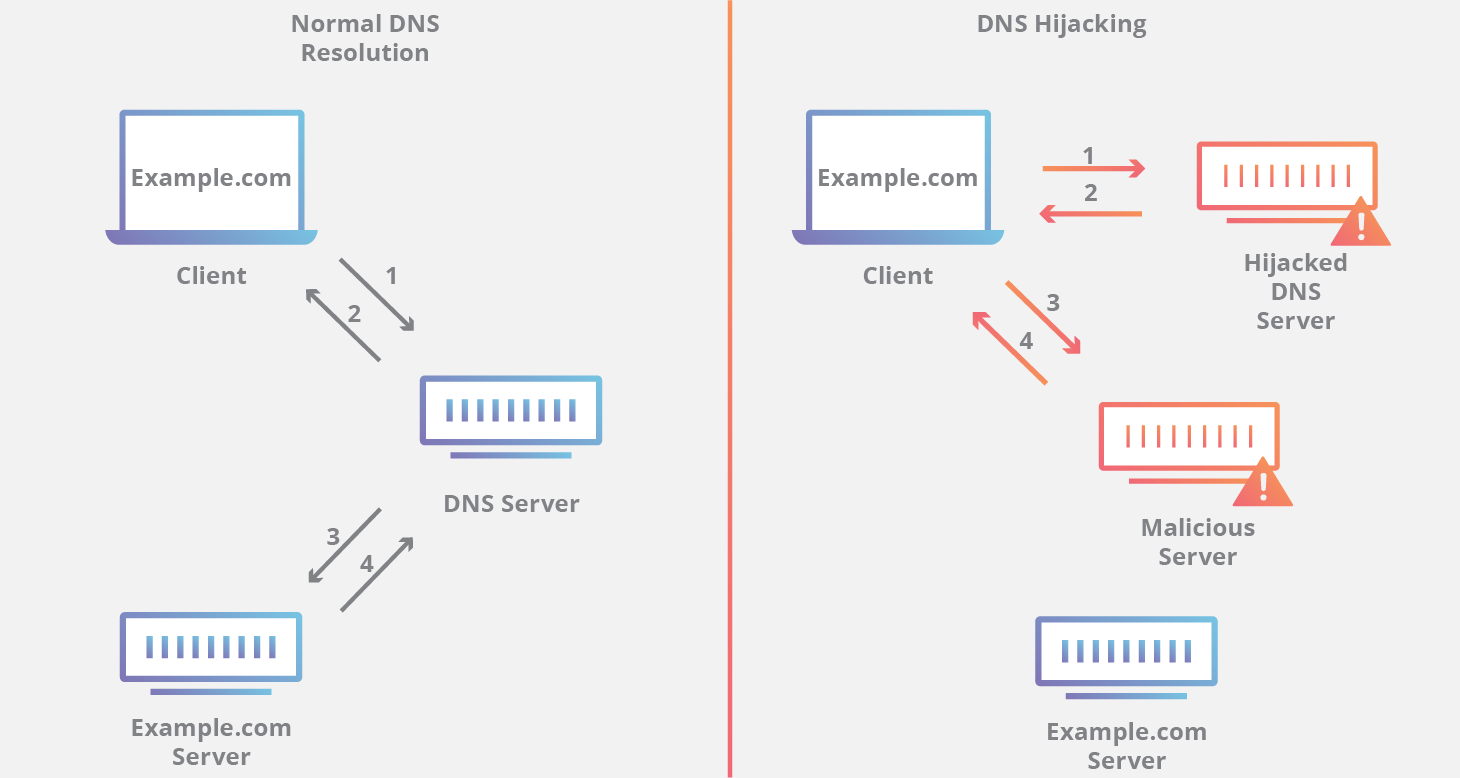
DNS hijacking: In DNS hijacking the attacker redirects queries to a different domain name server. This can be done either with malware or with the unauthorized modification of a DNS server. Although the result is similar to that of DNS spoofing, this is a fundamentally different attack because it targets the DNS record of the website on the nameserver, rather than a resolver’s cache.

DNS Hijacking

NXDOMAIN attack: This is a type of DNS flood attack where an attacker inundates a DNS server with requests, asking for records that do not exist, in an attempt to cause a denial-of-service for legitimate traffic. This can be accomplished using sophisticated attack tools that can auto-generate unique subdomains for each request. NXDOMAIN attacks can also target a recursive resolver with the goal of filling the resolver’s cache with junk requests.

Phantom domain attack: A phantom domain attack has a similar result to an NXDOMAIN attack on a DNS resolver. The attacker sets up a bunch of ‘phantom’ domain servers that either respond to requests very slowly or not at all. The resolver is then hit with a flood of requests to these domains and the resolver gets tied up waiting for responses, leading to slow performance and denial-of-service.

Random subdomain attack: In this case, the attacker sends DNS queries for several random, nonexistent subdomains of one legitimate site. The goal is to create a denial-of-service for the domain’s authoritative nameserver, making it impossible to lookup the website from the nameserver. As a side effect, the ISP serving the attacker may also be impacted, as their recursive resolver’s cache will be loaded with bad requests.

Domain lock-up attack: Attackers orchestrate this form of attack by setting up special domains and resolvers to create TCP connections with other legitimate resolvers. When the targeted resolvers send requests, these domains send back slow streams of random packets, tying up the resolver’s resources.

Botnet-based CPE attack: These attacks are carried out using CPE devices (Customer Premise Equipment; this is hardware given out by service providers for use by their customers, such as modems, routers, cable boxes, etc.). The attackers compromise the CPEs and the devices become part of a botnet, used to perform random subdomain attacks against one site or domain.

What is the best way to protect against DNS-based attacks?

In addition to DNSSEC, an operator of a DNS zone can take further measures to secure their servers. Over-provisioning infrastructure is one simple strategy to overcome DDoS attacks. Simply put, if your nameserver can handle several multiples more traffic than you expect, it is harder for a volume-based attack to overwhelm your server.

Anycast routing is another handy tool that can disrupt DDoS attacks. Anycast allows multiple servers to share a single IP address, so even if one DNS server gets shut down, there will still be others up and serving. Another popular strategy for securing DNS servers is a DNS firewall.

What is a DNS firewall?

A DNS firewall is a tool that can provide a number of security and performance services for DNS servers. A DNS firewall sits between a user’s recursive resolver and the authoritative nameserver of the website or service they are trying to reach. The firewall can provide rate limiting services to shut down attackers trying to overwhelm the server. If the server does experience downtime as the result of an attack or for any other reason, the DNS firewall can keep the operator’s site or service up by serving DNS responses from cache.

In addition to its security features, a DNS firewall can also provide performance solutions such as faster DNS lookups and reduced bandwidth costs for the DNS operator. Learn more about Cloudflare’s DNS firewall.

DNS as a security tool

DNS resolvers can also be configured to provide security solutions for their end users (people browsing the Internet). Some DNS resolvers provide features such as content filtering, which can block sites known to distribute malware and spam, and botnet protection, which blocks communication with known botnets. Many of these secured DNS resolvers are free to use and a user can switch to one of these recursive DNS services by changing a single setting in their local router. Cloudflare DNS has an emphasis on security.

Are DNS queries private?

Another important DNS security issue is user privacy. DNS queries are not encrypted. Even if users use a DNS resolver like 1.1.1.1 that does not track their activities, DNS queries travel over the Internet in plaintext. This means anyone who intercepts the query can see which websites the user is visiting.

This lack of privacy has an impact on security and, in some cases, human rights; if DNS queries are not private, then it becomes easier for governments to censor the Internet and for attackers to stalk users’ online behavior.

DNS over TLS and DNS over HTTPS are two standards for encrypting DNS queries in order to prevent external parties from being able to read them. Cloudflare DNS supports both of these standards. Cloudflare also partners with other organizations to help improve DNS security — for example, helping Mozilla enable DNS over HTTPS in its Firefox browser in order to protect users.