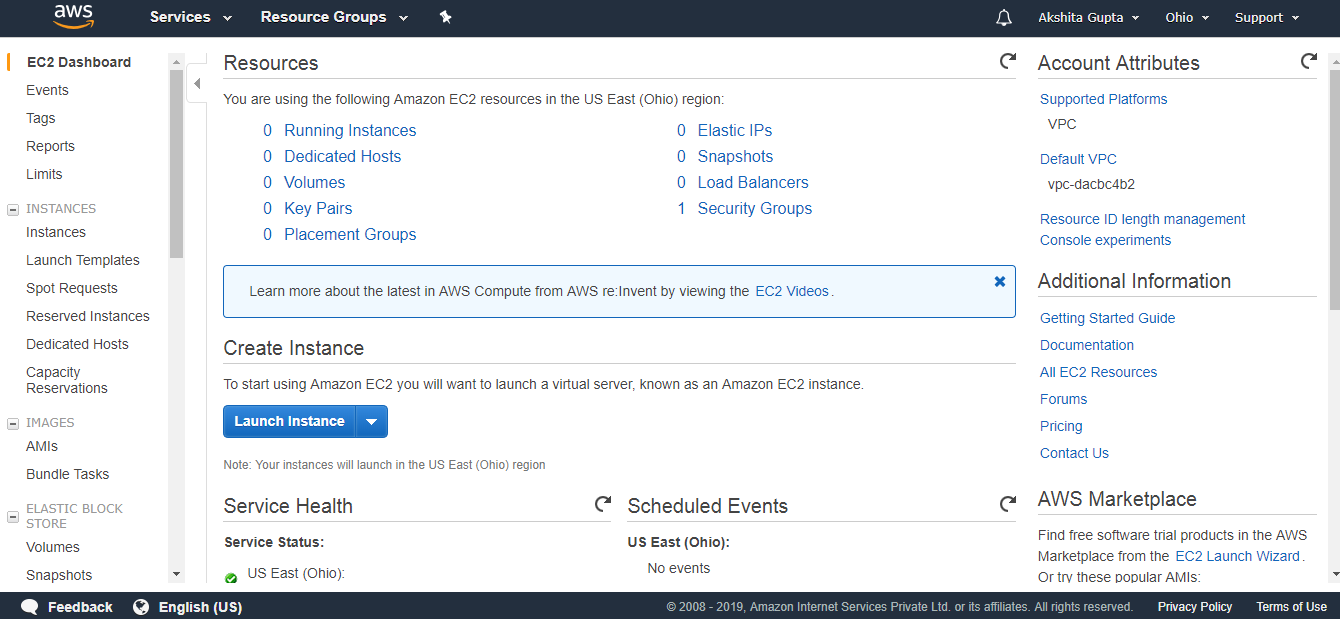
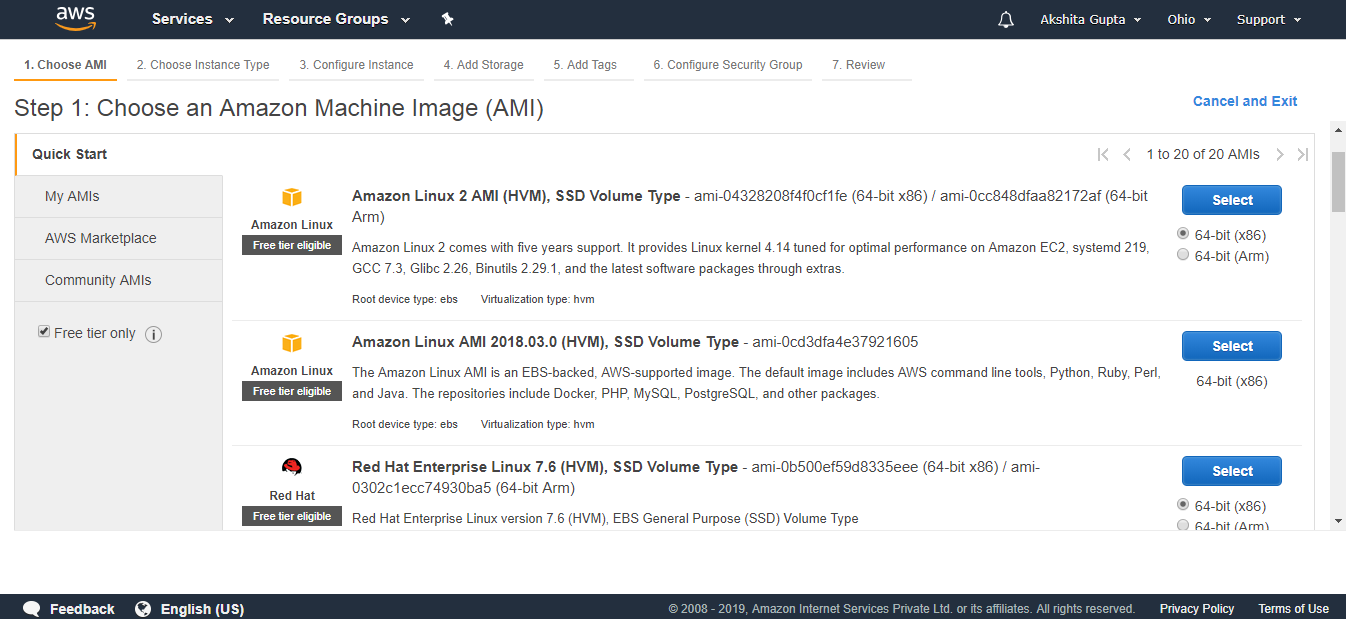
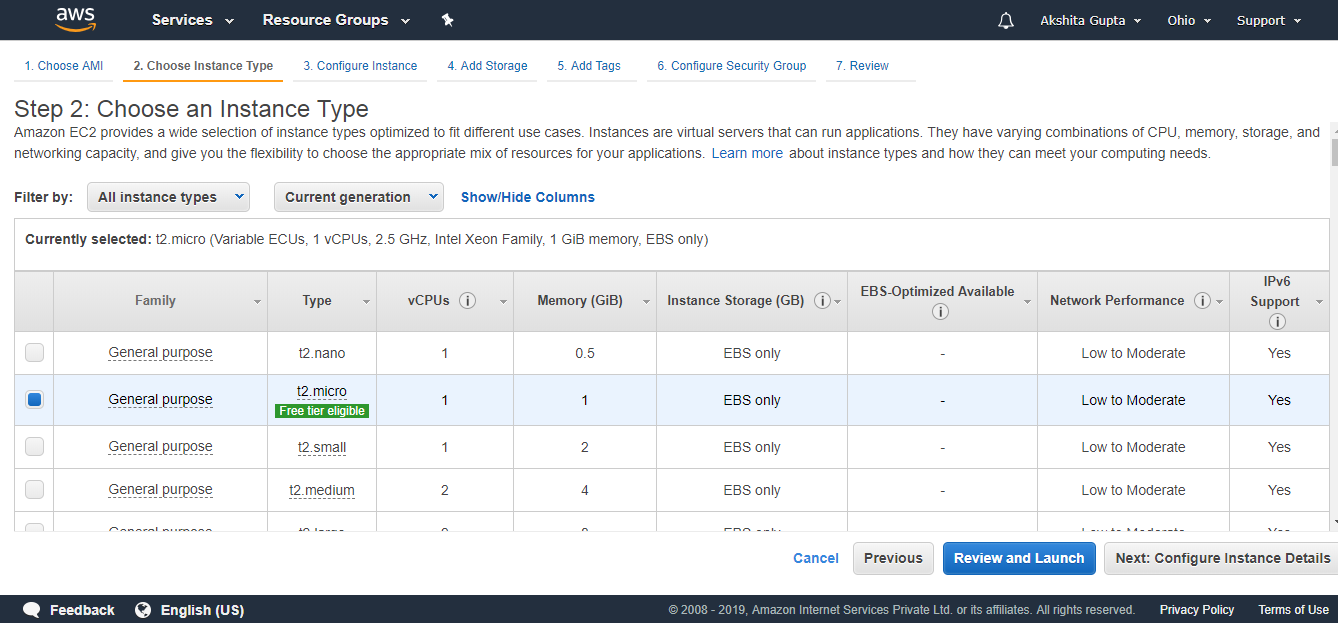
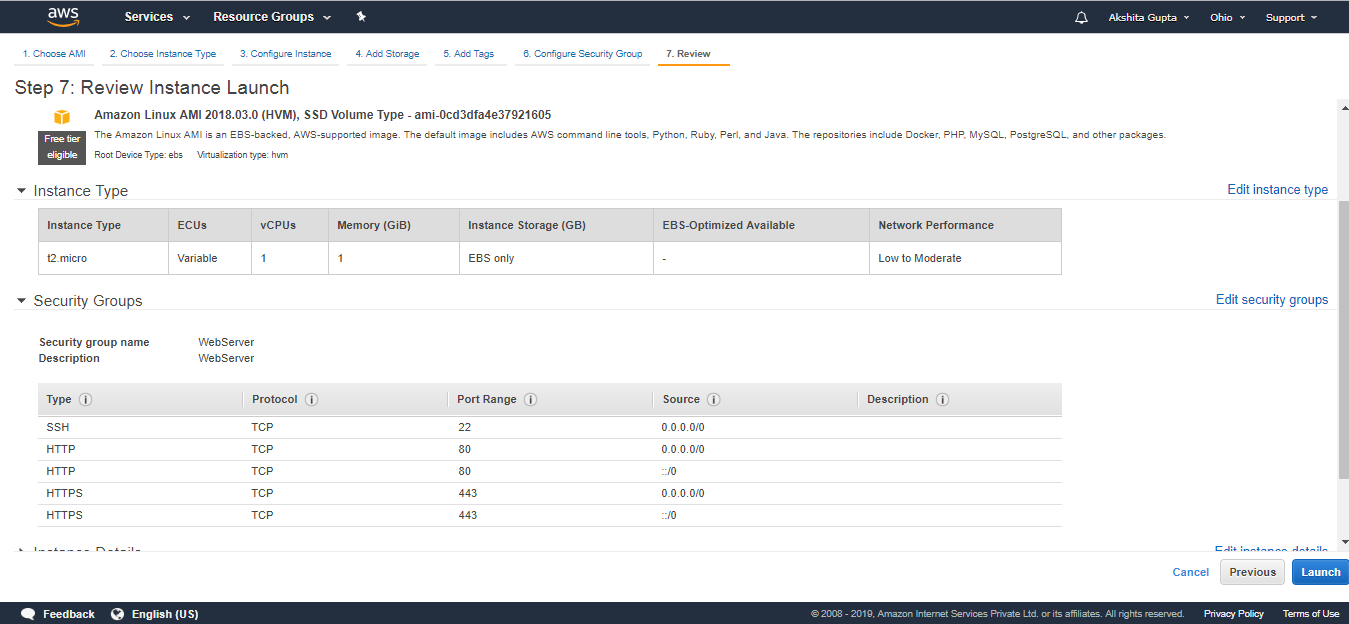
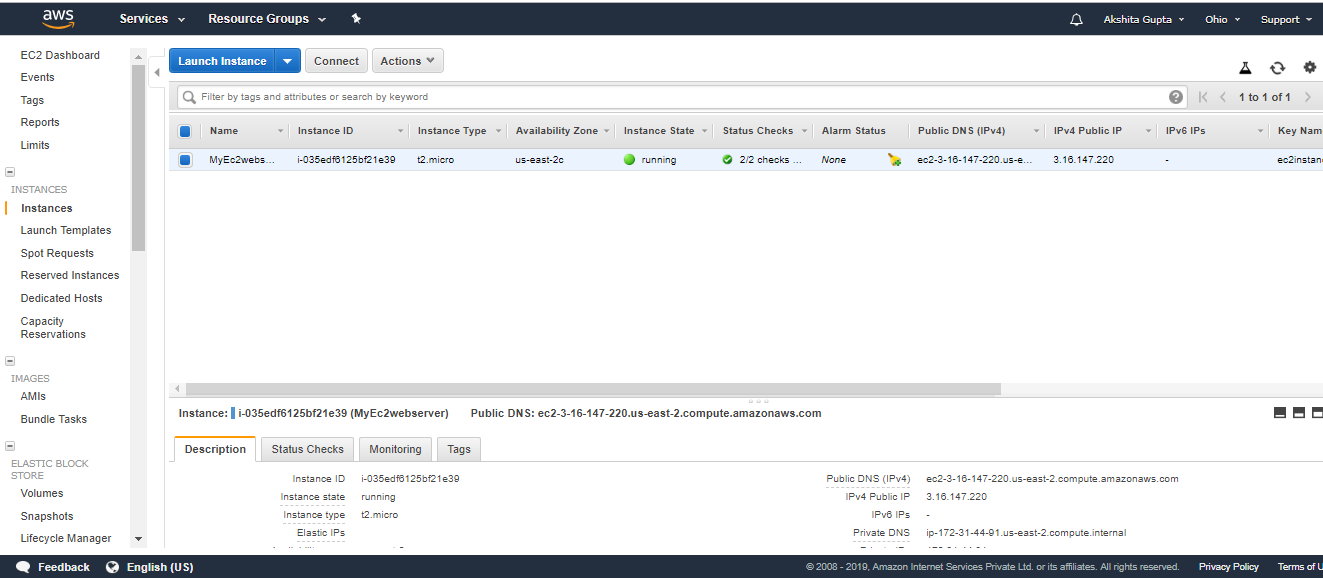
Next →← PrevCreating an EC2 instanceSign in to the AWS Management Console.Click on the EC2 service.Click on the Launch Instance button to create a new instance.Now, we have different Amazon Machine Images. These are the snapshots of different virtual machines. We will be using Amazon Linux AMI 2018.03.0 (HVM) as it has built-in tools such as java, python, ruby, perl, and especially AWS command line tools.Choose an Instance Type, and then click on the Next. Suppose I choose a t2.micro as an instance type.The main setup page of EC2 is shown below where we define setup configuration. Where,Number of Instances: It defines how many EC2 instances you want to create. I leave it as 1 as I want to create only one instance.Purchasing Option: In the purchasing option, you need to set the price, request from, request to, and persistent request. Right now, I leave it as unchecked.Tenancy: Click on the Shared-Run a shared hardware instance from the dropdown menu as we are sharing hardware.Network: Choose your network, set it as default, i.e., vpc-dacbc4b2 (default) where vpc is a virtual private cloud where we can launch the AWS resources such as EC2 instances in a virtual cloud.Subnet: It is a range of IP addresses in a virtual cloud. In a specified subnet, you can add new AWS resources.Shutdown behavior: It defines the behavior of the instance type. You can either stop or terminate the instance when you shut down the Linux machine. Now, I leave it as Stop.Enable Termination Protection: It allows the people to protect against the accidental termination.Monitoring: We can monitor things such as CPU utilization. Right now, I uncheck the Monitoring.User data: In Advanced details, you can pass the bootstrap scripts to EC2 instance. You can tell them to download PHP, Apache, install the Apache, etc.Now, add the EBS volume and attach it to the EC2 instance. Root is the default EBS volume. Click on the Next.Volume Type: We select the Magnetic (standard) as it is the only disk which is bootable.Delete on termination: It is checked means that the termination of an EC2 instance will also delete EBS volume.Now, Add the Tags and then click on the Next.In the above screen, we observe that we add two tags, i.e., the name of the server and department. Create as many tags as you can as it reduces the overall cost.Configure Security Group. The security group allows some specific traffic to access your instance.Review an EC2 instance that you have just configured, and then click on the Launch button.Create a new key pair and enter the name of the key pair. Download the Key pair.Click on the Launch Instances button.To use an EC2 instance in Windows, you need to install both Putty and PuttyKeyGen.Download the Putty and PuttyKeyGen.Download the putty.exe and puttygen.exe file.In order to use the key-pair which we have downloaded previously, we need to convert the pem file to ppk file. Puttygen is used to convert the pem file to ppk file.Open the Puttygen software.Click on the Load.Open the key-pair file, i.e., ec2instance.pem.Click on the OK button.Click on the Save private key. Change the file extension from pem to ppk.Click on the Save button.Move to the download directory where the ppk file is downloaded.Open the Putty.Move to the EC2 instance that you have created and copy its IP address.Now, move to the Putty configuration and type ec2user@, and then paste the IP address that you have copied in a previous step. Copy the Host Name in Saved Sessions.Now, your Host Name is saved in the default settings.Click on the SSH category appearing on the left side of the Putty, then click on the Auth.Click on the Browse to open the ppk file.Move to the Session category, click on the Save to save the settings.Click on the Open button to open the Putty window.The above screen shows that we are connected to the EC2 instance.Run the command sudo su, and then run the command yum update -y to update the EC2 instance.Note: sudo su is a command which is used to provide the privileges to the root level.Now, we install the apache web server to ensure that an EC2 instance becomes a web server by running a command yum install httpd -y.Run the command cd /var/www/html.To list the files available in the html folder, run the command ls.We observe that on running the command ls, we do not get any output. It means that it does not contain any file.We create a text editor, and the text editor is created by running the command nano index.html where index.html is the name of the web page.The text editor is shown below where we write the HTML code.After writing the HTML code, press ctrl+X to exit, then press ‘Y’ to save the page and press Enter.Start the Apache server by running the command service httpd start.Go to the web browser and paste the IP address which is used to connect to your EC2 instance. You will see the web page that you have created.
Operating System Interview Question A list of top frequently asked Operating System interview questions and answers are given below. 1) What is an operating system? The operating system is a software program that facilitates computer hardware to communicate and operate with the computer software. It is the most important part of a computer system without it computer…
CCNA Interview Questions A list of top frequently asked CCNA interview questions and answers are given below. 1) What is the difference between switch and hub? Basis of Comparison Hub Switch Description Hub is a networking device that connects the multiple devices to a single network. A switch is a control unit that turns the flow of…
Hacking Gaining access to a system that you are not supposed to have access is considered as hacking. For example: login into an email account that is not supposed to have access, gaining access to a remote computer that you are not supposed to have access, reading information that you are not supposed to able…
Next →← PrevWhat is EBS?EBS stands for Elastic Block Store.EC2 is a virtual server in a cloud while EBS is a virtual disk in a cloud.Amazon EBS allows you to create storage volumes and attach them to the EC2 instances.Once the storage volume is created, you can create a file system on the top of these volumes, and then you can run a database, store the files, applications or you can even use them as a block device in some other way.Amazon EBS volumes are placed in a specific availability zone, and they are automatically replicated to protect you from the failure of a single component.EBS volume does not exist on one disk, it spreads across the Availability Zone. EBS volume is a disk which is attached to an EC2 instance.EBS volume attached to the EC2 instance where windows or Linux is installed known as Root device of volume.EBS Volume TypesAmazon EBS provides two types of volume that differ in performance characteristics and price. EBS Volume types fall into two parts:SSD-backed volumesHDD-backed volumesSSDSSD stands for solid-state Drives.In June 2014, SSD storage was introduced.It is a general purpose storage.It supports up to 4000 IOPS which is quite very high.SSD storage is very high performing, but it is quite expensive as compared to HDD (Hard Disk Drive) storage.SSD volume types are optimized for transactional workloads such as frequent read/write operations with small I/O size, where the performance attribute is IOPS.SSD is further classified into two parts:General Purpose SSDProvisioned IOPS SSDGeneral Purpose SSDGeneral Purpose SSD is also sometimes referred to as a GP2.It is a General purpose SSD volume that balances both price and performance.You can get a ratio of 3 IOPS per GB with up to 10,000 IOPS and the ability to burst up to 3000 IOPS for an extended period of time for volumes at 3334 GiB and above. For example, if you get less than 10,000 IOPS, then GP2 is preferable as it gives you the best performance and price.Provisioned IOPS SSDIt is also referred to as IO1.It is mainly used for high-performance applications such as intense applications, relational databases.It is designed for I/O intensive applications such as large relational or NOSQL databases.It is used when you require more than 10,000 IOPS.HDDIt stands for Hard Disk Drive.HDD based storage was introduced in 2008.The size of the HDD based storage could be between 1 GB to 1TB.It can support up to 100 IOPS which is very low.Throughput Optimized HDD (st1)It is also referred to as ST1.Throughput Optimized HDD is a low-cost HDD designed for those applications that require higher throughput up to 500 MB/s.It is useful for those applications that require the data to be frequently accessed.It is used for Big data, Data warehouses, Log processing, etc.It cannot be a boot volume, so it contains some additional volume. For example, if we have Windows server installed in a C: drive, then C drive cannot be a Throughput Optimized Hard disk, D: drive or some other drive could be a Throughput Optimized Hard disk.The size of the Throughput Hard disk can be 500 GiB to 16 TiB.It supports up to 500 IOPS.Cold HDD (sc1)It is also known as SC1.It is the lowest cost storage designed for the applications where the workloads are infrequently accessed.It is useful when data is rarely accessed.It is mainly used for a File server.It cannot be a boot volume.The size of the Cold Hard disk can be 500 GiB to 16 TiB.It supports up to 250 IOPS.Magnetic VolumeIt is the lowest cost storage per gigabyte of all EBS volume types.It is ideal for the applications where the data is accessed infrequentlyIt is useful for applications where the lowest storage cost is important.Magnetic volume is the only hard disk which is bootable. Therefore, we can say that it can be used as a boot volume
Amazon EC2 is a web service that provides resizable compute capacity in the cloud.
Amazon EC2 reduces the time required to obtain and boot new user instances to minutes rather than in older days, if you need a server then you had to put a purchase order, and cabling is done to get a new server which is a very time-consuming process. Now, Amazon has provided an EC2 which is a virtual machine in the cloud that completely changes the industry.
You can scale the compute capacity up and down as per the computing requirement changes.
Amazon EC2 changes the economics of computing by allowing you to pay only for the resources that you actually use. Rather than you previously buy physical servers, you would look for a server that has more CPU capacity, RAM capacity and you buy a server over 5 year term, so you have to plan for 5 years in advance. People spend a lot of capital in such investments. EC2 allows you to pay for the capacity that you actually use.
Amazon EC2 provides the developers with the tools to build resilient applications that isolate themselves from some common scenarios.
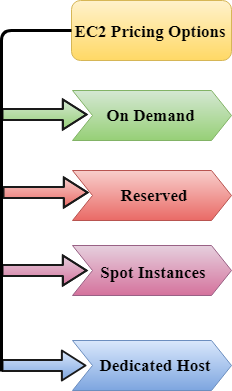
EC2 Pricing Options
On Demand
It allows you to pay a fixed rate by the hour or even by the second with no commitment.
Linux instance is by the second and windows instance is by the hour.
On Demand is perfect for the users who want low cost and flexibility of Amazon EC2 without any up-front investment or long-term commitment.
It is suitable for the applications with short term, spiky or unpredictable workloads that cannot be interrupted.
It is useful for the applications that have been developed or tested on Amazon EC2 for the first time.
On Demand instance is recommended when you are not sure which instance type is required for your performance needs.
Reserved
It is a way of making a reservation with Amazon or we can say that we make a contract with Amazon. The contract can be for 1 or 3 years in length.
In a Reserved instance, you are making a contract means you are paying some upfront, so it gives you a significant discount on the hourly charge for an instance.
It is useful for applications with steady state or predictable usage.
It is used for those applications that require reserved capacity.
Users can make up-front payments to reduce their total computing costs. For example, if you pay all your upfronts and you do 3 years contract, then only you can get a maximum discount, and if you do not pay all upfronts and do one year contract then you will not be able to get as much discount as you can get If you do 3 year contract and pay all the upfronts.
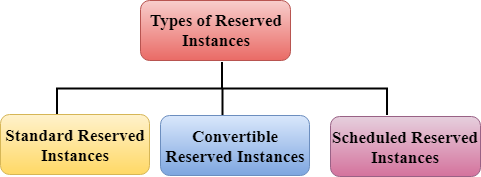
Types of Reserved Instances:
Standard Reserved Instances
Convertible Reserved Instances
Scheduled Reserved Instances
Standard Reserved Instances
It provides a discount of up to 75% off on demand. For example, you are paying all up-fronts for 3 year contract.
It is useful when your Application is at the steady-state.
Convertible Reserved Instances
It provides a discount of up to 54% off on demand.
It provides the feature that has the capability to change the attributes of RI as long as the exchange results in the creation of Reserved Instances of equal or greater value.
Like Standard Reserved Instances, it is also useful for the steady state applications.
Scheduled Reserved Instances
Scheduled Reserved Instances are available to launch within the specified time window you reserve.
It allows you to match your capacity reservation to a predictable recurring schedule that only requires a fraction of a day, a week, or a month.
Spot Instances
It allows you to bid for a price whatever price that you want for instance capacity, and providing better savings if your applications have flexible start and end times.
Spot Instances are useful for those applications that have flexible start and end times.
It is useful for those applications that are feasible at very low compute prices.
It is useful for those users who have an urgent need for large amounts of additional computing capacity.
EC2 Spot Instances provide less discounts as compared to On Demand prices.
Spot Instances are used to optimize your costs on the AWS cloud and scale your application’s throughput up to 10X.
EC2 Spot Instances will continue to exist until you terminate these instances.
Dedicated Hosts
A dedicated host is a physical server with EC2 instance capacity which is fully dedicated to your use.
The physical EC2 server is the dedicated host that can help you to reduce costs by allowing you to use your existing server-bound software licenses. For example, Vmware, Oracle, SQL Server depending on the licenses that you can bring over to AWS and then they can use the Dedicated host.
Dedicated hosts are used to address compliance requirements and reduces host by allowing to use your existing server-bound server licenses.
It can be purchased as a Reservation for up to 70% off On-Demand price.
Serverless computing is a method of providing backend services on an as-used basis. A serverless provider allows users to write and deploy code without the hassle of worrying about the underlying infrastructure. A company that gets backend services from a serverless vendor is charged based on their computation and do not have to reserve and pay for a fixed amount of bandwidth or number of servers, as the service is auto-scaling. Note that despite the name serverless, physical servers are still used but developers do not need to be aware of them.
In the early days of the web, anyone who wanted to build a web application had to own the physical hardware required to run a server, which is a cumbersome and expensive undertaking.
Then came cloud computing, where fixed numbers of servers or amounts of server space could be rented remotely. Developers and companies who rent these fixed units of server space generally over-purchase to ensure that a spike in traffic or activity will not exceed their monthly limits and break their applications. This means that much of the server space that gets paid for can go to waste. Cloud vendors have introduced auto-scaling models to address the issue, but even with auto-scaling an unwanted spike in activity, such as a DDoS Attack, could end up being very expensive.
Serverless computing allows developers to purchase backend services on a flexible ‘pay-as-you-go’ basis, meaning that developers only have to pay for the services they use. This is like switching from a cell phone data plan with a monthly fixed limit, to one that only charges for each byte of data that actually gets used.
The term ‘serverless’ is somewhat misleading, as there are still servers providing these backend services, but all of the server space and infrastructure concerns are handled by the vendor. Serverless means that the developers can do their work without having to worry about servers at all.
What are backend services? What’s the difference between frontend and backend?
Application development is generally split into two realms: the frontend and the backend. The frontend is the part of the application that users see and interact with, such as the visual layout. The backend is the part that the user doesn’t see; this includes the server where the application’s files live and the database where user data and business logic is persisted.
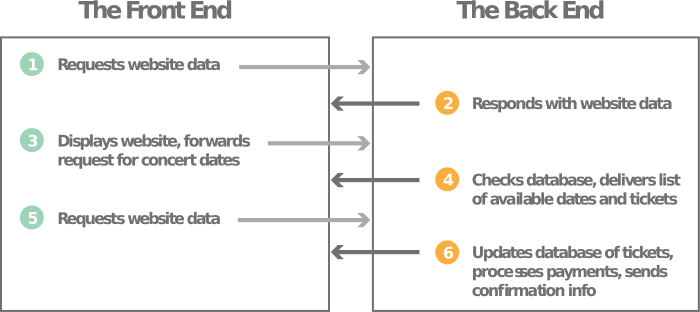
For example, let’s imagine a website that sells concert tickets. When a user types a website address into the browser window, the browser sends a request to the backend server, which responds with the website data. The user will then see the frontend of the website, which can include content such as text, images, and form fields for the user to fill out. The user can then interact with one of the form fields on the frontend to search for their favorite musical act. When the user clicks on ‘submit’, this will trigger another request to the backend. The backend code checks its database to see if a performer with this name exists, and if so, when they will be playing next, and how many tickets are available. The backend will then pass that data back to the frontend, and the frontend will display the results in a way that makes sense to the user. Similarly, when the user creates an account and enters financial information to buy the tickets, another back-and-forth communication between the frontend and backend will occur.
What kind of backend services can serverless computing provide?
Most serverless providers offer database and storage services to their customers, and many also have Function-as-a-Service (FaaS) platforms, like Cloudflare Workers. FaaS allows developers to execute small pieces of code on the network edge. With FaaS, developers can build a modular architecture, making a codebase that is more scalable without having to spend resources on maintaining the underlying backend. Learn more about FaaS >>
What are the advantages of serverless computing?
Lower costs – Serverless computing is generally very cost-effective, as traditional cloud providers of backend services (server allocation) often result in the user paying for unused space or idle CPU time.
Simplified scalability – Developers using serverless architecture don’t have to worry about policies to scale up their code. The serverless vendor handles all of the scaling on demand.
Simplified backend code – With FaaS, developers can create simple functions that independently perform a single purpose, like making an API call.
Quicker turnaround – Serverless architecture can significantly cut time to market. Instead of needing a complicated deploy process to roll out bug fixes and new features, developers can add and modify code on a piecemeal basis.
How does serverless compare to other cloud backend models?
A couple of technologies that are often conflated with serverless computing are Backend-as-a-Service and Platform-as-a-Service. Although they share similarities, these models do not necessarily meet the requirements of serverless.
Backend-as-a-service (BaaS) is a service model where a cloud provider offers backend services such as data storage, so that developers can focus on writing front-end code. But while serverless applications are event-driven and run on the edge, BaaS applications may not meet either of these requirements. Learn more about BaaS >>
Platform-as-a-service (PaaS) is a model where developers essentially rent all the necessary tools to develop and deploy applications from a cloud provider, including things like operating systems and middleware. However PaaS applications are not as easily scalable as serverless applications. PaaS also don’t necessarily run on the edge and often have a noticeable startup delay that isn’t present in serverless applications. Learn more about PaaS >>
Infrastructure-as-a-service (IaaS) is a catchall term for cloud vendors hosting infrastructure on behalf of their customers. IaaS providers may offer serverless functionality, but the terms are not synonymous. Learn more about IaaS >>
What is next for serverless?
Serverless computing continues to evolve as serverless providers come up with solutions to overcome some of its drawbacks. One of these drawbacks is cold starts.
Typically when a particular serverless function has not been called in a while, the provider shuts down the function to save energy and avoid over-provisioning. The next time a user runs an application that calls that function, the serverless provider will have to spin it up fresh and start hosting that function again. This startup time adds significant latency, which is known as a ‘cold start’.
Once the function is up and running it will be served much more rapidly on subsequent requests (warm starts), but if the function is not requested again for a while, the function will once again go dormant. This means the next user to request that function will experience a cold start. Up until fairly recently, cold starts were considered a necessary trade-off of using serverless functions.
Cloudflare Workers has addressed this problem by spinning up serverless functions in advance, during the TLS handshake. Since Workers functions spin up at the edge in a very short amount of time, even shorter than the time required to complete the handshake, the result is an FaaS platform with zero cold starts.
As more and more of the drawbacks of using serverless get addressed and the popularity of edge computing grows, we can expect to see serverless architecture becoming more widespread.
Encrypted server name indication (ESNI) is an essential feature for keeping user browsing data private. It ensures that snooping third parties cannot spy on the TLS handshake process to determine which websites users are visiting. ESNI, as the name implies, accomplishes this by encrypting the server name indication (SNI) part of the TLS handshake.
SNI tells a web server which TLS certificate to show at the start of a connection between the client and server. SNI is an addition to the TLS protocol that enables a server to host multiple TLS certificates at the same IP address.
Think of SNI as being like the apartment number on a mailing address: multiple apartments are in one building, so each apartment needs a different number to distinguish it. Similarly, while the server is indicated by the IP address, a client device needs to include SNI in its first message to the server to indicate which website (which apartment) it is trying to reach.
What is TLS?
Transport Layer Security, or TLS for short, is an encryption protocol that keeps communications private and secure on the Internet. TLS is used mostly to encrypt the communication between applications and web servers, like when web browsers load a website. All websites that use TLS must have a TLS certificate. TLS is sometimes called SSL, although SSL is an outdated name for the protocol.
All TLS connections start with something called a “handshake.” Just as a handshake is used in real life when two people meet and exchange introductions, the TLS handshake is a series of introductory communications between a client device (like a user’s smartphone) and a web application or website. During a TLS handshake, the two communicating devices agree on what encryption keys to use, among other steps. Despite the number of steps involved, a TLS handshake takes only a few milliseconds.
How does server name indication (SNI) work?
SNI is a small but crucial part of the first step of the TLS handshake. The first message in a TLS handshake is called the “client hello.” As part of this message, the client asks to see the web server’s TLS certificate. The server is supposed to send the certificate as part of its reply.
The problem is, many web servers host more than one website, and each website may have its own TLS certificate. If the server shows the wrong one to the client, then the client will be unable to connect securely to the desired website, resulting in a “Your connection is not private” error.
SNI solves this problem by indicating which website the client is trying to reach. Paradoxically, no encryption can take place until after the TLS handshake is successfully completed using SNI. As a result, regular SNI is not encrypted because the client hello message is sent at the start of the TLS handshake. Any attacker monitoring the connection between the client and the server could determine which website the client was connecting with by reading the SNI part of the handshake, even though all further communications are indecipherable to the attacker. (Attackers could use this information in a number of ways — setting up a phishing website to trick the user, for instance.)
How does encrypted SNI work?
ESNI keeps SNI secret by encrypting the SNI part of the client hello message (and only this part). Encryption only works if both sides of a communication — in this case, the client and the server — have the key for encrypting and decrypting the information, just as two people can use the same locker only if both have a key to the locker. Because the client hello message is sent before the client and server have negotiated TLS encryption keys, the ESNI encryption key has to be communicated some other way.
The solution: public key cryptography. The web server adds a public key to its DNS record, so that when the client looks up where to find the right server, it finds the server’s public key as well. This is somewhat like leaving a house key in a lockbox outside one’s home so that a visitor can safely enter the home. The client can then use the public key to encrypt its SNI record in such a way that only that specific server can decrypt it. (This is a somewhat simplified explanation; for a lengthier technical explanation, see this blog post.)
Imagine that Alice wants to visit Bob’s website, http://www.bobisawesome.example.com. Like every responsible website owner should, Bob uses TLS for his website so that all traffic to and from his website is encrypted. Bob has also implemented ESNI to further protect site visitors like Alice.
When Alice types https://www.bobisawesome.example.com into her laptop’s browser, her laptop goes through the following process for loading the website:
Her laptop sends a query to a DNS server to find out the website’s IP address.
The DNS response tells Alice’s laptop which IP address to use in order to find Bob’s website, and the DNS response also includes Bob’s ESNI public key.
Alice’s laptop sends a client hello message to the indicated IP address, encrypting the SNI part of the message by using Bob’s public key.
Bob’s web server shows Bob’s TLS certificate.
The TLS handshake proceeds, and Alice’s laptop loads http://www.bobisawesome.example.com. Any attackers who may be monitoring the network cannot see which website Alice is visiting.*
*This last statement is only true if the DNS part of the process used DNSSEC and either DNS over HTTPS or DNS over TLS — more below.
Does ESNI alone keep web browsing private?
ESNI is a major step towards privacy and security on the web, but other new protocols and features are important as well. The Internet was not designed with security and privacy in mind, and as a result there are a number of steps in the process of visiting a website that are not private. However, various new protocols are helping to encrypt and secure each step from malicious attackers.
The Domain Name System, or DNS, matches human-readable website addresses like http://www.bobisawesome.example.com to alphanumerical IP addresses. It is like looking up someone’s address in a large address book that everyone uses. However, normal DNS is not encrypted, meaning anyone could see which address someone is looking up, and anyone could pretend to be the address book. Even with ESNI in place, an attacker could see what DNS records users are querying and figure out which websites they are visiting.
Three additional protocols aim to close these gaps: DNS over TLS, DNS over HTTPS, and DNSSEC.
DNS over TLS and DNS over HTTPS both do the same thing: encrypt DNS queries with TLS encryption. The main differences between them are what layer of the network they use and which network port they use. DNSSEC verifies that DNS records are real and come from a legitimate DNS server, not from an attacker impersonating a DNS server (as in a DNS cache poisoning attack).
Does Cloudflare support ESNI?
The Cloudflare network has supported ESNI since September 2018. Not only was Cloudflare the first major network to support ESNI, but Cloudflare was also instrumental in developing ESNI. ESNI has not yet been published as an official RFC, or Internet standard, but a draft RFC is in the works.
HTTPS is a secure way to send data between a web server and a web browser.
What is HTTPS?
Hypertext transfer protocol secure (HTTPS) is the secure version of HTTP, which is the primary protocol used to send data between a web browser and a website. HTTPS is encrypted in order to increase security of data transfer. This is particularly important when users transmit sensitive data, such as by logging into a bank account, email service, or health insurance provider.
Any website, especially those that require login credentials, should use HTTPS. In modern web browsers such as Chrome, websites that do not use HTTPS are marked differently than those that are. Look for a green padlock in the URL bar to signify the webpage is secure. Web browsers take HTTPS seriously; Google Chrome and other browsers flag all non-HTTPS websites as not secure.
The private key – this key is controlled by the owner of a website and it’s kept, as the reader may have speculated, private. This key lives on a web server and is used to decrypt information encrypted by the public key.
The public key – this key is available to everyone who wants to interact with the server in a way that’s secure. Information that’s encrypted by the public key can only be decrypted by the private key.
Why is HTTPS important? What happens if a website doesn’t have HTTPS?
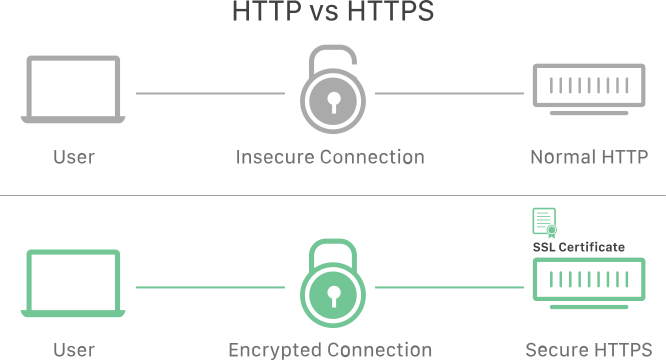
HTTPS prevents websites from having their information broadcast in a way that’s easily viewed by anyone snooping on the network. When information is sent over regular HTTP, the information is broken into packets of data that can be easily “sniffed” using free software. This makes communication over the an unsecure medium, such as public Wi-Fi, highly vulnerable to interception. In fact, all communications that occur over HTTP occur in plain text, making them highly accessible to anyone with the correct tools, and vulnerable to on-path attacks.
With HTTPS, traffic is encrypted such that even if the packets are sniffed or otherwise intercepted, they will come across as nonsensical characters. Let’s look at an example:
Before encryption:
This is a string of text that is completely readable
In websites without HTTPS, it is possible for Internet service providers (ISPs) or other intermediaries to inject content into webpages without the approval of the website owner. This commonly takes the form of advertising, where an ISP looking to increase revenue injects paid advertising into the webpages of their customers. Unsurprisingly, when this occurs, the profits for the advertisements and the quality control of those advertisements are in no way shared with the website owner. HTTPS eliminates the ability of unmoderated third parties to inject advertising into web content.
For a full list of benefits HTTPS provides, see Why use HTTPS?
How is HTTPS different from HTTP?
Technically speaking, HTTPS is not a separate protocol from HTTP. It is simply using TLS/SSL encryption over the HTTP protocol. HTTPS occurs based upon the transmission of TLS/SSL certificates, which verify that a particular provider is who they say they are.
When a user connects to a webpage, the webpage will send over its SSL certificate which contains the public key necessary to start the secure session. The two computers, the client and the server, then go through a process called an SSL/TLS handshake, which is a series of back-and-forth communications used to establish a secure connection. To take a deeper dive into encryption and the SSL/TLS handshake, read about what happens in a TLS handshake.
How does a website start using HTTPS?
Many website hosting providers and other services will offer TLS/SSL certificates for a fee. These certificates will be often be shared amongst many customers. More expensive certificates are available which can be individually registered to particular web properties.
All websites using Cloudflare receive HTTPS for free using a shared certificate (the technical term for this is a multi-domain SSL certificate). Setting up a free account will guarantee a web property receives continually updated HTTPS protection. You can also explore our paid plans for individual certificates and other features. In either case, a web property receives all the benefits of using HTTPS.
Google Chrome is marking non-HTTPS sites as “Not secure”, this is just one of many good reasons to secure a website.
What is the difference between HTTP and HTTPS?
HTTPS is HTTP with TLS encryption. HTTPS uses TLS (SSL) to encrypt normal HTTP requests and responses, making it safer and more secure. A website that uses HTTPS has https:// in the beginning of its URL instead of http://, like https://www.cloudflare.com.
Reason No. 1: Website using HTTPS are more trustworthy for users.
A website using HTTPS is like a restaurant displaying a “Pass” from the local food safety inspector: potential customers can trust that they can patronize the business without experiencing massively negative effects. And in this day and age, using HTTP is essentially like displaying a “Fail” food safety inspection sign: there’s no guarantee that something terrible won’t happen to a customer.
HTTPS uses the SSL/TLS protocol to encrypt communications so that attackers can’t steal data. SSL/TLS also confirms that a website server is who it says it is, preventing impersonations. This stops multiple kinds of cyber attacks (just like food safety prevents illness).
Even though some users may be unaware of the benefits of SSL/TLS, modern browsers are making sure they’re aware of the trustworthiness of a website no matter what.
Chrome and other browsers mark all HTTP websites as “not secure.”
Google incrementally took steps to nudge websites towards incorporating HTTPS over a number of years. Google also uses HTTPS as a quality factor in how they return search results; the more secure the website, the less likely the visitor will be making a mistake by clicking on the link Google provided.
Starting in July 2018 with the release of Chrome 68, all unsecured HTTP traffic has been flagged in the URL bar as “not secure”. This notification appears for all websites without a valid SSL certificate. Other browsers have followed suit.
Reason No. 2: HTTPS is more secure, for both users and website owners.
With HTTPS, data is encrypted in transit in both directions: going to and coming from the origin server. The protocol keeps communications secure so that malicious parties can’t observe what data is being sent. As a result usernames and passwords can’t be stolen in transit when users enter them into a form. If websites or web applications have to send sensitive or personal data to users (for instance, bank account information), encryption protects that data as well.
Reason No. 3: HTTPS authenticates websites.
Users of rideshare apps such as Uber and Lyft don’t have to get into an unfamiliar car on faith, just because the driver says they’re there to pick them up. Instead the apps tell them information about the driver, like their name and appearance, what kind of car they drive, and the license plate number. User can check these things and be certain they are getting into the right car, even though every rideshare car is different and they’ve never seen the driver before.
Similarly, when a user navigates to a website, what they’re actually doing is connecting to faraway computers that they don’t know about, maintained by people they’ve never seen. An SSL certificate, which enables HTTPS, is like that driver information in the rideshare app. It represents external verification by a trustworthy third party that a web server is who it claims to be.
This prevents attacks in which an attacker impersonates or spoofs a website, making users think they’re on the site they intended to reach when actually they’re on a fake site. HTTPS authentication also does a lot to help a company website appear legitimate, and that influences user attitudes towards the company itself. (Users can check if a website is properly using HTTPS by testing it at the Cloudflare Diagnostic Center.)
HTTPS myth-conceptions
Many websites have been slow to adopt HTTPS. To explore why this is the case we have to look at the history.
When HTTPS initially began rolling out, proper implementation was hard, slow, and expensive; it was hard to implement properly, slowed down Internet requests, and increased costs by requiring expensive certificate services. None of these impediments remain true, but a lingering fear still exists for a lot of website owners, which has impeded some taking the leap into better security. Let’s explore some of the myths about HTTPS.
“I don’t handle sensitive information on my website so I don’t need HTTPS”
A common reason websites don’t implement security is because they think it’s overkill for their purposes. After all, if you’re not dealing with sensitive data, who cares if someone is snooping? There are a few reasons that this is an overly simplistic view on web security. For example, some Internet service providers will actually inject advertising into HTTP-served websites. These ads may or may not be in line with the content of the website, and can potentially be offensive, aside from the fact that the website provider has no creative input or share of the revenue. These injected ads are no longer feasible once a site is secured.
Modern web browsers now limit functionality for sites that are not secure. Important features that improve the quality of the website now require HTTPS. Geolocation, push notifications and the service workers needed to run progressive web applications (PWAs) all require heightened security. This makes sense; data such as a user’s location is sensitive and can be used for nefarious purposes.
“I don’t want to damage my website’s performance by increasing my page load times”
Performance is an important factor in both user experience and how Google returns results in search. Understandably, increasing latency is something to take seriously. Luckily, over time improvements have been made to HTTPS to reduce the performance overhead required to set up a encrypted connection.
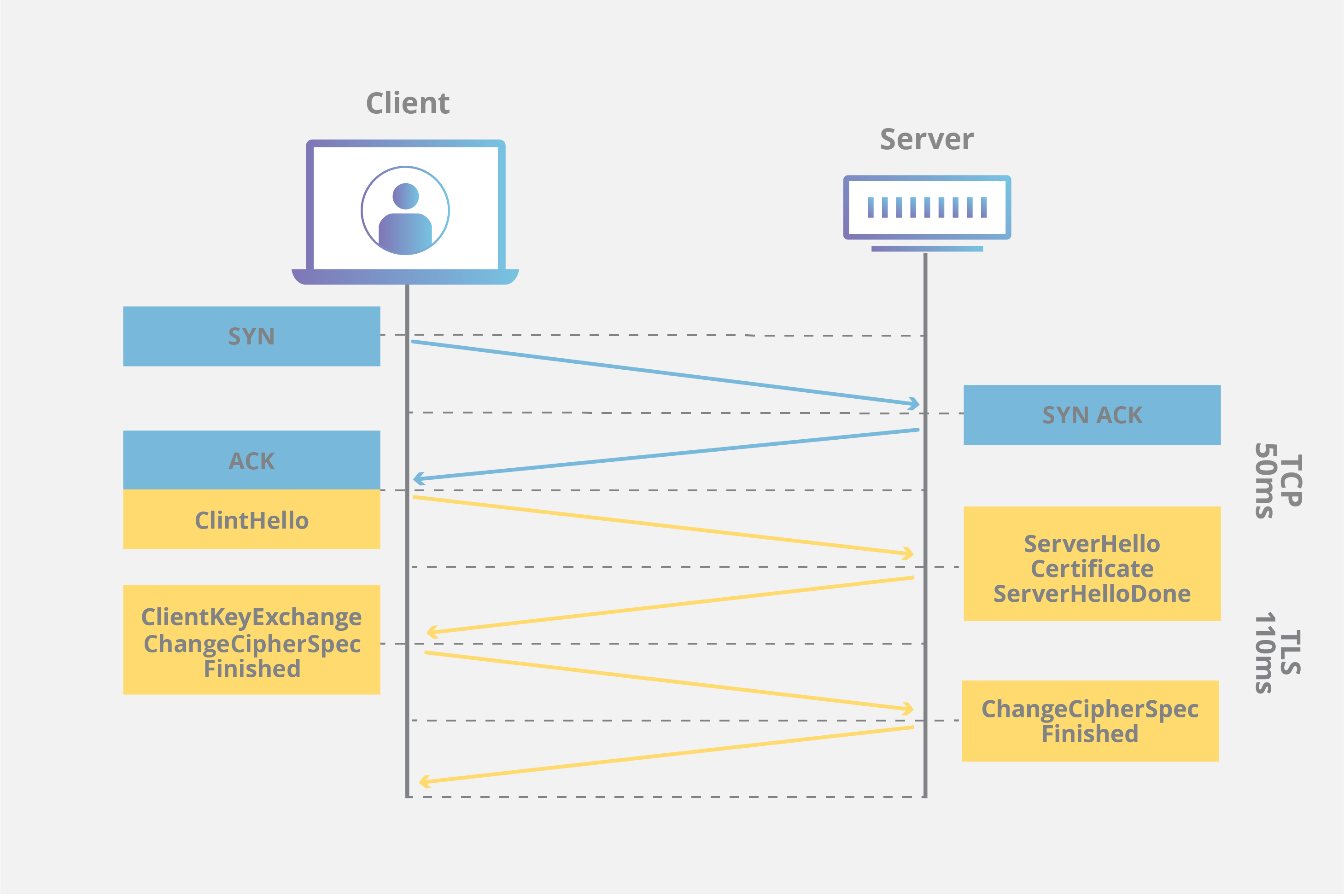
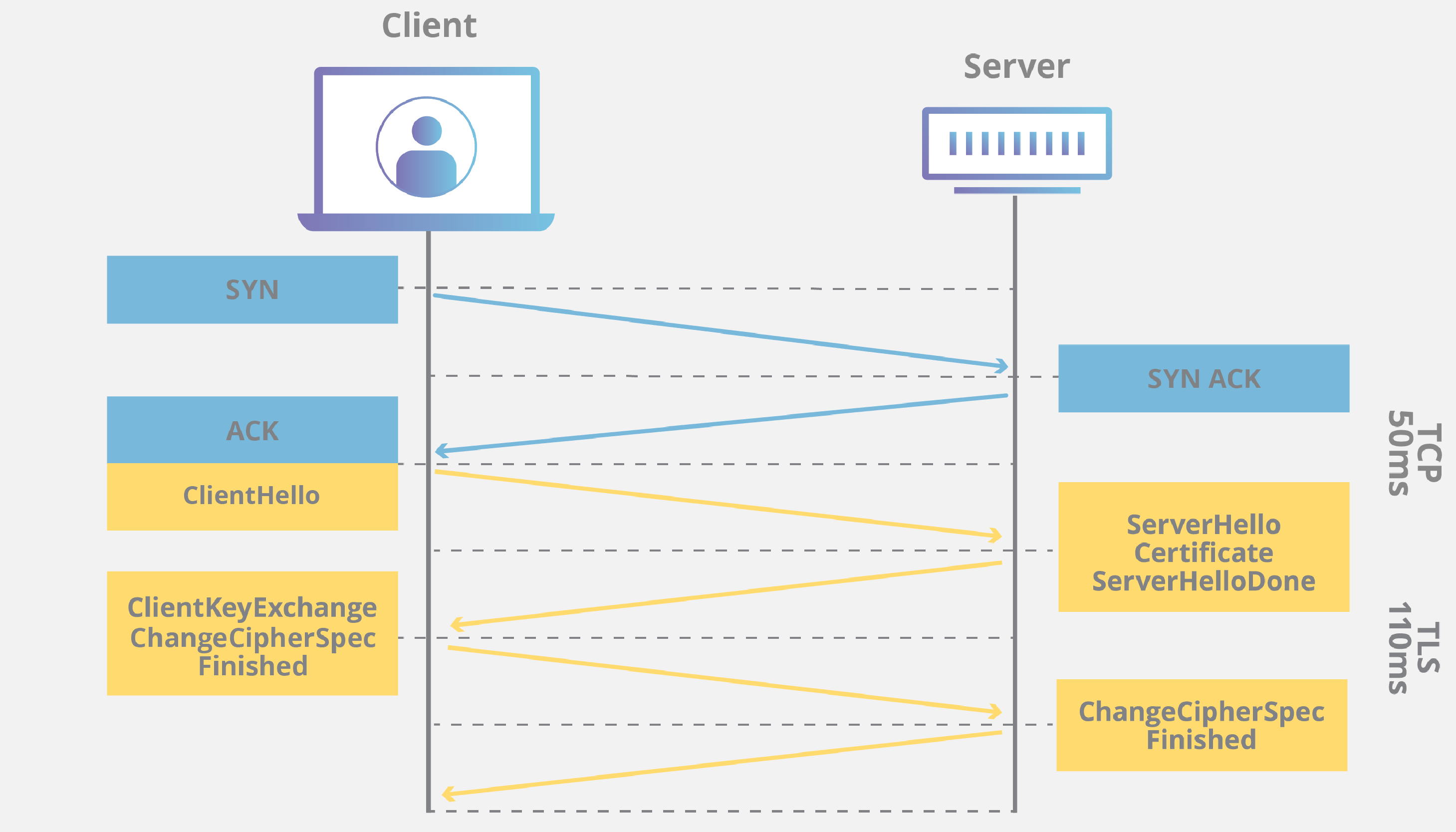
When an HTTP connection occurs, there are a number of trips the connection needs to make between the client requesting the webpage and the server. Aside from the normal latency associated with a TCP handshake (shown in blue below), an additional TLS/SSL handshake (shown in yellow) must occur to use HTTPS.
Improvements can be implemented to reduce the total latency of creating a SSL connection, including TLS session resumption and TLS false start.
By using session resumption a server can keep a connection alive for longer by resuming the same session for additional requests. Keeping the connection alive saves time spent renegotiating the connection when the client requires an uncached origin fetch, reducing the total RTT by 50%.
Another improvement to the speed at which an encrypted channel can be created is to implement a process called TLS false start, which cuts down on the latency by sending the encrypted data before the client has finished authentication. For more information explore how TLS/SSL works on a CDN.
Last but not least, HTTPS unlocks performance enhancements using HTTP/2 that let you do cool things like server pushing and multiplexing which can greatly optimize performance for HTTP requests. In total there is a significant performance benefit for making the switch.
“It’s too expensive for me to implement HTTPS”
At one point this may have been true, but now the cost is no longer a concern; Cloudflare offers websites the ability to encrypt transit free of charge. We were the first to provide SSL at no cost, and we continue to do so. By improving Internet security at large, we are able to help make the Internet safer and faster.
“I’m going to lose search ranking while migrating my site to HTTPS”
There are risks associated with website migration, and done improperly a negative SEO impact is possible. Potential pitfalls include website downtime, uncrawled webpages, and penalization for content duplication when two copies of the site exist at the same time. That said, websites can be migrated safely to HTTPS by following best practices.
Two of the most important migration practices are:
1) using 301 redirects and 2) the proper placement of canonical tags. By using server 301 redirects on the HTTP site to point to the HTTPS version, a website tells Google to move to the new location for all search and indexing purposes. By placing canonical tags on the HTTPS site only, crawlers such as Googlebot will know that the new secure content should be considered canonical going forward.
If you have a large number of pages and are concerned that the recrawl will take too long, reach out to Google and tell them how much traffic you’re willing to put through your website. The network engineers will then crank up the crawl rate to help parse your site quickly and get it indexed.
TLS is a security protocol that provides privacy and data integrity for Internet communications. Implementing TLS is a standard practice for building secure web apps.
What is Transport Layer Security (TLS)?
Transport Layer Security, or TLS, is a widely adopted security protocol designed to facilitate privacy and data security for communications over the Internet. A primary use case of TLS is encrypting the communication between web applications and servers, such as web browsers loading a website. TLS can also be used to encrypt other communications such as email, messaging, and voice over IP (VoIP). In this article we will focus on the role of TLS in web application security.
TLS was proposed by the Internet Engineering Task Force (IETF), an international standards organization, and the first version of the protocol was published in 1999. The most recent version is TLS 1.3, which was published in 2018.
What is the difference between TLS and SSL?
TLS evolved from a previous encryption protocol called Secure Sockets Layer (SSL), which was developed by Netscape. TLS version 1.0 actually began development as SSL version 3.1, but the name of the protocol was changed before publication in order to indicate that it was no longer associated with Netscape. Because of this history, the terms TLS and SSL are sometimes used interchangeably.
What is the difference between TLS and HTTPS?
HTTPS is an implementation of TLS encryption on top of the HTTP protocol, which is used by all websites as well as some other web services. Any website that uses HTTPS is therefore employing TLS encryption.
Why should businesses and web applications use the TLS protocol?
TLS encryption can help protect web applications from data breaches and other attacks. Additionally, TLS-protected HTTPS is quickly becoming a standard practice for websites. For example, the Google Chrome browser is cracking down on non-HTTPS sites, and everyday Internet users are starting to become more wary of websites that do not feature the HTTPS padlock icon.
What does TLS do?
There are three main components to what the TLS protocol accomplishes: Encryption, Authentication, and Integrity.
Encryption: hides the data being transferred from third parties.
Authentication: ensures that the parties exchanging information are who they claim to be.
Integrity: verifies that the data has not been forged or tampered with.
How does TLS work?
For a website or application to use TLS, it must have a TLS certificate installed on its origin server (the certificate is also known as an “SSL certificate” because of the naming confusion described above). A TLS certificate is issued by a certificate authority to the person or business that owns a domain. The certificate contains important information about who owns the domain, along with the server’s public key, both of which are important for validating the server’s identity.
A TLS connection is initiated using a sequence known as the TLS handshake. When a user navigates to a website that uses TLS, the TLS handshake begins between the user’s device (also known as the client device) and the web server.
During the TLS handshake, the user’s device and the web server:
Specify which version of TLS (TLS 1.0, 1.2, 1.3, etc.) they will use
Decide on which cipher suites (see below) they will use
Authenticate the identity of the server using the server’s TLS certificate
Generate session keys for encrypting messages between them after the handshake is complete
The TLS handshake establishes a cipher suite for each communication session. The cipher suite is a set of algorithms that specifies details such as which shared encryption keys, or session keys, will be used for that particular session. TLS is able to set the matching session keys over an unencrypted channel thanks to a technology known as public key cryptography.
The handshake also handles authentication, which usually consists of the server proving its identity to the client. This is done using public keys. Public keys are encryption keys that use one-way encryption, meaning that anyone with the public key can unscramble the data encrypted with the server’s private key to ensure its authenticity, but only the original sender can encrypt data with the private key. The server’s public key is part of its TLS certificate.
Once data is encrypted and authenticated, it is then signed with a message authentication code (MAC). The recipient can then verify the MAC to ensure the integrity of the data. This is kind of like the tamper-proof foil found on a bottle of aspirin; the consumer knows no one has tampered with their medicine because the foil is intact when they purchase it.
How does TLS affect web application performance?
The latest versions of TLS hardly impact web application performance at all.
Because of the complex process involved in setting up a TLS connection, some load time and computational power must be expended. The client and server must communicate back and forth several times before any data is transmitted, and that eats up precious milliseconds of load times for web applications, as well as some memory for both the client and the server.
However, there are technologies in place that help to mitigate potential latency created by the TLS handshake. One is TLS False Start, which lets the server and client start transmitting data before the TLS handshake is complete. Another technology to speed up TLS is TLS Session Resumption, which allows clients and servers that have previously communicated to use an abbreviated handshake.
These improvements have helped to make TLS a very fast protocol that should not noticeably affect load times. As for the computational costs associated with TLS, they are mostly negligible by today’s standards.
TLS 1.3, released in 2018, has made TLS even faster. TLS handshakes in TLS 1.3 only require one round trip (or back-and-forth communication) instead of two, shortening the process by a few milliseconds. When the user has connected to a website before, the TLS handshake has zero round trips, speeding it up still further.
How to start implementing TLS on a website
Cloudflare offers free TLS/SSL certificates to all users. Anyone who does not use Cloudflare will have to acquire an SSL certificate from a certificate authority, often for a fee, and install the certificate on their origin servers.
Secure Sockets Layer (SSL) is a security protocol that provides privacy, authentication, and integrity to Internet communications. SSL eventually evolved into Transport Layer Security (TLS).
What is SSL?
SSL, or Secure Sockets Layer, is an encryption-based Internet security protocol. It was first developed by Netscape in 1995 for the purpose of ensuring privacy, authentication, and data integrity in Internet communications. SSL is the predecessor to the modern TLS encryption used today.
A website that implements SSL/TLS has “HTTPS” in its URL instead of “HTTP.”
How does SSL/TLS work?
In order to provide a high degree of privacy, SSL encrypts data that is transmitted across the web. This means that anyone who tries to intercept this data will only see a garbled mix of characters that is nearly impossible to decrypt.
SSL initiates an authentication process called a handshake between two communicating devices to ensure that both devices are really who they claim to be.
SSL also digitally signs data in order to provide data integrity, verifying that the data is not tampered with before reaching its intended recipient.
There have been several iterations of SSL, each more secure than the last. In 1999 SSL was updated to become TLS.
Why is SSL/TLS important?
Originally, data on the Web was transmitted in plaintext that anyone could read if they intercepted the message. For example, if a consumer visited a shopping website, placed an order, and entered their credit card number on the website, that credit card number would travel across the Internet unconcealed.
SSL was created to correct this problem and protect user privacy. By encrypting any data that goes between a user and a web server, SSL ensures that anyone who intercepts the data can only see a scrambled mess of characters. The consumer’s credit card number is now safe, only visible to the shopping website where they entered it.
SSL also stops certain kinds of cyber attacks: It authenticates web servers, which is important because attackers will often try to set up fake websites to trick users and steal data. It also prevents attackers from tampering with data in transit, like a tamper-proof seal on a medicine container.
Are SSL and TLS the same thing?
SSL is the direct predecessor of another protocol called TLS (Transport Layer Security). In 1999 the Internet Engineering Task Force (IETF) proposed an update to SSL. Since this update was being developed by the IETF and Netscape was no longer involved, the name was changed to TLS. The differences between the final version of SSL (3.0) and the first version of TLS are not drastic; the name change was applied to signify the change in ownership.
Since they are so closely related, the two terms are often used interchangeably and confused. Some people still use SSL to refer to TLS, others use the term “SSL/TLS encryption” because SSL still has so much name recognition.
Is SSL still up to date?
SSL has not been updated since SSL 3.0 in 1996 and is now considered to be deprecated. There are several known vulnerabilities in the SSL protocol, and security experts recommend discontinuing its use. In fact, most modern web browsers no longer support SSL at all.
TLS is the up-to-date encryption protocol that is still being implemented online, even though many people still refer to it as “SSL encryption.” This can be a source of confusion for someone shopping for security solutions. The truth is that any vendor offering “SSL” these days is almost certainly providing TLS protection, which has been an industry standard for over 20 years. But since many folks are still searching for “SSL protection,” the term is still featured prominently on many product pages.
What is an SSL certificate?
SSL can only be implemented by websites that have an SSL certificate (technically a “TLS certificate”). An SSL certificate is like an ID card or a badge that proves someone is who they say they are. SSL certificates are stored and displayed on the Web by a website’s or application’s server.
One of the most important pieces of information in an SSL certificate is the website’s public key. The public key makes encryption possible. A user’s device views the public key and uses it to establish secure encryption keys with the web server. Meanwhile the web server also has a private key that is kept secret; the private key decrypts data encrypted with the public key.
Certificate authorities (CA) are responsible for issuing SSL certificates.
What are the types of SSL certificates?
There are several different types of SSL certificates. One certificate can apply to a single website or several websites, depending on the type:
Single-domain: A single-domain SSL certificate applies to only one domain (a “domain” is the name of a website, like http://www.cloudflare.com).
Wildcard: Like a single-domain certificate, a wildcard SSL certificate applies to only one domain. However, it also includes that domain’s subdomains. For example, a wildcard certificate could cover http://www.cloudflare.com, blog.cloudflare.com, and developers.cloudflare.com, while a single-domain certificate could only cover the first.
Multi-domain: As the name indicates, multi-domain SSL certificates can apply to multiple unrelated domains.
SSL certificates also come with different validation levels. A validation level is like a background check, and the level changes depending on the thoroughness of the check.
Domain Validation: This is the least-stringent level of validation, and the cheapest. All a business has to do is prove they control the domain.
Organization Validation: This is a more hands-on process: The CA directly contacts the person or business requesting the certificate. These certificates are more trustworthy for users.
Extended Validation: This requires a full background check of an organization before the SSL certificate can be issued.
How can a business obtain an SSL certificate?
Cloudflare offers free SSL certificates for any business. A website protected by Cloudflare can activate SSL with a few clicks. Websites may need to set up an SSL certificate on their origin server as well: this article has further instructions.
More about SSL/TLS
For more on how SSL/TLS encryption works, see What is TLS? Use the Cloudflare Diagnostic Center to check if a website is properly implementing SSL/TLS encryption.
Network-as-a-service (NaaS) is a cloud service model in which customers rent networking services from a cloud vendor instead of setting up their own network infrastructure
What is network-as-a-service (NaaS)?
Network-as-a-service (NaaS) is a cloud service model in which customers rent networking services from cloud providers. NaaS allows customers to operate their own networks without maintaining their own networking infrastructure. Like other cloud services, NaaS vendors run networking functions using software, essentially allowing companies to set up their own networks entirely without hardware. All they need is Internet connectivity.
When most organizations were configuring their network infrastructure, the Internet itself was not considered a trusted place to conduct business. So they built their own internal private versions of the Internet and connected facilities to one another with rented links. They needed to configure their own wide area networks (WANs), and each office location needed its own hardware for firewalls, DDoS protection, load balancing, and so on. Businesses also needed to set up dedicated connections between each location using a method such as MPLS.
When employees connected to the Internet instead of the internal network, their traffic had to first go through the corporate networking infrastructure via a VPN before it could go out to the Internet. For instance, if a company’s headquarters were in Austin, Texas and a company employee in a branch office in New Orleans, Louisiana needed to load a website, their HTTP request for the website would travel through the corporate VPN, across an MPLS link to the headquarters in Austin (about 800 kilometers away), and then out to the wider Internet.
This model quickly became inefficient as some business activities began moving into the cloud. For instance, imagine the New Orleans employee frequently used a SaaS application, meaning they needed to load content over the Internet constantly. Their requests, and the requests of other employees, would become bottlenecked in the Austin data center, slowing down network service.
In addition, more capabilities have become available through the cloud as cloud computing becomes more efficient. Today, DDoS mitigation, firewalls, load balancing, and other important networking functions can all run in the cloud, eliminating the need for internal IT teams to build and maintain these services.
For these reasons, NaaS is a more efficient option than relying on internally maintained WANs that require constant maintenance and often create bottlenecks for network traffic. With NaaS, company employees can connect to their cloud services directly through a virtual network that an external vendor manages and secures, instead of internal IT teams attempting to keep up with the demand for network services.
If our example company switches to a NaaS model, the New Orleans-based employee no longer has to wait for their web traffic to travel through all the internal corporate infrastructure. Instead, they simply connect to the Internet and sign in through a browser, and they can access all the cloud services they need. Meanwhile, the NaaS provider secures their browsing activity, protects their data, and routes their web traffic wherever it needs to go, as efficiently as possible.
In many ways, NaaS is the logical result of several decades of business processes migrating to the cloud. Today the whole network can be offered as a service, instead of just software, infrastructure, or platforms.
What are the challenges of NaaS?
Compatibility: The NaaS vendor’s infrastructure may not be compatible with legacy systems that are still in place — older hardware, on-premise-based applications, etc.
Legacy data centers: In many organizations, important applications and processes still run in on-premise data centers, not the cloud. This makes migration to a NaaS model slightly more challenging (although services such as Cloudflare Network Interconnect can help overcome this challenge).
Vendor lock-in: Moving to a cloud service always introduces the risk that an organization may become too reliant on that particular service provider. If the service provider’s infrastructure fails or if they raise their prices, vendor lock-in can have major repercussions.
What are the advantages of NaaS?
Flexibility: Cloud services offer more flexibility and greater customization. Changes are made to the network via software, not hardware. IT teams are often able to reconfigure their corporate networks on demand.
Scalability: Cloud services like NaaS are naturally more scalable than traditional, hardware-based services. A NaaS customer can simply purchase more capacity from a vendor instead of purchasing, plugging in, and turning on more hardware.
Access from anywhere: Depending on how a cloud-based network is configured, users may be able to access it from anywhere — and on any device — without using a VPN, although this introduces the need for strong access control. Ideally, all a user needs is an Internet connection and login credentials.
No maintenance: The cloud provider maintains the network, managing software and hardware upgrades.
Bundled with security: NaaS makes it possible for a single provider to offer both networking services and security services like firewalls. This results in tighter integration between the network and network security.
Cost savings: This advantage depends on the vendor. However, purchasing cloud services instead of building one’s own services often results in cost savings: cloud customers do not need to purchase and maintain hardware, and the vendor already has the servers they need to provide the service.
How does NaaS relate to SASE?
Secure access service edge (SASE) combines software-defined networking with network security functions, all offered via a single service provider. As with NaaS, SASE hosts networking functions in the cloud and combines them with security functions. In many ways NaaS and SASE are similar models for how more and more businesses are operating today.
What is Cloudflare One?
Cloudflare One is a NaaS solution that is designed to be secure, fast, and reliable. It is built to replace hardware appliances and WAN technologies with a single network. Learn more about Cloudflare One.

 Now, we have different Amazon Machine Images. These are the snapshots of different virtual machines. We will be using Amazon Linux AMI 2018.03.0 (HVM) as it has built-in tools such as java, python, ruby, perl, and especially AWS command line tools.
 Choose an Instance Type, and then click on the Next. Suppose I choose a t2.micro as an instance type.
 The main setup page of EC2 is shown below where we define setup configuration.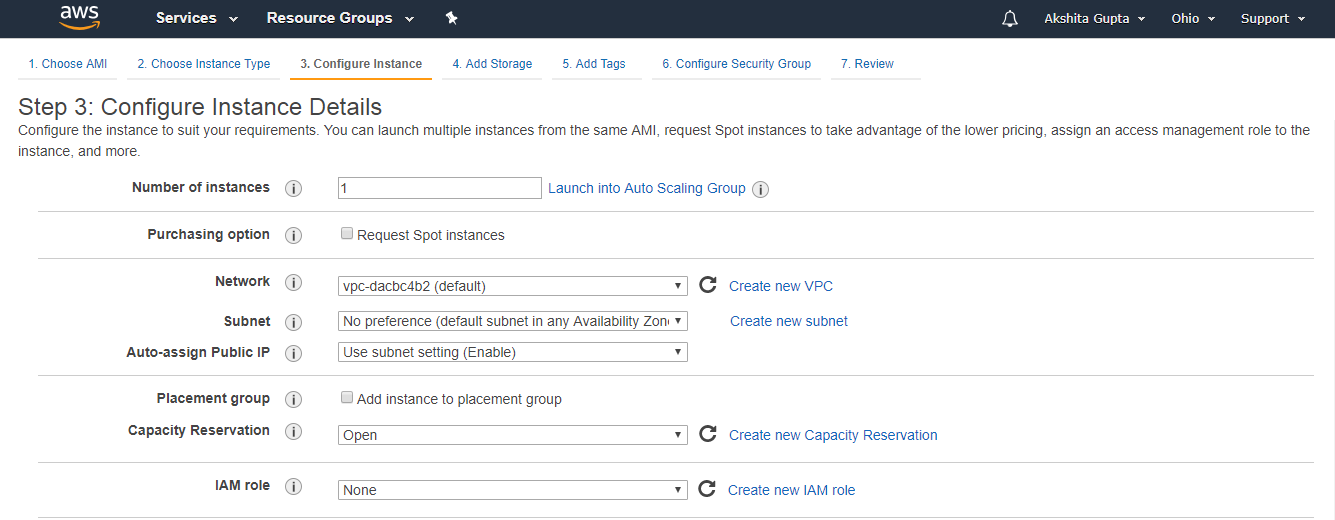
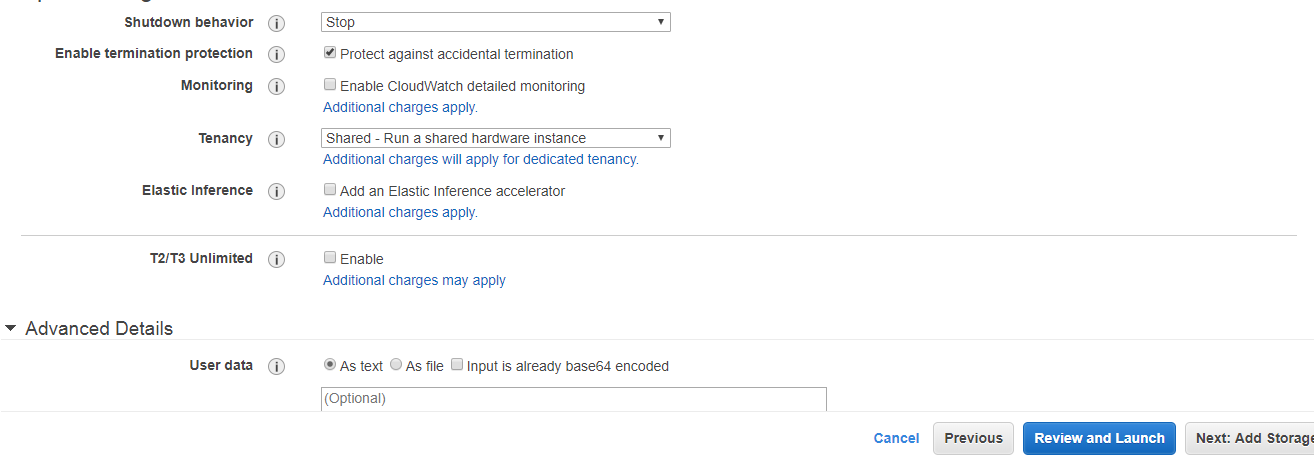 Where,Number of Instances: It defines how many EC2 instances you want to create. I leave it as 1 as I want to create only one instance.Purchasing Option: In the purchasing option, you need to set the price, request from, request to, and persistent request. Right now, I leave it as unchecked.Tenancy: Click on the Shared-Run a shared hardware instance from the dropdown menu as we are sharing hardware.Network: Choose your network, set it as default, i.e., vpc-dacbc4b2 (default) where vpc is a virtual private cloud where we can launch the AWS resources such as EC2 instances in a virtual cloud.Subnet: It is a range of IP addresses in a virtual cloud. In a specified subnet, you can add new AWS resources.Shutdown behavior: It defines the behavior of the instance type. You can either stop or terminate the instance when you shut down the Linux machine. Now, I leave it as Stop.Enable Termination Protection: It allows the people to protect against the accidental termination.Monitoring: We can monitor things such as CPU utilization. Right now, I uncheck the Monitoring.User data: In Advanced details, you can pass the bootstrap scripts to EC2 instance. You can tell them to download PHP, Apache, install the Apache, etc.Now, add the EBS volume and attach it to the EC2 instance. Root is the default EBS volume. Click on the Next.
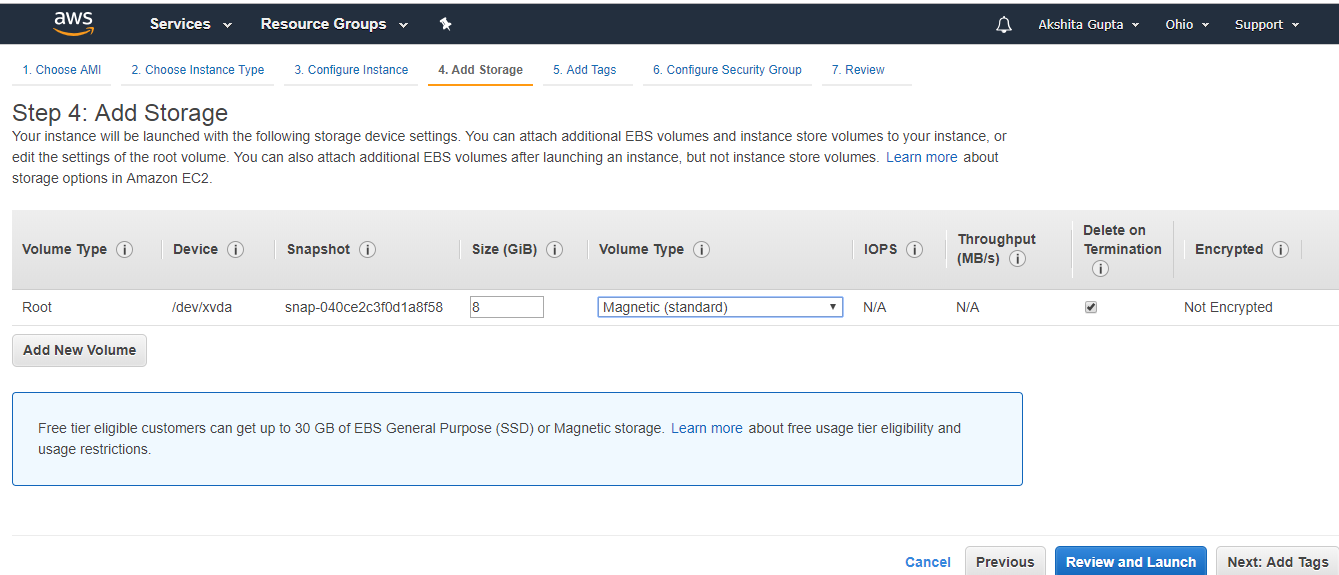 Volume Type: We select the Magnetic (standard) as it is the only disk which is bootable.Delete on termination: It is checked means that the termination of an EC2 instance will also delete EBS volume.Now, Add the Tags and then click on the Next.
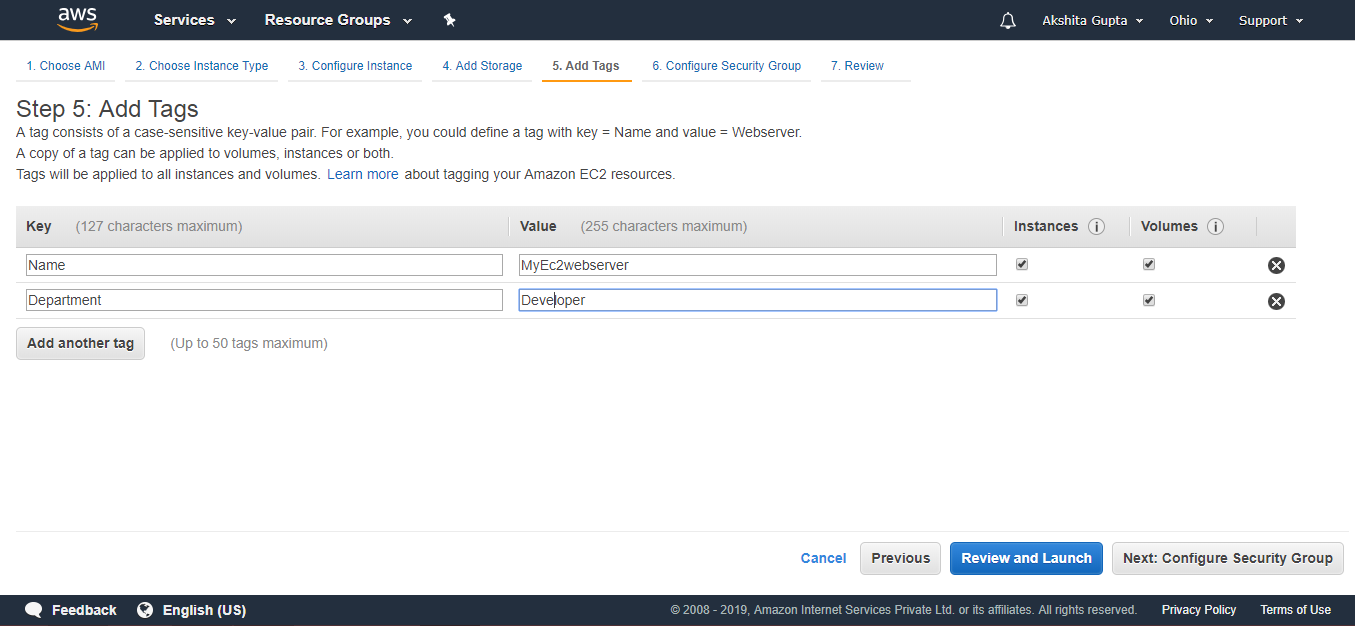 In the above screen, we observe that we add two tags, i.e., the name of the server and department. Create as many tags as you can as it reduces the overall cost.Configure Security Group. The security group allows some specific traffic to access your instance.
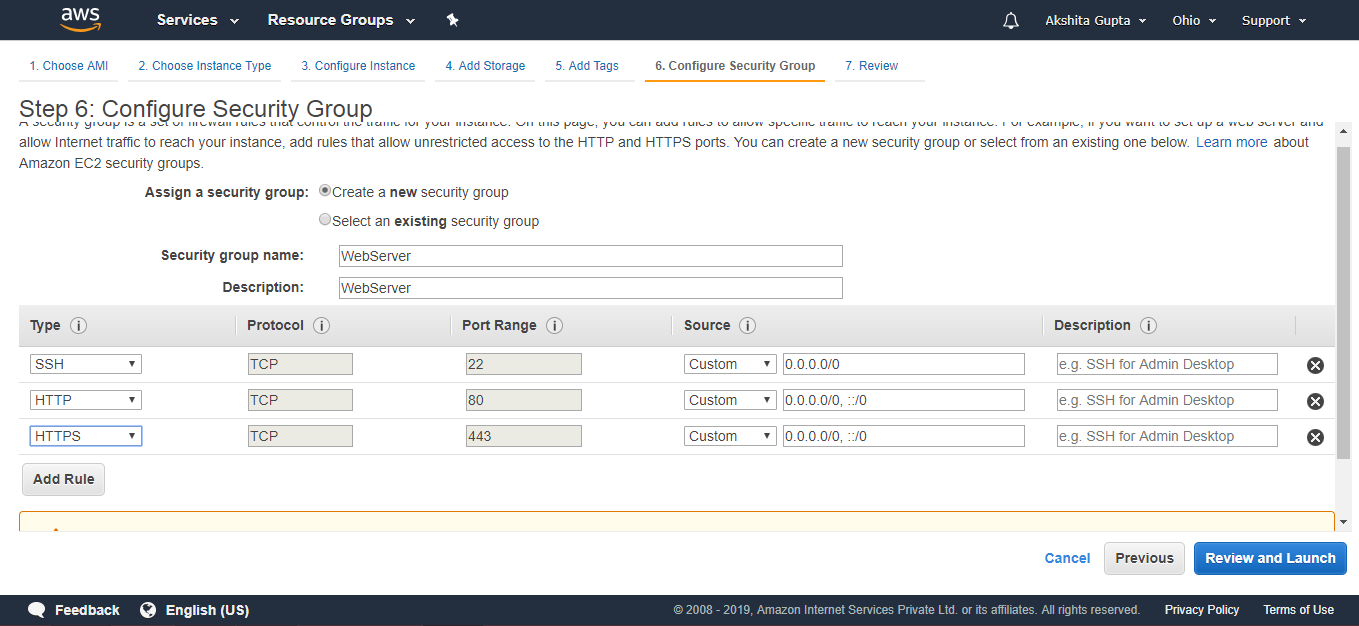 Review an EC2 instance that you have just configured, and then click on the Launch button.
 Create a new key pair and enter the name of the key pair. Download the Key pair.
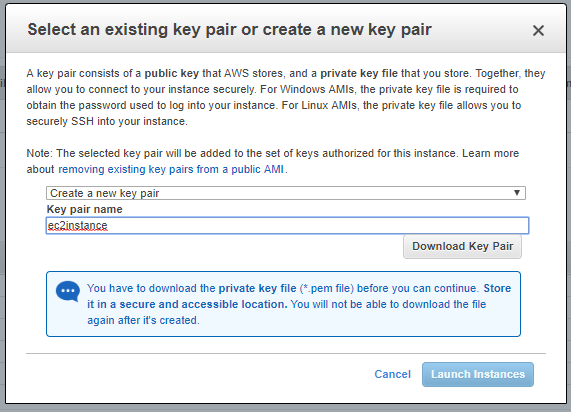 Click on the Launch Instances button.
 To use an EC2 instance in Windows, you need to install both Putty and PuttyKeyGen.Download the Putty and PuttyKeyGen.
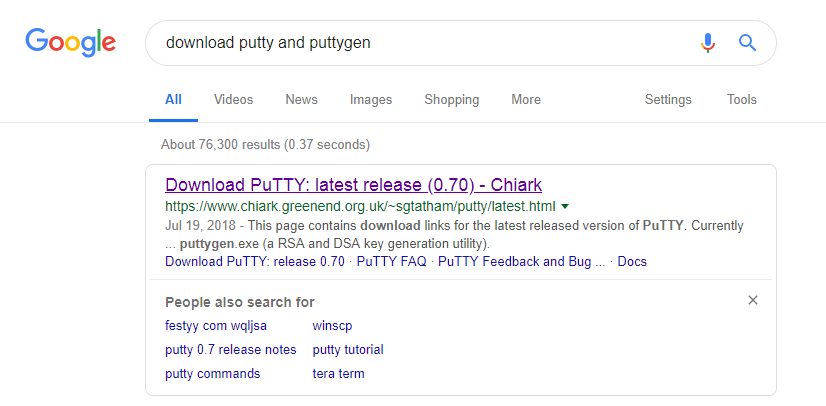 Download the putty.exe and puttygen.exe file.
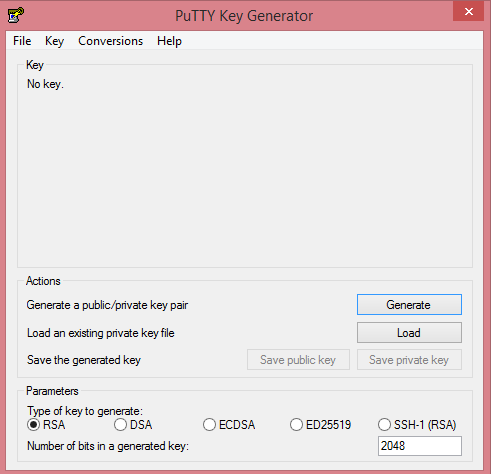
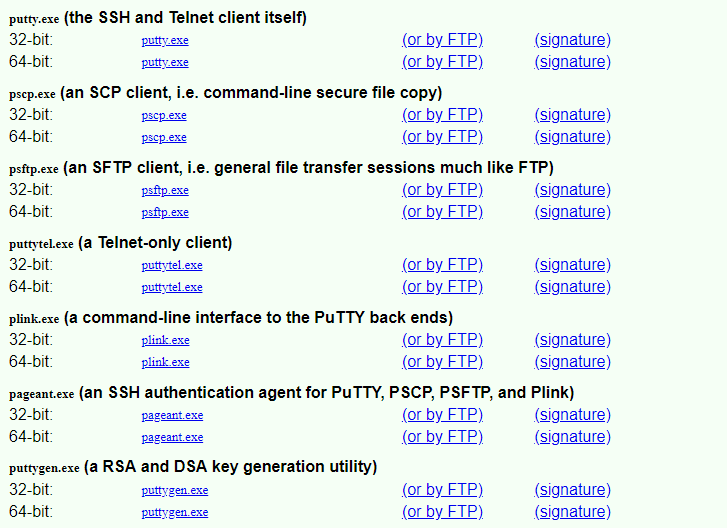 In order to use the key-pair which we have downloaded previously, we need to convert the pem file to ppk file. Puttygen is used to convert the pem file to ppk file.Open the Puttygen software.Click on the Load.
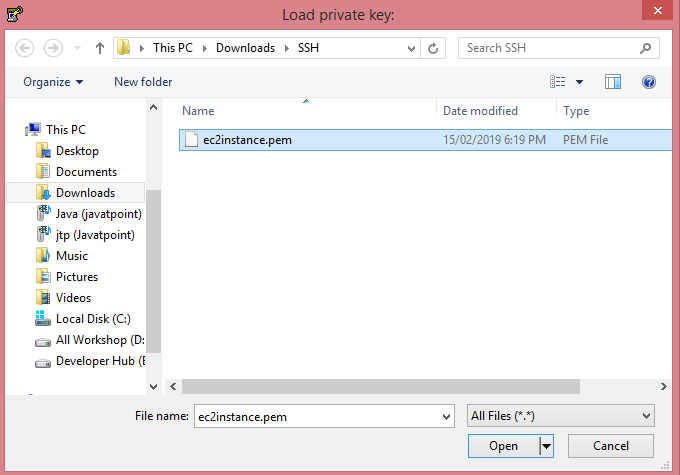
 Open the key-pair file, i.e., ec2instance.pem.
 Click on the OK button.
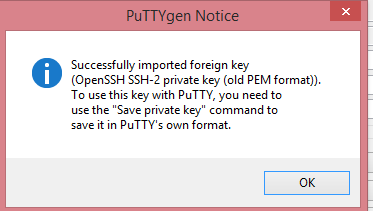 Click on the Save private key. Change the file extension from pem to ppk.
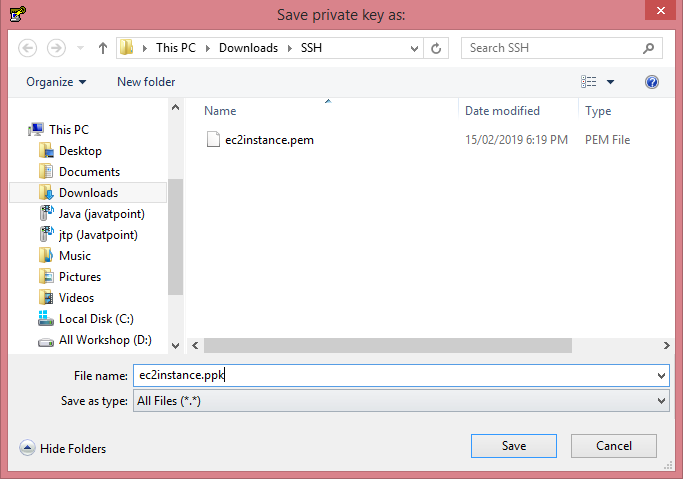 Click on the Save button.Move to the download directory where the ppk file is downloaded.
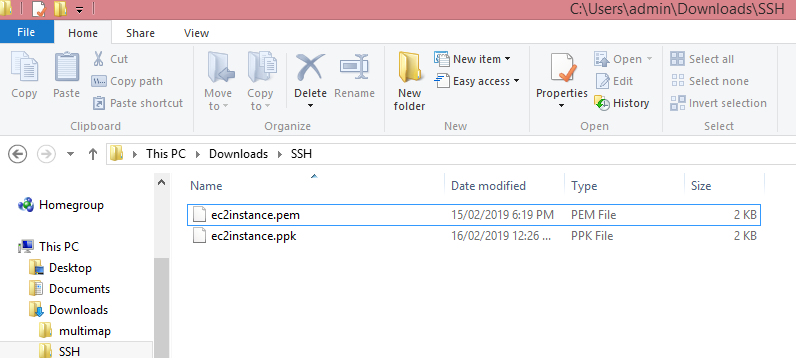 Open the Putty.
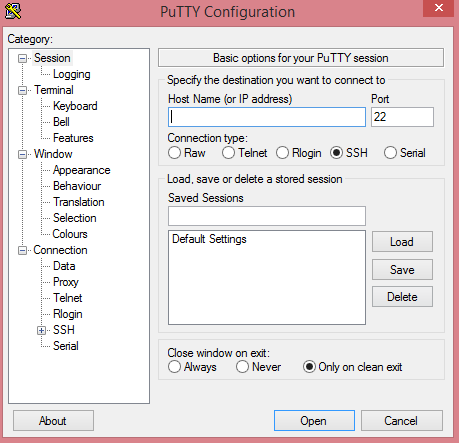 Move to the EC2 instance that you have created and copy its IP address.
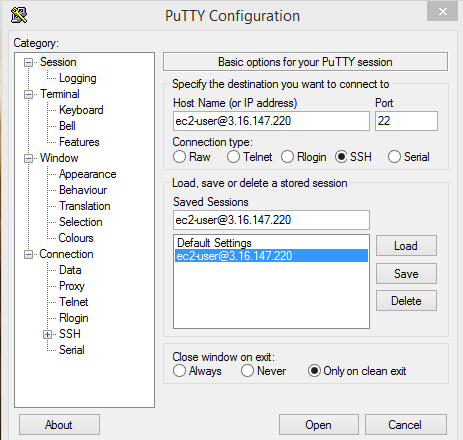
 Now, move to the Putty configuration and type ec2user@, and then paste the IP address that you have copied in a previous step. Copy the Host Name in Saved Sessions.
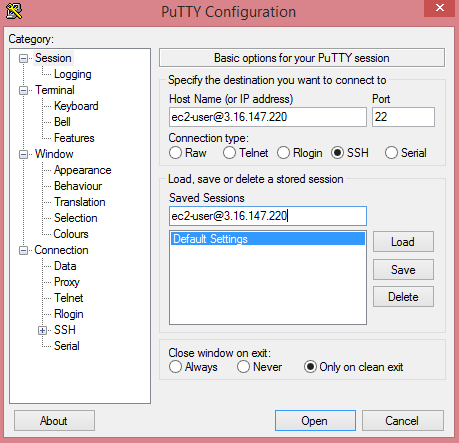 Now, your Host Name is saved in the default settings.Click on the SSH category appearing on the left side of the Putty, then click on the Auth.
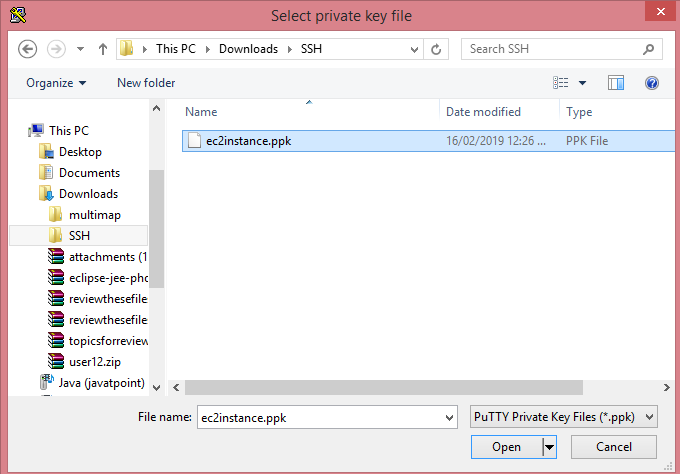
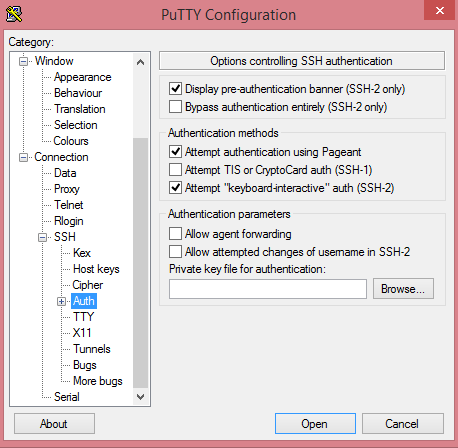 Click on the Browse to open the ppk file.
 Move to the Session category, click on the Save to save the settings.
 Click on the Open button to open the Putty window.
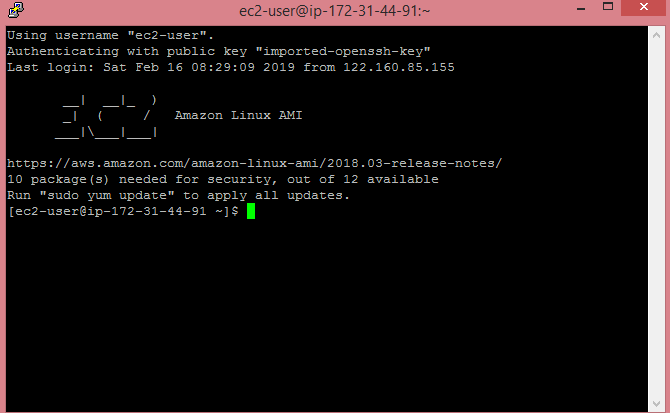 The above screen shows that we are connected to the EC2 instance.Run the command sudo su, and then run the command yum update -y to update the EC2 instance.
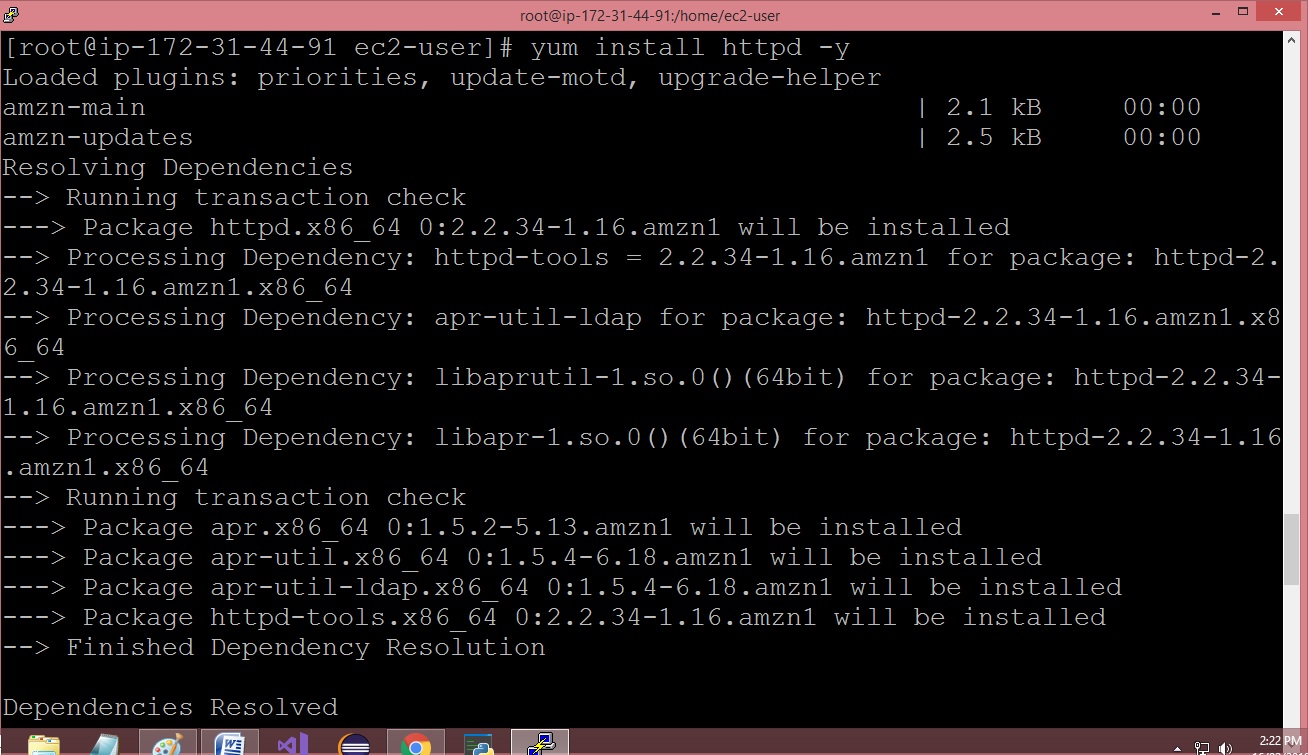
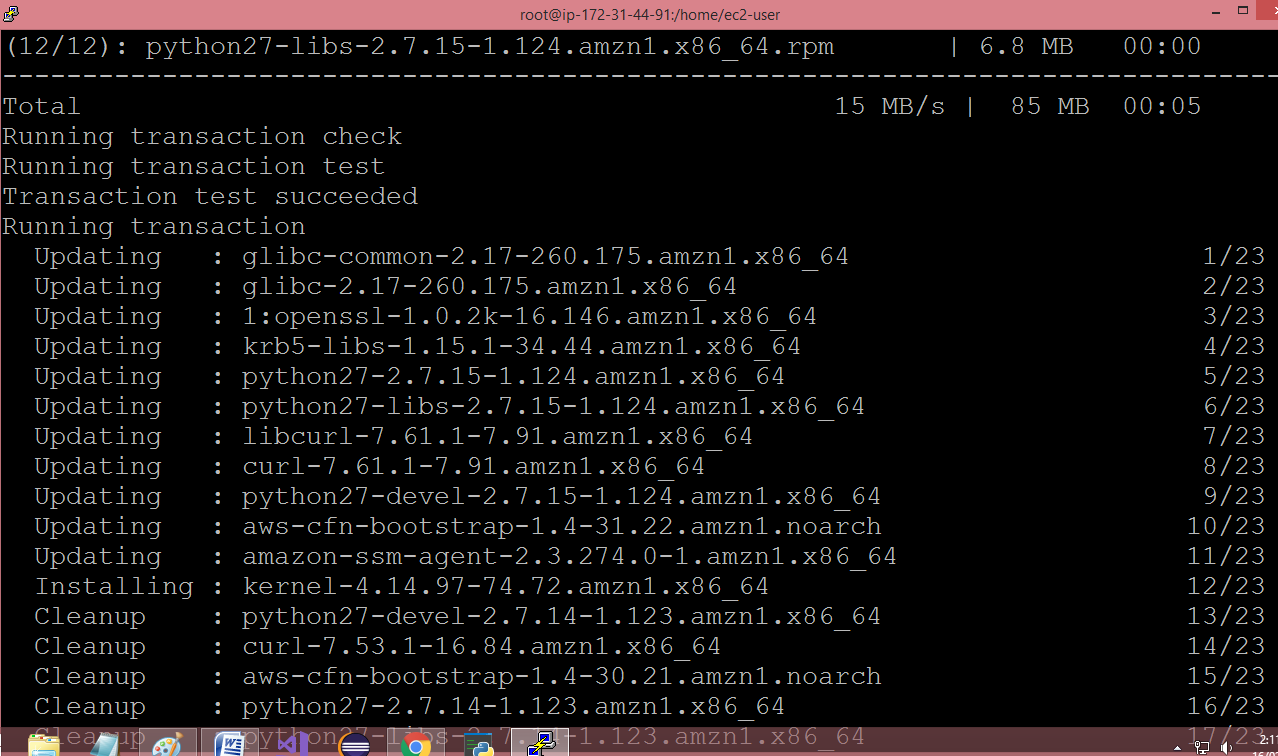 Note: sudo su is a command which is used to provide the privileges to the root level.Now, we install the apache web server to ensure that an EC2 instance becomes a web server by running a command yum install httpd -y.
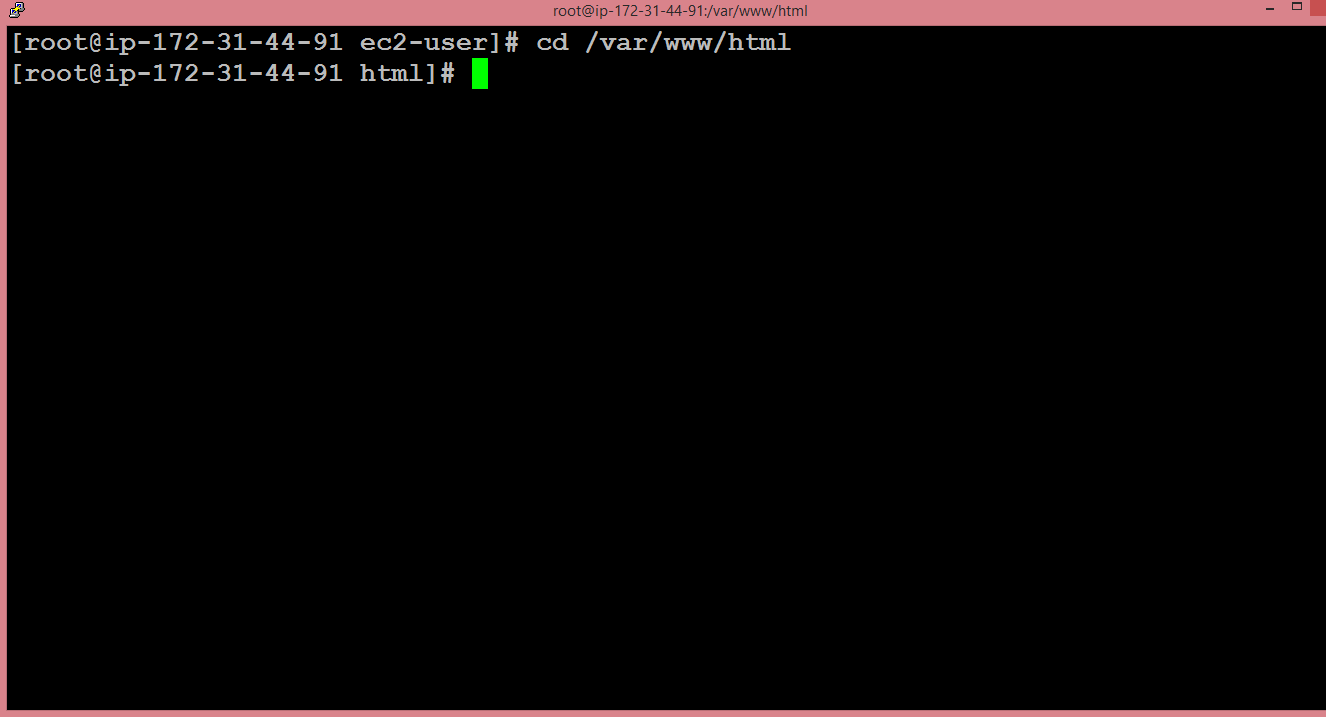
 Run the command cd /var/www/html.
 To list the files available in the html folder, run the command ls.
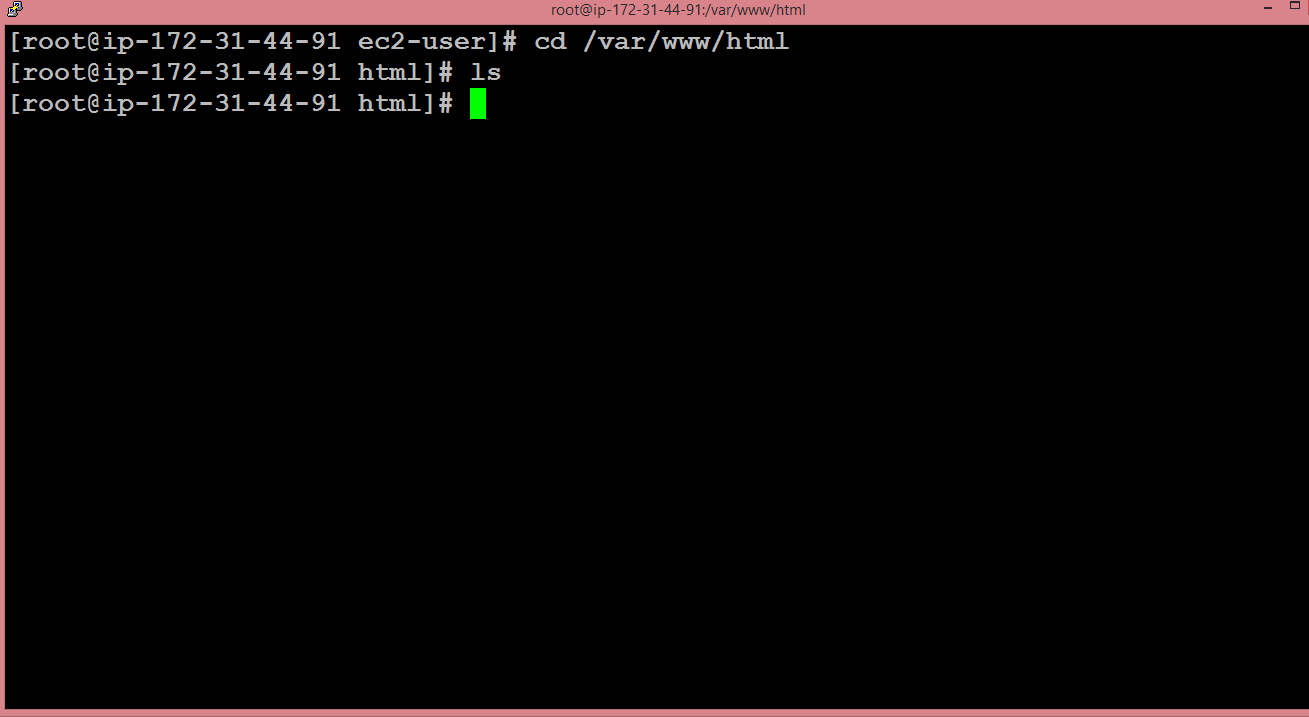 We observe that on running the command ls, we do not get any output. It means that it does not contain any file.We create a text editor, and the text editor is created by running the command nano index.html where index.html is the name of the web page.
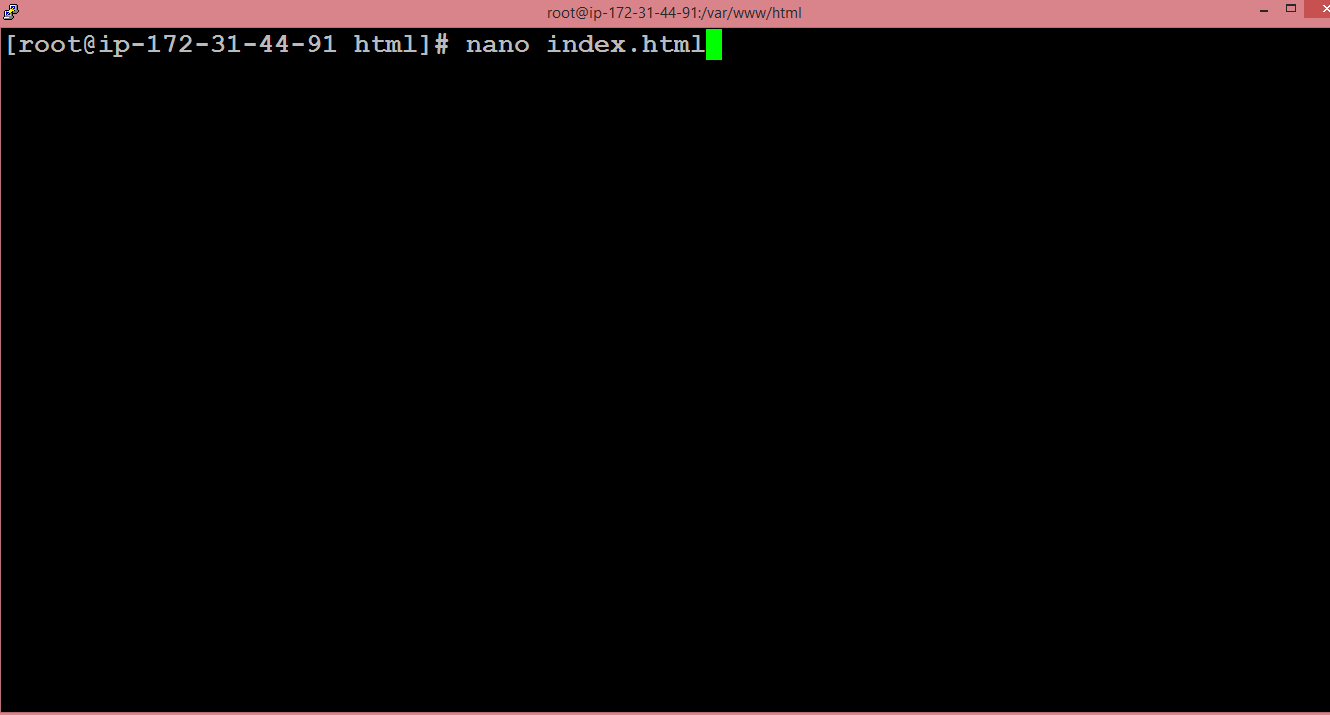 The text editor is shown below where we write the HTML code.
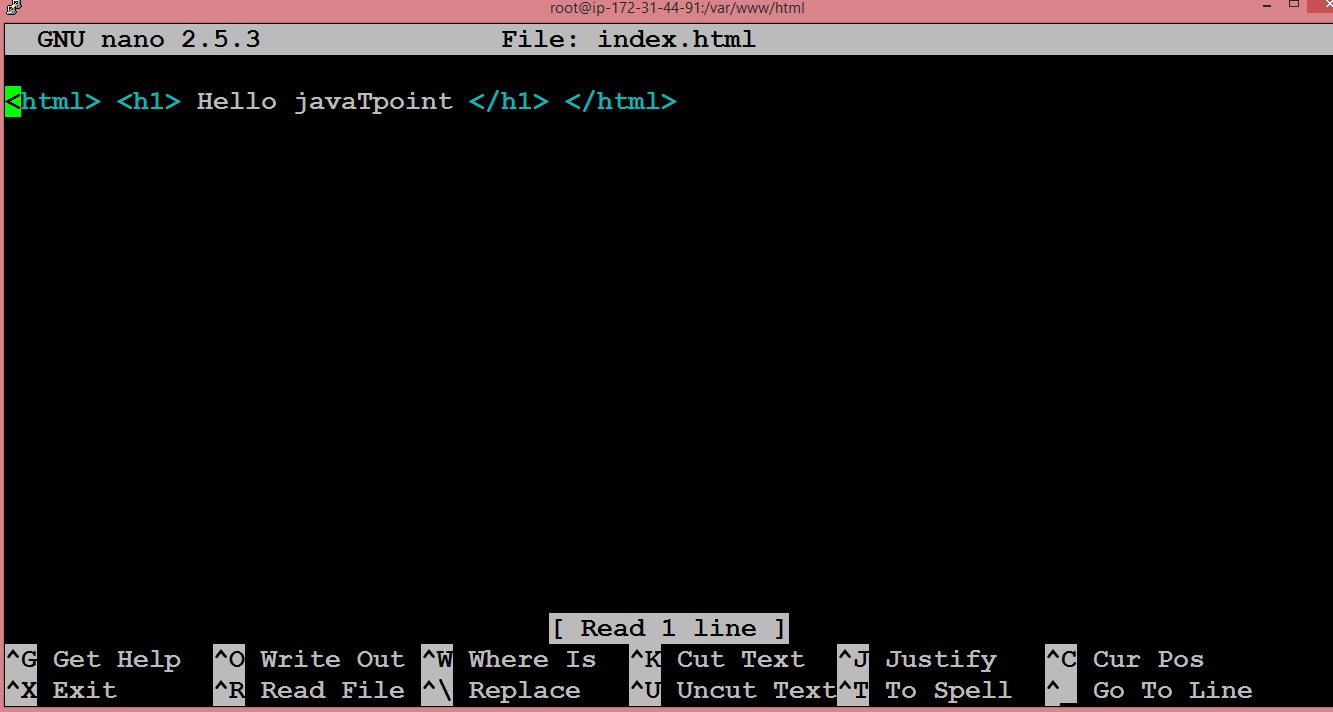 After writing the HTML code, press ctrl+X to exit, then press ‘Y’ to save the page and press Enter.Start the Apache server by running the command service httpd start.
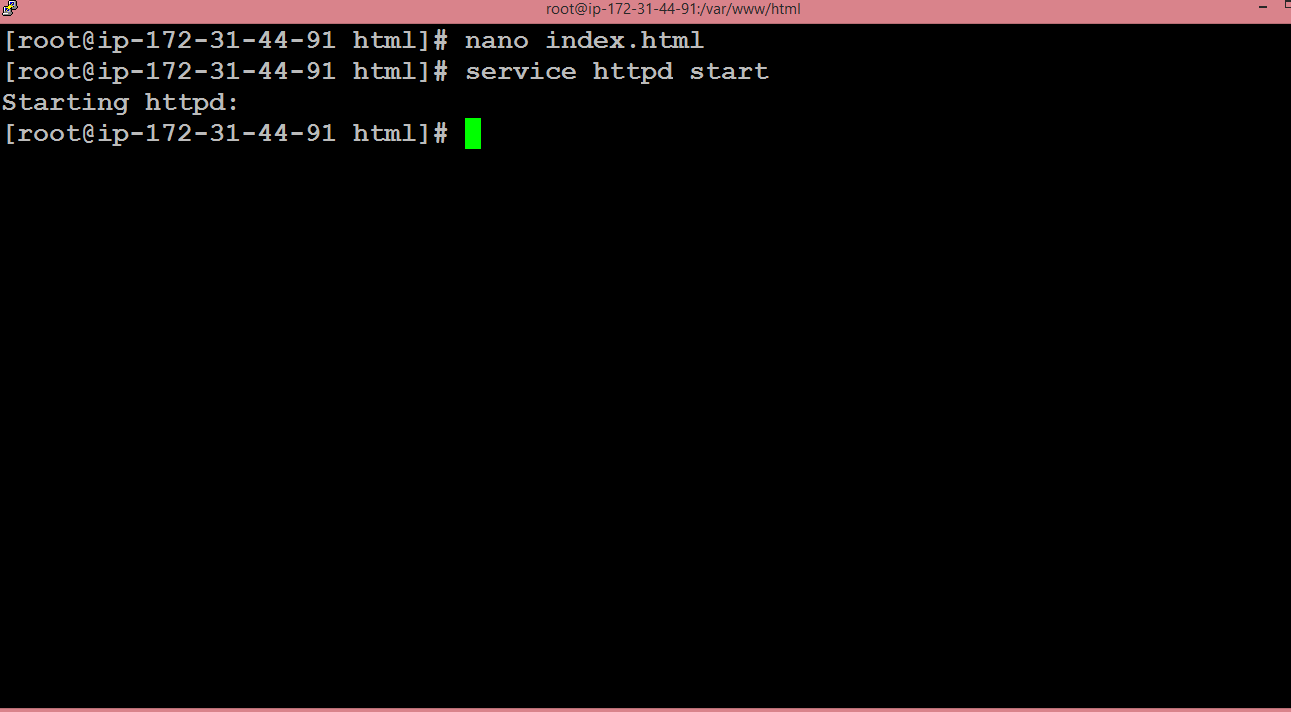 Go to the web browser and paste the IP address which is used to connect to your EC2 instance. You will see the web page that you have created.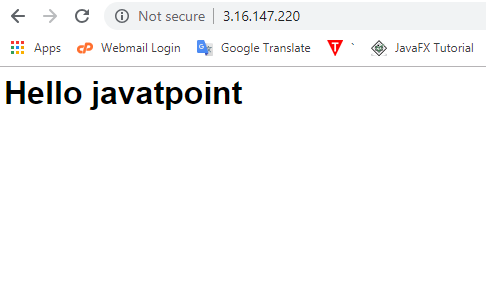


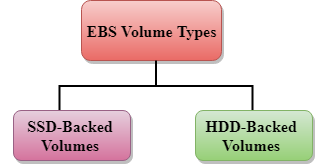 Amazon EBS provides two types of volume that differ in performance characteristics and price. EBS Volume types fall into two parts:SSD-backed volumesHDD-backed volumesSSDSSD stands for solid-state Drives.In June 2014, SSD storage was introduced.It is a general purpose storage.It supports up to 4000 IOPS which is quite very high.SSD storage is very high performing, but it is quite expensive as compared to HDD (Hard Disk Drive) storage.SSD volume types are optimized for transactional workloads such as frequent read/write operations with small I/O size, where the performance attribute is IOPS.
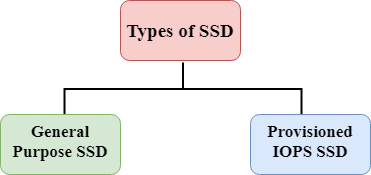 SSD is further classified into two parts:General Purpose SSDProvisioned IOPS SSDGeneral Purpose SSDGeneral Purpose SSD is also sometimes referred to as a GP2.It is a General purpose SSD volume that balances both price and performance.You can get a ratio of 3 IOPS per GB with up to 10,000 IOPS and the ability to burst up to 3000 IOPS for an extended period of time for volumes at 3334 GiB and above. For example, if you get less than 10,000 IOPS, then GP2 is preferable as it gives you the best performance and price.Provisioned IOPS SSDIt is also referred to as IO1.It is mainly used for high-performance applications such as intense applications, relational databases.It is designed for I/O intensive applications such as large relational or NOSQL databases.It is used when you require more than 10,000 IOPS.HDDIt stands for Hard Disk Drive.HDD based storage was introduced in 2008.The size of the HDD based storage could be between 1 GB to 1TB.It can support up to 100 IOPS which is very low.
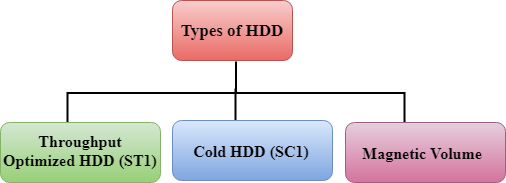 Throughput Optimized HDD (st1)It is also referred to as ST1.Throughput Optimized HDD is a low-cost HDD designed for those applications that require higher throughput up to 500 MB/s.It is useful for those applications that require the data to be frequently accessed.It is used for Big data, Data warehouses, Log processing, etc.It cannot be a boot volume, so it contains some additional volume. For example, if we have Windows server installed in a C: drive, then C drive cannot be a Throughput Optimized Hard disk, D: drive or some other drive could be a Throughput Optimized Hard disk.The size of the Throughput Hard disk can be 500 GiB to 16 TiB.It supports up to 500 IOPS.Cold HDD (sc1)It is also known as SC1.It is the lowest cost storage designed for the applications where the workloads are infrequently accessed.It is useful when data is rarely accessed.It is mainly used for a File server.It cannot be a boot volume.The size of the Cold Hard disk can be 500 GiB to 16 TiB.It supports up to 250 IOPS.Magnetic VolumeIt is the lowest cost storage per gigabyte of all EBS volume types.It is ideal for the applications where the data is accessed infrequentlyIt is useful for applications where the lowest storage cost is important.Magnetic volume is the only hard disk which is bootable. Therefore, we can say that it can be used as a boot volume





 NETWORKING AND CCNA